
 DMSShaders · 1.8 – 26.x
A shader pack that turns your world into a depth map
Free81,234 downloads
A highly performant geometry shader that modifies distant terrain, making the world feel alive!
Opens Modrinth · 6,783 downloads there

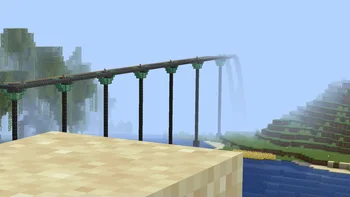

A highly performant geometry shader that modifies distant terrain, making the world feel alive!
Tilde is a shader pack made by Kattjakt. It supports Minecraft 1.21. It has been downloaded 6,783 times on Modrinth. The last update came out on Feb 24, 2025.
Tilde has had 2 releases on Modrinth since Feb 21, 2025. None of them came out in the past year. The newest is v2, released on Feb 23, 2025. It is made for Minecraft 1.21 – 1.21.6. It runs on Iris. The download is 13 KB.
| Version | Released | Minecraft | Type |
|---|---|---|---|
v2 | Feb 23, 2025 | 1.21 – 1.21.6 | Release |
v1 | Feb 21, 2025 | 1.21 | Release |
Tilde is a highly performant geometry shader that makes the world feel alive.
The shader only modifies the geometry of distant terrain1, making it extremely lightweight. If you're able to run Minecraft without shaders, you can run Tilde!
Comes with three presets: Default, Increased Motion, and Reduced Motion.
1. Small deviations from vanilla may be present as of this time. Modifying the terrain geometry in a shader
like this means we have to replicate some aspects of the vanilla style ourself, such as the hand
and cloud appearance for example. Feel free to report an issue if you find anything that looks off!
Please note that the shader is still under development, and has only been only tested with Iris on 1.21.4 - but it should surely work on other versions as well!
Written by Kattjakt. Read it with pictures on Modrinth.
Install Iris (with Sodium) or OptiFine for your Minecraft version: shaders need one of them.
Download the .zip file from Modrinth. Do not unzip it.
In Minecraft, open Options, then Video Settings, then Shader Packs, and click Open Shader Pack Folder.
Drop the .zip file into that folder, pick Tilde in the list and click Done.
Shaders are heavy on the graphics card. If the game gets slow, pick a lower profile in the shader settings.
| Resource | Downloads | Versions | Last update | Price |
|---|---|---|---|---|
| Tildethe one you looked at | 6,783 | 1.21 | Feb 24, 2025 | Free |
| DMSSeltop | 81K | 1.8 – 26.x | Jul 12, 2026 | Free |
 NMSSeltop | 57K | 1.8 – 26.x | Aug 21, 2026 | Free |
 PSX-Core ShaderDooji | 56K | 1.8 – 26.x | Sep 8, 2026 | Free |
Not yet. The newest version it supports is Minecraft 1.21.
Yes. Tilde is free to download from Modrinth.
Yes. The last update came out in the past day.
The closest ones are DMS, NMS and PSX-Core Shader. Compare all alternatives
DMSShaders · 1.8 – 26.xA shader pack that turns your world into a depth map
NMSShaders · 1.8 – 26.xA shader pack that turns your world into a normal map
PSX-Core ShaderShaders · 1.8 – 26.xA PSX shader with affine texture mapping, dithering, vertex snapping and more!
 Liminal ShaderShaders · 1.17 – 26.x
Perfect for horror maps, liminal space builds, and atmospheric survival gameplay.
 Tri Valor realistic shaderShaders · 1.21
Dynamic Lighting Glow Utilizing advanced emissive maps light sources like lava and torches cast natural vibrant glows that interact realistically with the…
 EchoShiftShaders · 1.20 – 26.x
EchoShift is a cinematic Minecraft Java shader that makes the world feel more alive with realistic lighting, clearer skies, softer shadows, moving foliage…
Log in to leave a review.