8-Bit Textures, Dithered Shadows, and 8-Bit Trial Chamber Sounds
Direct download from Modrinth · 4,445 downloads


8-Bit Trial Chambers is a shader pack made by BloopTank. 8-Bit Textures, Dithered Shadows, and 8-Bit Trial Chamber Sounds.
It supports Minecraft 1.21. It has been downloaded 4,445 times on Modrinth. The last update came out on Jul 11, 2025.
The newest is 1.0.0, released on Jul 11, 2025. It is made for Minecraft 1.21.1. It runs on Minecraft and Vanilla. The download is 10.5 MB.
| Version | Released | Minecraft | Type |
|---|---|---|---|
1.0.0 | Jul 11, 2025 | 1.21.1 | Release |
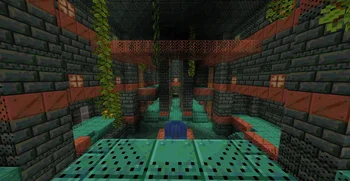
Experience the Trial Chambers in full 8-bit glory just like a Classic Dungeon Crawler by downloading this Resource Pack! Try it both with and without Smooth Lighting!
This pack modifies shaders to increases contrast and saturation of all textures then restricts them to an 8-bit format. These shaders also create a dither effect as the light level decreases for an interesting 8-bit aesthetic! Plus, almost all sounds that could be emitted from playing through the Trial Chambers have been changed to a custom 8-bit one using the Famitracker Tool.
Written by BloopTank. Read it with pictures on Modrinth.
Install Iris (with Sodium) or OptiFine for your Minecraft version: shaders need one of them.
Download the .zip file from Modrinth. Do not unzip it.
In Minecraft, open Options, then Video Settings, then Shader Packs, and click Open Shader Pack Folder.
Drop the .zip file into that folder, pick 8-Bit Trial Chambers in the list and click Done.
Shaders are heavy on the graphics card. If the game gets slow, pick a lower profile in the shader settings.
Full guide: How to install Minecraft shaders
Not yet. The newest version it supports is Minecraft 1.21.
Yes. 8-Bit Trial Chambers is free to download from Modrinth.
Yes. The last update came out in the past day.
Log in to leave a review.
