
 Boosted BrightnessShaders · 1.21 – 26.x
Multiples the brightness setting by 10x which allows for fullbright. Uses the new 1.21.2 lightmap core shader meaning it works with Sodium. Like night vision
Free110,818 downloads

A core shader intended to make Minecraft slightly spooky
Opens Modrinth · 4,425 downloads there
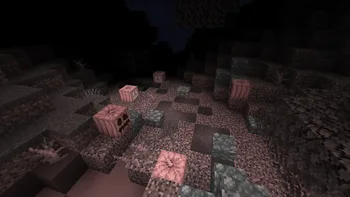
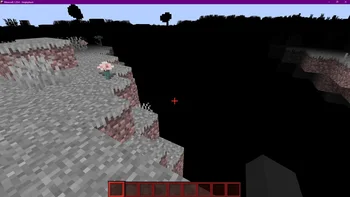

A core shader intended to make Minecraft slightly spooky
Spook is a shader pack made by Electronacl. It supports Minecraft 1.20 – 1.21. It has been downloaded 4,425 times on Modrinth. The last update came out on Dec 26, 2024.
Spook has had 8 releases on Modrinth since Aug 16, 2024. None of them came out in the past year. The newest is 1.4, released on Dec 26, 2024. It is made for Minecraft 1.20.5 – 1.21.1. It runs on Minecraft. The download is 38 KB.
| Version | Released | Minecraft | Type |
|---|---|---|---|
1.4 | Dec 26, 2024 | 1.20.5 – 1.21.1 | Release |
1.3 | Dec 21, 2024 | 1.20.5 – 1.21.1 | Release |
1.2.1 | Oct 8, 2024 | 1.20.2, 1.20.3, 1.20.4 | Release |
1.2 | Oct 7, 2024 | 1.20.2 | Release |
1.2 | Oct 7, 2024 | 1.20, 1.20.1 | Release |
I am currently inactive on this project at the moment, and new updates may be extremely delayed
This RP does not contain any creepy/scary content or jumpscares. It only contains shader effects and only intends to just make the atmosphere more spooky feeling.
This RP does not work with optifine or sodium.
Spook is a resource pack making use of core shaders to add a spooky vibe to the game, without having to use optifine/iris.
Written by Electronacl. Read it with pictures on Modrinth.
Install Iris (with Sodium) or OptiFine for your Minecraft version: shaders need one of them.
Download the .zip file from Modrinth. Do not unzip it.
In Minecraft, open Options, then Video Settings, then Shader Packs, and click Open Shader Pack Folder.
Drop the .zip file into that folder, pick Spook in the list and click Done.
Shaders are heavy on the graphics card. If the game gets slow, pick a lower profile in the shader settings.
| Resource | Downloads | Versions | Last update | Price |
|---|---|---|---|---|
| Spookthe one you looked at | 4,425 | 1.20 – 1.21 | Dec 26, 2024 | Free |
| Boosted BrightnessBluebird | 111K | 1.21 – 26.x | Sep 15, 2026 | Free |
 RetrusEucloid | 61K | 1.18 – 1.20 | Mar 11, 2024 | Free |
 PSX-Core ShaderDooji | 56K | 1.8 – 26.x | Sep 8, 2026 | Free |
Not yet. The newest version it supports is Minecraft 1.21.
Yes. Spook is free to download from Modrinth.
Yes. The last update came out in the past day.
The closest ones are Boosted Brightness, Retrus and PSX-Core Shader. Compare all alternatives
Boosted BrightnessShaders · 1.21 – 26.xMultiples the brightness setting by 10x which allows for fullbright. Uses the new 1.21.2 lightmap core shader meaning it works with Sodium. Like night vision
RetrusShaders · 1.18 – 1.20A vanilla core "fabulous" shader that emulates the VHS/VCR found footage style seen in media such as the Kane Pixels backrooms series. Works on any version…
PSX-Core ShaderShaders · 1.8 – 26.xA PSX shader with affine texture mapping, dithering, vertex snapping and more!
 ASCII ShaderShaders · 1.8 – 1.21
A shader intended to make Minecraft render only with ASCII characters!
Log in to leave a review.