
 ShrimpleShaders · 1.16 – 1.21
A simple Minecraft Java shader that attempts to maintain the vanilla aesthetic while adding optional shadows, colored lighting, and ray-tracing.
Free2,222,554 downloads
Miniature Shader fork. Adding Bloom, Colored Lighting, emissive, Sunrays and Voxy support.
Direct download from Modrinth · 4,032 downloads
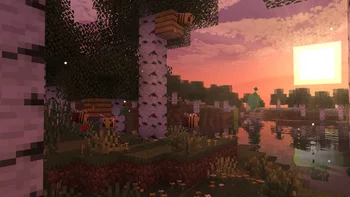
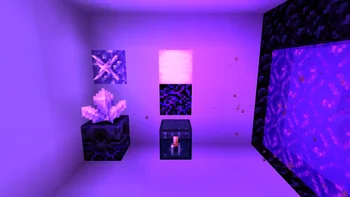

MiniatureXL is a shader pack made by Shaddh. Miniature Shader fork. Adding Bloom, Colored Lighting, emissive, Sunrays and Voxy support.
It supports Minecraft 1.16 – 26.x. It has been downloaded 4,032 times on Modrinth. The last update came out on Nov 7, 2026.
MiniatureXL has had 2 releases on Modrinth since Aug 25, 2026. 2 of them came out in the past year. The newest is 1.1, released on Nov 7, 2026. It is made for Minecraft 1.19.4 – 26.3. It runs on Iris and Optifine. The download is 111 KB.
| Version | Released | Minecraft | Type |
|---|---|---|---|
1.1 | Nov 7, 2026 | 1.19.4 – 26.3 | Release |
1.0 | Aug 25, 2026 | 1.16.4 – 26.2 | Release |
This is a lightweight fork of the Miniature Shader by ukrech with some added features such as :
For any issues report them on Github : miniatureXL
Written by Shaddh. Read it with pictures on Modrinth.
Install Iris (with Sodium) or OptiFine for your Minecraft version: shaders need one of them.
Download the .zip file from Modrinth. Do not unzip it.
In Minecraft, open Options, then Video Settings, then Shader Packs, and click Open Shader Pack Folder.
Drop the .zip file into that folder, pick MiniatureXL in the list and click Done.
Shaders are heavy on the graphics card. If the game gets slow, pick a lower profile in the shader settings.
Full guide: How to install Minecraft shaders
| Resource | Downloads | Versions | Last update | Price |
|---|---|---|---|---|
| MiniatureXLthe one you looked at | 4,032 | 1.16 – 26.x | 4 days ago | Free |
| ShrimpleNull | 2.2M | 1.16 – 1.21 | Dec 8, 2024 | Free |
 Just Colored Lightingtimetravelbeard | 676K | 1.19 – 26.x | Sep 24, 2026 | Free |
 Solas ShaderSeptonious | 18.7M | 1.12 – 26.x | 9 days ago | Free |
Yes. MiniatureXL supports Minecraft 26.x. All supported versions: 26.x, 1.21, 1.20, 1.19, 1.18, 1.17, 1.16.
Yes. MiniatureXL is free to download from Modrinth.
Yes. The last update came out in the past day.
The closest ones are Shrimple, Just Colored Lighting and Solas Shader. Compare all alternatives
ShrimpleShaders · 1.16 – 1.21A simple Minecraft Java shader that attempts to maintain the vanilla aesthetic while adding optional shadows, colored lighting, and ray-tracing.
Just Colored LightingShaders · 1.19 – 26.xJust Colored Lighting and Dynamic Lights added to a very fast shader for Potato computers, with optional shadows, texture upscaling, and great PBR support…
Solas ShaderShaders · 1.12 – 26.xA modern fantasy stylized shaderpack with colored lighting and stunning visuals
 DreamLight ShadersShaders · 1.18 – 26.x
A good-performing, dreamy, stylized shader pack with colored lighting and fancy visuals.
This shader gives the game a more cinematic look by changing the color and adding a Bloom effect.
 Floodfill LightsShaders · 1.21
A vanilla shader that adds colored lighting.
Log in to leave a review.