
 Ashen 16xTexture packs · 1.19 – 26.x
A 16x, medieval-fantasy take on Minecraft.
Free2,626,459 downloads

Instead of the basic and boring loading screens we know and see so often they have been replaced by high quality medieval minecraft views, enjoy!
Direct download from Modrinth · 126,057 downloads

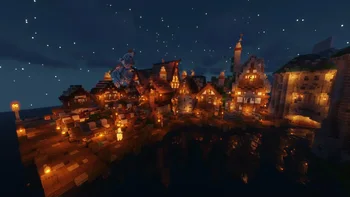
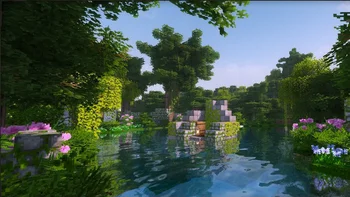
Medieval Loading Screens is a texture pack made by SwaixYT. Instead of the basic and boring loading screens we know and see so often they have been replaced by high quality medieval minecraft views, enjoy!
It supports Minecraft 1.20 – 26.x. It has been downloaded 126,057 times on Modrinth. The last update came out on Jun 2, 2026.
Medieval Loading Screens has had 8 releases on Modrinth since Feb 19, 2024. 3 of them came out in the past year. The newest is 8.0.0, released on Jun 2, 2026. It is made for Minecraft 1.20 – 26.1.2. It runs on Minecraft. The download is 149.6 MB.
| Version | Released | Minecraft | Type |
|---|---|---|---|
8.0.0 | Jun 2, 2026 | 1.20 – 26.1.2 | Release |
7.0.0 | May 9, 2026 | 1.20 – 26.1.2 | Release |
6.0.0 | Jan 12, 2026 | 1.20 – 1.21.11 | Release |
5.0.0 | Oct 17, 2025 | 1.20 – 1.21.10 | Release |
4.0.0 | Jul 19, 2025 | 1.20 – 1.21.10 | Release |
Loading Screens - Medieval
This is a resourcepack for the Loading Backgrounds Mod. This resourcepack adds many medieval themed images to your background when loading up your minecraft worlds.
Requires the mod: Loading Backgrounds
Can this be used on a server?
Yes, it works on servers.
Patreon: https://www.patreon.com/Swaix
Ko-Fi: https://ko-fi.com/swaix
Support Server: https://discord.gg/FwC2c6u3Jt
Written by SwaixYT. Read it with pictures on Modrinth.
Download the .zip file from Modrinth. Do not unzip it.
In Minecraft, open Options, then Resource Packs, then Open Pack Folder.
Drop the .zip file into that folder and go back to the game.
Move Medieval Loading Screens to the right-hand list and click Done.
It is made for Minecraft 1.20 – 26.x. On other versions Minecraft marks it as incompatible, but it often still works.
Full guide: How to install Minecraft resource packs
| Resource | Downloads | Versions | Last update | Price |
|---|---|---|---|---|
| Medieval Loading Screensthe one you looked at | 126K | 1.20 – 26.x | Jun 2, 2026 | Free |
| Ashen 16xAim_Boot | 2.6M | 1.19 – 26.x | 23 days ago | Free |
 ArdaCraft Resource PackFornad | 798K | 1.19 – 1.20 | 7 days ago | Free |
 MajesticaEftann | 125K | 1.19 – 1.21 | Sep 28, 2024 | Free |
Yes. Medieval Loading Screens supports Minecraft 26.x. All supported versions: 26.x, 1.21, 1.20.
Yes. Medieval Loading Screens is free to download from Modrinth.
Yes. The last update came out in the past day.
The closest ones are Ashen 16x, ArdaCraft Resource Pack and Majestica. Compare all alternatives
Ashen 16xTexture packs · 1.19 – 26.xA 16x, medieval-fantasy take on Minecraft.
ArdaCraft Resource PackTexture packs · 1.19 – 1.20The resource pack overlay for the ArdaCraft server. Download the ArdaCraft modpack to join the server. Do not download this unless you know what you're doing.
MajesticaTexture packs · 1.19 – 1.21Majestica is a fantasy medieval based texture pack that mixes realistic and cartoon-ish textures unique style!
 Beautiful Enchanted BooksTexture packs · 1.16 – 26.x
This resource pack aims to improve the appearance of enchanted books, now each one will be different!
 AlacrityTexture packs · 1.16 – 26.x
32x resource pack with crazy attention to details
 Clayful 512xTexture packs · 1.8 – 26.x
Minecraft in a Claylike, Sculpted Way! 512x
Log in to leave a review.