
Split translation files into many for clear separation!
Direct download from Modrinth · 12 downloads
Many Translations is a mod made by jason13official. Split translation files into many for clear separation!
It supports Minecraft 1.21. It has been downloaded 12 times on Modrinth. The last update came out on Aug 29, 2026.
The newest is merged-1.21.1-1.0.0, released on Aug 29, 2026. It is made for Minecraft 1.21.1. It runs on Fabric and NeoForge. The download is 284 KB.
| Version | Released | Minecraft | Type |
|---|---|---|---|
merged-1.21.1-1.0.0 | Aug 29, 2026 | 1.21.1 | Release |
Hi, occasionally I like to just test what's possible, this is a result of that urge.
I got really tired of dealing with SUPER LONG / cumbersome translation files, if you reference vanilla's translations for 1.21.1 it's already at/nearing 500Kb of raw text... and trying to developer large-scale content mods you run into similar issues (assume you're not data-genning, but even then the scale can get crazy.) So...
This is a small shared-library mod that lets any mod (or resource pack) split a single
language file into several smaller ones, instead of maintaining one giant (or multiple giant) files.
Vanilla loads exactly one file per namespace per language code:
assets//lang/.json.
ClientLanguage.loadFrom does an exact
path lookup (String.format("lang/%s.json", code)); it never scans the lang/
directory, so mods with a lot of content end up with increasingly large,
hard-to-review JSON files. Or more typically, a single giant "en_us.json" file.
ClientLanguageMixin, redirects the
ResourceManager#getResourceStack(...) call inside ClientLanguage#loadFrom.
After fetching the normal exact-match stack for lang/.json, it also
looks up (via ResourceManager#listResourceStacks) every resource in the same
namespace matching lang/_*.json, sorts those matches by filename, and
traverses them in that order.
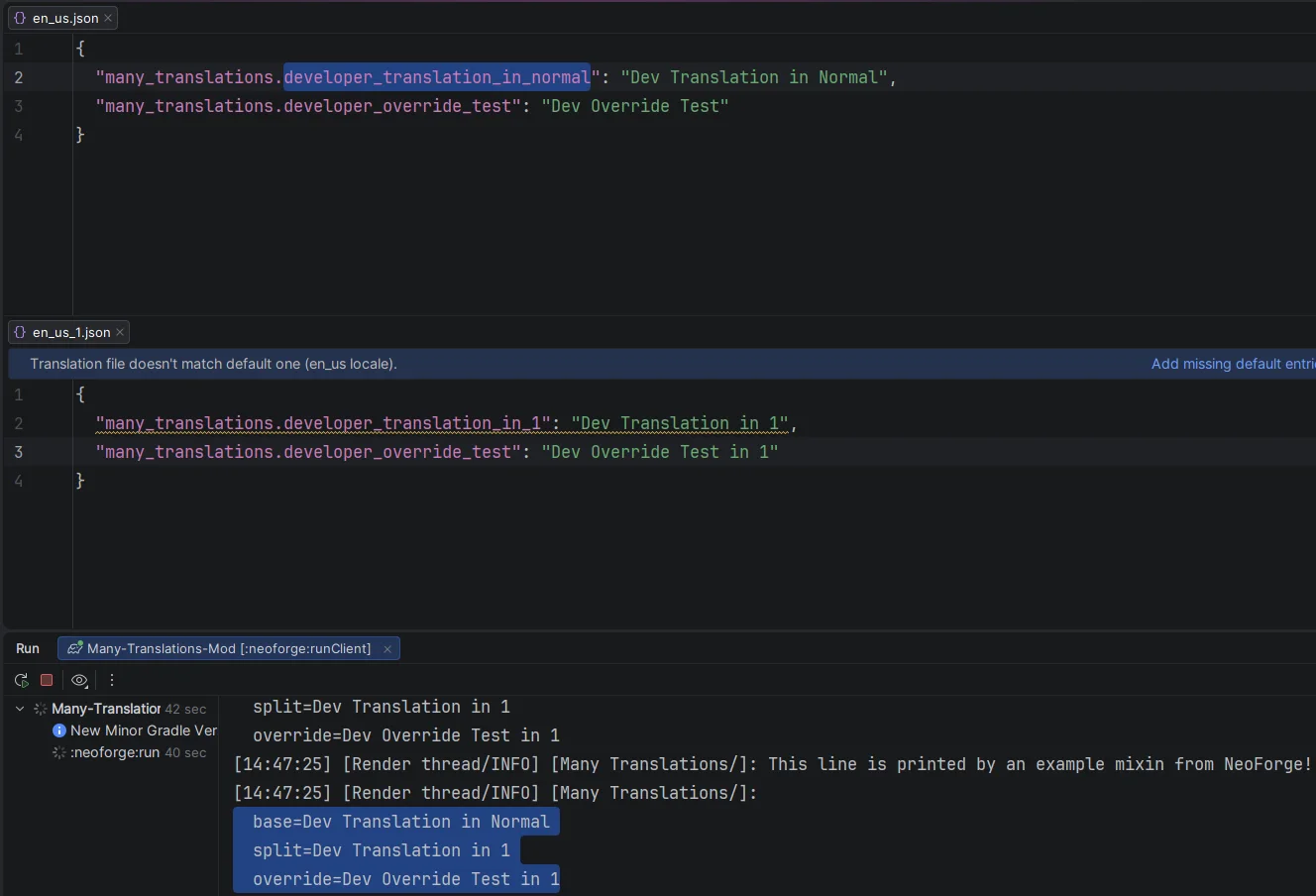
Translation keys are merged in file order, so later files wins on collisions.
Create your mod like normal! Use the normal en_us.json / whatever locale code you're building for until it gets overwhelming.
Then with this mod installed, you can simply copy and paste out the huge sections to separate files such as en_us_1.json or en_us_items.json etc.
This mod can be consumed with [Modrinth's Maven](https://www.cursemaven.com/) for in-development work.
Written by jason13official. Read it with pictures on Modrinth.
This mod runs only on your own game. Servers do not need it, so you can use it on any server.
Install Fabric and NeoForge for Minecraft 1.21.
Download the .jar file from Modrinth and put it in the mods folder of your .minecraft directory.
Start Minecraft with the Fabric profile.
Easier: in Prism Launcher or the Modrinth App, search for Many Translations in your instance's mods and click Install. It adds the loader and the mods it needs for you.
Full guide: How to install Minecraft mods
Not yet. The newest version it supports is Minecraft 1.21.
Yes. Many Translations is free to download from Modrinth.
Client-side. Many Translations goes in your own mods folder and works on any server, including servers without mods.
Yes. The last update came out in the past day.
Log in to leave a review.
