
 Eclipse ServerPlugins · 26.x
Paper plugin + Fabric mod for Eclipse Client: friends on the map at any distance, shared team waypoints, build together and feature rules.
Free34 downloads
A Fabric mod that adds a client-side Sound Board
Direct download from Modrinth · 28,479 downloads


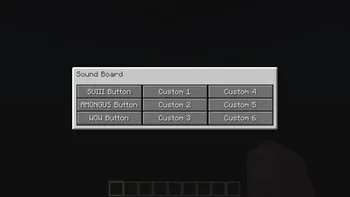
SoundBoard is a plugin for Paper / Spigot servers, made by TheOnlySD12. A Fabric mod that adds a client-side Sound Board.
It supports Minecraft 1.19 – 1.20. It has been downloaded 28,479 times on Modrinth. That puts it at #75 of the 142 voice chat and social plugins listed here. The last update came out on Dec 10, 2023.
SoundBoard has had 14 releases on Modrinth since Aug 12, 2022. None of them came out in the past year. The newest is 1.1, released on Dec 10, 2023. It is made for Minecraft 1.20.2. It runs on Fabric. The download is 4 KB.
| Version | Released | Minecraft | Type |
|---|---|---|---|
1.1 | Dec 10, 2023 | 1.20.2 | Release |
3.0-1.20.2 | Dec 10, 2023 | 1.20.2 | Release |
1.0 | Dec 10, 2023 | 1.20 – 1.20.4 | Release |
1.0 | Aug 15, 2023 | 1.20.1 | Release |
3.0.0 | Aug 15, 2023 | 1.20.1 | Release |
SoundBoard is a must-have mod for Minecraft players using Fabric. It introduces an ingenious client-side sound board that not only enhances your own auditory experience but also transforms multiplayer interactions. When combined with the server-side version, SoundBoard enables you to share your favorite sounds with other players, fostering a vibrant community atmosphere that adds a whole new dimension to your gameplay. Elevate your Minecraft experience to new heights by immersing yourself in the world of customizable sounds and collaborative audio exploration.
Embark on your sound adventure with SoundBoard by downloading and installing the version tailored for your Minecraft setup. Find your groove and redefine how you interact with the game. This table that can help you choose the correct versions:
Minecraft · Client · Server-Mod · Server-Plugin
1.20.2 · 3.0-1.20.2 · 1.1 · 1.0
1.20.1 · 3.0.0 · 1.0 · 1.0
1.19.4 · 2.5.0 · Not Supported · Not Supported
Once you've successfully installed SoundBoard into your Minecraft environment, fine-tune your experience using the user-friendly ModMenu interface. Accessible through the Mods button on the main menu screen, you can effortlessly modify themes and modes to your liking by pressing on the mod's icon.
To add custom sounds you must use a resource pack and if you want other to hear your sounds they must also have that resource pack. I have created a template that can be used to easily add sounds.
Note: Make sure that you didn't zip the folder of the resource pack. The path to the pack.mcmeta file should look like this: ResourcepackName.zip\pack.mcmeta
To add subtitles you can do this:
To add a few more custom sounds you can change the default ones. Simply follow the guide for adding sounds but instead of naming the files custom1.ogg, custom2.ogg etc. Name them among.ogg, smg.ogg, sui.ogg and wow.ogg.
For any inquiries or concerns related to the SoundBoard client-mod, navigate to our dedicated issue tracker. If you encounter issues with the server-side mod, you're encouraged to utilize our server-side issue tracker.
SoundBoard was developed by TheOnlySD12 and is licensed under the MIT License. Special thanks to the following people for their contributions to the project:
I hope you enjoy using SoundBoard! Please don't hesitate to use the issue tracker if you have any feedback or suggestions.
Written by TheOnlySD12. Read it with pictures on Modrinth.
Make sure your server runs Paper and Spigot on Minecraft 1.19 – 1.20.
Download the .jar file from Modrinth and put it in the plugins folder of your server.
Restart the server. Avoid /reload, many plugins do not handle it well.
Type /plugins in the console: SoundBoard should be listed in green. Its config files are created in the plugins folder on the first start.
Full guide: How to install plugins on a Minecraft server
| Resource | Downloads | Versions | Last update | Price |
|---|---|---|---|---|
| SoundBoardthe one you looked at | 28K | 1.19 – 1.20 | Dec 10, 2023 | Free |
| Eclipse Servernobub | 34 | 26.x | 3 days ago | Free |
| YT PartyZoey2936 | 985 | 1.8 – 26.x | 2 days ago | Free |
 VoicePhysicsShamanalle | 1 | 1.16 – 26.x | 8 hours ago | Free |
Not yet. The newest version it supports is Minecraft 1.20.
Yes. SoundBoard is free to download from Modrinth.
SoundBoard runs on Paper and Spigot servers.
Yes. The last update came out in the past day.
The closest ones are Eclipse Server, YT Party and VoicePhysics. Compare all alternatives
Eclipse ServerPlugins · 26.xPaper plugin + Fabric mod for Eclipse Client: friends on the map at any distance, shared team waypoints, build together and feature rules.
A client-side Fabric mod fetches, decodes and plays YouTube audio itself (playlist, play/pause, volume, seek) and keeps the playlist order, current track and…
VoicePhysicsPlugins · 1.16 – 26.xSimple Voice Chat addon: server-side wall occlusion (no client mod needed), sound zones, game rules & chat-mute sync.
 FreedomChatPlugins · 1.19 – 26.x
Liberate your server from the chat-reporting bourgeoisie! The best paper chat report disabler this side of the Mississippi
 Voice ChatPlugins · 1.21
An addon for Simple Voice Chat that adds a global spectator chat
 pv-addon-whisperPlugins · 1.16 – 26.x
Server-side Plasmo Voice add-on. By default, whisper is half of the current proximity distance. You can change the percentage in the config.
Log in to leave a review.