
 ModernFixMods · 1.16 – 26.x
All-in-one mod that improves performance, reduces memory usage, and fixes many bugs. Compatible with all your favorite performance mods!
Free83,884,742 downloads

Fixes narrow aspect ratios by expanding your field of view vertically when needed
Direct download from Modrinth · 9 downloads
FitFov is a mod made by malucart. Fixes narrow aspect ratios by expanding your field of view vertically when needed.
It supports Minecraft 26.x. It has been downloaded 9 times on Modrinth. The last update came out on Oct 7, 2026.
The newest is 1.0, released on Oct 7, 2026. It is made for Minecraft 26.1 – 26.3. It runs on Fabric. The download is 15 KB.
| Version | Released | Minecraft | Type |
|---|---|---|---|
1.0 | Oct 7, 2026 | 26.1 – 26.3 | Release |
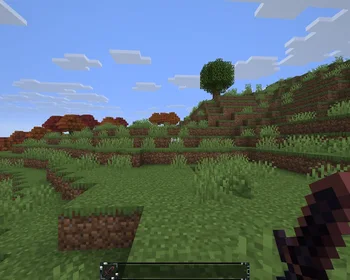
Minecraft is designed for widescreens, so it normally only expands and shrinks your view horizontally. You see more to your sides on an ultrawide, but on a narrow(/tall) display, the image is cropped. You can try increasing your FOV to compensate, but your hand and your held items will still be cropped out!
Vanilla in 5:4
This mod does a bit of math so that when your display is narrower than 16:9, the view will expand vertically by the right amount instead to compensate, which is much more comfortable.
FitFov in 5:4
Has no effect when running in 16:9 or wider, so you can drop this in a modpack to share across devices without having to change settings or anything.
Works on all 26.x versions, and includes compatibility with Iris. I don't imagine many other mods will have issues with this, unless they mess too deeply with hand rendering.
Written by malucart. Read it with pictures on Modrinth.
This mod runs only on your own game. Servers do not need it, so you can use it on any server.
Install Fabric for Minecraft 26.x.
Download the .jar file from Modrinth and put it in the mods folder of your .minecraft directory.
Start Minecraft with the Fabric profile.
Easier: in Prism Launcher or the Modrinth App, search for FitFov in your instance's mods and click Install. It adds the loader and the mods it needs for you.
Full guide: How to install Minecraft mods
| Resource | Downloads | Versions | Last update | Price |
|---|---|---|---|---|
| FitFovthe one you looked at | 9 | 26.x | Oct 7, 2026 | Free |
| ModernFixembeddedt | 83.9M | 1.16 – 26.x | 13 hours ago | Free |
 Debugifyisxander | 39.1M | 1.18 – 26.x | Sep 28, 2026 | Free |
 Memory Leak FixFX | 38.9M | 1.16 – 1.20 | Jan 6, 2024 | Free |
Yes. FitFov supports Minecraft 26.x. All supported versions: 26.x.
Yes. FitFov is free to download from Modrinth.
Client-side. FitFov goes in your own mods folder and works on any server, including servers without mods.
Yes. The last update came out in the past day.
The closest ones are ModernFix, Debugify and Memory Leak Fix. Compare all alternatives
ModernFixMods · 1.16 – 26.xAll-in-one mod that improves performance, reduces memory usage, and fixes many bugs. Compatible with all your favorite performance mods!
DebugifyMods · 1.18 – 26.xFixes Minecraft bugs found on the bug tracker
Memory Leak FixMods · 1.16 – 1.20A mod that fixes random memory leaks for both the client and server
 Model Gap FixMods · 1.18 – 1.21
Fixes gaps in Block Models and Item Models
 ToolTipFixMods · 1.17 – 1.21
Fixes Tooltips from runnning off the screen.
 Fast PaintingsMods · 1.19 – 26.x
Fixes painting rendering, increasing their performance and allowing them to have custom models
Log in to leave a review.