
 Clientcommands NeoForgedMods · 1.20 – 26.x
An unofficial port of Clientcommands for (Neo)Forge.
Free106 downloads

A port of the Genie Lamp mod to NeoForge 1.21.1. Wish for any item the legit way!
Direct download from Modrinth · 27 downloads
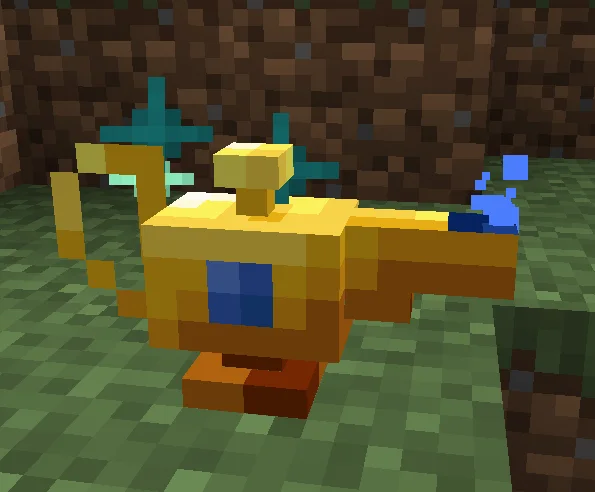
Genie Lamp Unofficial 1.21.1 NeoForge port is a mod made by tovarish54. A port of the Genie Lamp mod to NeoForge 1.21.1. Wish for any item the legit way!
It supports Minecraft 1.21. It has been downloaded 27 times on Modrinth. The last update came out on Oct 16, 2026.
The newest is 1.0.1-1.21.1, released on Oct 16, 2026. It is made for Minecraft 1.21.1. It runs on NeoForge. The download is 94 KB.
| Version | Released | Minecraft | Type |
|---|---|---|---|
1.0.1-1.21.1 | Oct 16, 2026 | 1.21.1 | Release |
This mod adds a magical Genie Lamp that can give you ONE any item
Also you can disable specific items in Config
Wandering trader can sell you one Old Lamp Scrap for 64 Emerald Blocks
You can craft Old Lamp by combinig nine Old Lamp Scraps
From combination of Old Lamp and eight Blocks of Gold you get Golden Lamp
And then the same step with Blocks of Lapis Lazuli gives you a Magic Lamp!
Then you can charge it with 100 Experience levels
And after this whole process you gets Empowered Magic Lamp that you can place and right click to wish for ONE any item
You can disable specific items and change the amount of levels required for charging the lamp
Default disabled items: ["minecraft:reinforced_deepslate", "minecraft:dragon_egg", "minecraft:end_portal_frame", "minecraft:bedrock", "minecraft:command_block", "minecraft:chain_command_block", "minecraft:repeating_command_block", "minecraft:command_block_minecart", "minecraft:jigsaw", "minecraft:structure_block", "minecraft:structure_void", "minecraft:debug_stick", "minecraft:light", "minecraft:barrier"]
About This Port:
This port updates Genie lamp to work with Minecraft 1.21.1 and the NeoForge mod loader. This is a community-maintained port and is not officially affiliated with the original Genie lamp developer.
Disclaimer:
This is an unofficial community port. All credit for the original mod design, artwork, models, and code goes to the original Genie lamp author. This port exists to make the mod available for newer Minecraft version.
Written by tovarish54. Read it with pictures on Modrinth.
This mod is needed on both the server and every player who joins.
Install NeoForge for Minecraft 1.21.
Download the .jar file from Modrinth and put it in the mods folder of your .minecraft directory.
Start Minecraft with the NeoForge profile.
Easier: in Prism Launcher or the Modrinth App, search for Genie Lamp Unofficial 1.21.1 NeoForge port in your instance's mods and click Install. It adds the loader and the mods it needs for you.
Full guide: How to install Minecraft mods
| Resource | Downloads | Versions | Last update | Price |
|---|---|---|---|---|
| Genie Lamp Unofficial 1.21.1 NeoForge portthe one you looked at | 27 | 1.21 | Oct 16, 2026 | Free |
| Clientcommands NeoForgedDilideguazi | 106 | 1.20 – 26.x | Sep 25, 2026 | Free |
 TexTrue's Embeddium OptionsTexTrue | 3.4M | 1.16 – 1.20 | Feb 6, 2024 | Free |
 Steam 'n' Rails NeoforgePoppyBlossom | 2.7M | 1.21 | Jul 27, 2026 | Free |
Not yet. The newest version it supports is Minecraft 1.21.
Yes. Genie Lamp Unofficial 1.21.1 NeoForge port is free to download from Modrinth.
Both. The server and every player need Genie Lamp Unofficial 1.21.1 NeoForge port installed.
Yes. The last update came out 2 days ago.
The closest ones are Clientcommands NeoForged, TexTrue's Embeddium Options and Steam 'n' Rails Neoforge. Compare all alternatives
Clientcommands NeoForgedMods · 1.20 – 26.xAn unofficial port of Clientcommands for (Neo)Forge.
TexTrue's Embeddium OptionsMods · 1.16 – 1.20Unofficial port of Reese's Sodium Options to work with Embeddium on MinecraftForge/NeoForge. Alternative Options Menu for Embeddium.
Steam 'n' Rails NeoforgeMods · 1.21An unofficial port of Create: Steam 'n' Rails to 1.21.1.
 PrimogemCraft NeoMods · 1.21
A remastered MOD that includes elements from Genshin Impact and Honkai: Star Rail.
 TorchMasterMods · 1.16 – 1.21
Control Mob Spawning with simple to use Blocks like the Mega Torch or the Dread Lamp
 Jade AddonsMods · 1.18 – 26.x
Jade 🔍's additional mod supports for Neo/Forge
Log in to leave a review.