
 Emoji TypeMods · 1.16 – 26.x
Type Minecraft emojis and symbols with simple shortcodes.
Free3,865,734 downloads
Add a convenient symbol menu to Minecraft Java Edition chat! Open the Symbols menu from the chat screen, browse categories of Unicode symbols and emojis, and…
Direct download from Modrinth · 8 downloads
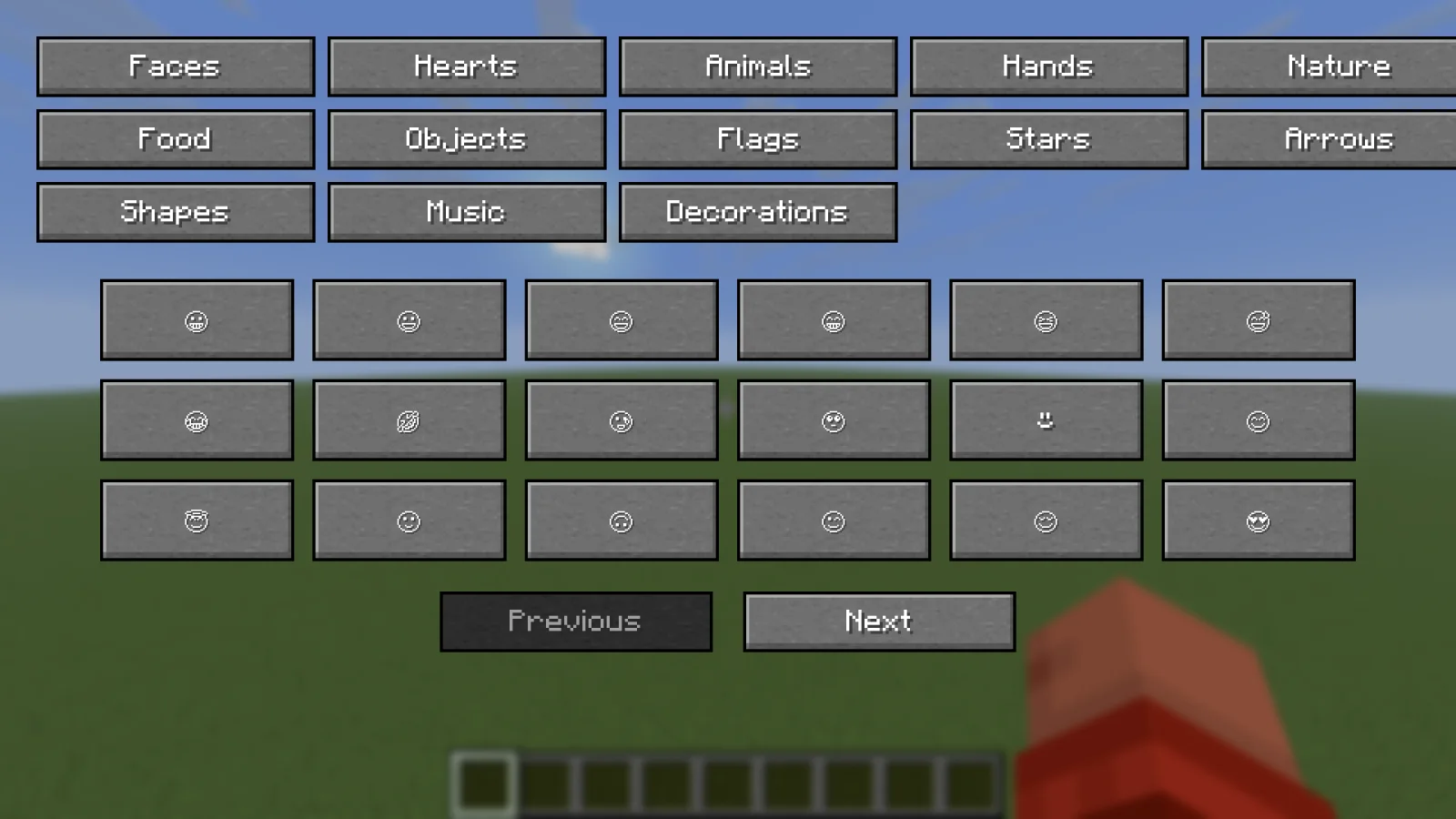
MrMister14's Symbol Menu is a mod made by MrMister14. Add a convenient symbol menu to Minecraft Java Edition chat! Open the Symbols menu from the chat screen, browse categories of Unicode symbols and emojis, and…
It supports Minecraft 26.x. It has been downloaded 8 times on Modrinth. The last update came out on Oct 24, 2026.
The newest is 1.00, released on Oct 23, 2026. It is made for Minecraft 26.2. It runs on Fabric. The download is 23 KB.
| Version | Released | Minecraft | Type |
|---|---|---|---|
1.00 | Oct 23, 2026 | 26.2 | Release |
Add a convenient symbol menu to Minecraft Java Edition chat!
Symbol menu in chat for conveniently putting symbols (Unicode) into chat, with 912 different symbols! No need to copy and paste emojis from your browser anymore! :)
Features
Requirements
Video
Written by MrMister14. Read it with pictures on Modrinth.
This mod runs only on your own game. Servers do not need it, so you can use it on any server.
Install Fabric for Minecraft 26.x.
Add the mods it needs: Fabric API.
Download the .jar file from Modrinth and put it in the mods folder of your .minecraft directory.
Start Minecraft with the Fabric profile.
Easier: in Prism Launcher or the Modrinth App, search for MrMister14's Symbol Menu in your instance's mods and click Install. It adds the loader and the mods it needs for you.
Full guide: How to install Minecraft mods
| Resource | Downloads | Versions | Last update | Price |
|---|---|---|---|---|
| MrMister14's Symbol Menuthe one you looked at | 8 | 26.x | 22 days ago | Free |
| Emoji TypeNorbiros | 3.9M | 1.16 – 26.x | Jun 25, 2026 | Free |
 Smooth ScrollingSmajloSlovakian | 13.4M | 1.20 – 26.x | 28 days ago | Free |
 WayLinkPrimeli | 126 | 1.21 – 26.x | Oct 11, 2026 | Free |
Yes. MrMister14's Symbol Menu supports Minecraft 26.x. All supported versions: 26.x.
Yes. MrMister14's Symbol Menu is free to download from Modrinth.
Client-side. MrMister14's Symbol Menu goes in your own mods folder and works on any server, including servers without mods.
Yes: Fabric API. Install it before MrMister14's Symbol Menu.
Yes. The last update came out 2 days ago.
The closest ones are Emoji Type, Smooth Scrolling and WayLink. Compare all alternatives
Emoji TypeMods · 1.16 – 26.xType Minecraft emojis and symbols with simple shortcodes.
Smooth ScrollingMods · 1.20 – 26.xCustomize the scrolling smoothness or speed in various places like chat, hotbar, creative screen...
WayLinkMods · 1.21 – 26.xMakes waypoints shared in chat work across JourneyMap, Xaero's Minimap and NoRisk Client. Add them with one click and share your own. Client-side.
 No Chat ReportsMods · 1.19 – 26.x
Makes chat unreportable (where possible)
 Essential ModMods · 1.8 – 26.x
Enhance your Minecraft with one simple mod. Host worlds for free, chat with friends, and so much more!
 More Chat HistoryMods · 1.16 – 26.x
Increases the maximum length of chat history.
Log in to leave a review.