
 Colourful containers Dark Mode GUIResource packs · 1.8 – 26.x
A container GUI replacement mod that hopes to match the menu to every one of Minecraft's colourful interactable blocks.
Free514,509 downloads
Makes Dark Coffee GUI work with AppleSkin.
Direct download from Modrinth · 6 downloads
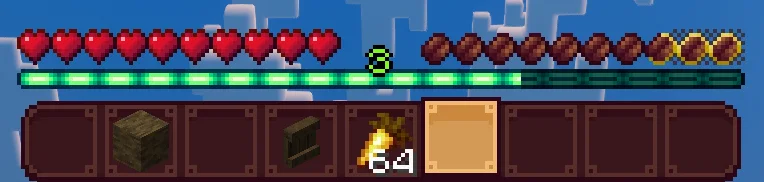
Dark Coffee GUI is a resource pack made by Kalli-Harpy. Makes Dark Coffee GUI work with AppleSkin.
It supports Minecraft 1.20 – 26.x. It has been downloaded 6 times on Modrinth. The last update came out on Oct 28, 2026.
Dark Coffee GUI has had 2 releases on Modrinth since Oct 28, 2026. 2 of them came out in the past year. The newest is 1.0-1.21.9+, released on Oct 28, 2026. It is made for Minecraft 1.21.9 – 26.3. It runs on Minecraft. The download is 3 KB.
| Version | Released | Minecraft | Type |
|---|---|---|---|
1.0-1.21.9+ | Oct 28, 2026 | 1.21.9 – 26.3 | Release |
1.0-1.20.2+ | Oct 28, 2026 | 1.20.2 – 1.21.8 | Release |
This resource pack changes the hunger bar saturation icons from AppleSkin to resemble the coffee beans in Dark Coffee GUI!
This was made to add compatability between the two, so that the saturation bar wouldn't have the outline of the hunger honches.
Spoiler
Because... y'know... they're beans.
This resource pack is an unofficial addon and is not affiliated with the original creators of Dark Coffee or AppleSkin.
Written by Kalli-Harpy. Read it with pictures on Modrinth.
Download the .zip file from Modrinth. Do not unzip it.
In Minecraft, open Options, then Resource Packs, then Open Pack Folder.
Drop the .zip file into that folder and go back to the game.
Move Dark Coffee GUI to the right-hand list and click Done.
It is made for Minecraft 1.20 – 26.x. On other versions Minecraft marks it as incompatible, but it often still works.
Full guide: How to install Minecraft resource packs
| Resource | Downloads | Versions | Last update | Price |
|---|---|---|---|---|
| Dark Coffee GUIthe one you looked at | 6 | 1.20 – 26.x | 13 days ago | Free |
| Colourful containers Dark Mode GUIKingybu | 515K | 1.8 – 26.x | Sep 9, 2026 | Free |
 Duskfall-UISirKillian | 119K | 1.20 – 26.x | Apr 2, 2026 | Free |
 Dark Everywherevindocel | 120K | 1.18 – 1.20 | Feb 5, 2024 | Free |
Yes. Dark Coffee GUI supports Minecraft 26.x. All supported versions: 26.x, 1.21, 1.20.
Yes. Dark Coffee GUI is free to download from Modrinth.
Yes: AppleSkin, Dark Coffee GUI. Install it before Dark Coffee GUI.
Yes. The last update came out in the past day.
The closest ones are Colourful containers Dark Mode GUI, Duskfall-UI and Dark Everywhere. Compare all alternatives
Colourful containers Dark Mode GUIResource packs · 1.8 – 26.xA container GUI replacement mod that hopes to match the menu to every one of Minecraft's colourful interactable blocks.
Duskfall-UIResource packs · 1.20 – 26.xA dark GUI theme.
Dark EverywhereResource packs · 1.18 – 1.20Objective to leave all the Dark gui both base minecraft and mods
 Recolourful Containers GUI + HUDResource packs · 1.19 – 26.x
Do you want more immersive, more interesting, more colourful GUIs and HUD? Than this pack is for you!
 GUI RetexturesResource packs · 1.19 – 26.x
Makes GUI and HUD fancier - Dark mode, configurability with Respackopts
 Immersive InterfacesResource packs · 1.20 – 26.x
Shrimp's Immersive Interfaces is a complete graphical revamp of Minecraft's GUI, brings variety and charm to the previously grey boxes.
Log in to leave a review.