
 Lifesteal PluginPlugins · 1.20 – 26.x
A fully customizable, production-grade Minecraft plugin that implements a complete lifesteal system with hearts, bans, revives, MySQL support, advanced…
Free25,244 downloads

A customizable health display plugin featuring mob health bars, player hearts, damage indicators, and multiple display styles.
Direct download from Modrinth · 3 downloads
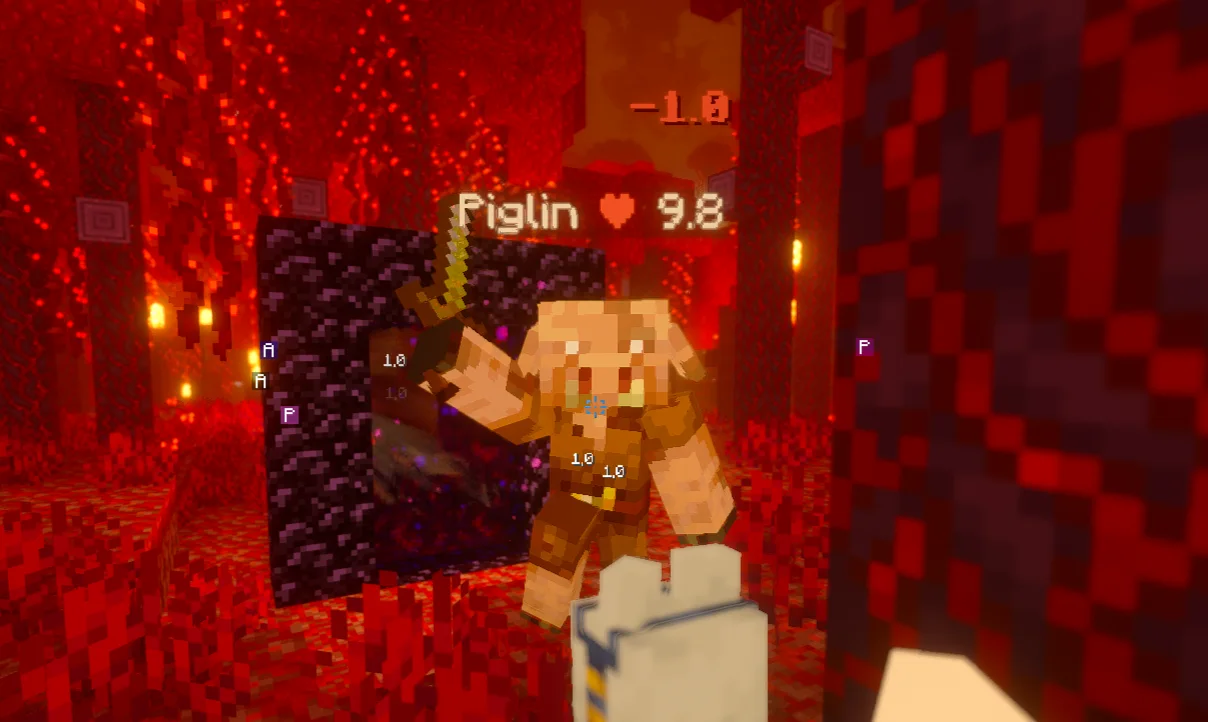
Healthcore is a plugin for Paper / Spigot servers, made by kawz1. A customizable health display plugin featuring mob health bars, player hearts, damage indicators, and multiple display styles.
It supports Minecraft 26.x. It has been downloaded 3 times on Modrinth. That puts it at #115 of the 115 mob and adventure plugins listed here. The last update came out on Nov 7, 2026.
The newest is 1.0.0, released on Nov 7, 2026. It is made for Minecraft 26.2. It runs on Paper and Purpur. The download is 16 KB.
| Version | Released | Minecraft | Type |
|---|---|---|---|
1.0.0 | Nov 7, 2026 | 26.2 | Release |
The commands named on the Modrinth page of Healthcore:
/healthcore/hcorePermission nodes named there, to give with a plugin like LuckPerms:
healthcore.togglehealthcore.reloadHealthCore shows the health of mobs and players in a clean, configurable way. Pick the look you like (hearts, a single heart with a number, or a bar) and decide where it appears: above mobs, below player names, in the action bar of whoever hits, or as floating damage numbers.
Command · Description · Permission
/healthcore toggle · Turn your own hit bar on or off · healthcore.toggle (default: everyone)
/healthcore reload · Reload the configuration · healthcore.reload (default: OP)
The alias /hcore also works.
Use these in any format: `, , , , , and `.
Folia is not supported.
Found a bug or have a suggestion? Open an issue on the project page.
Written by kawz1. Read it with pictures on Modrinth.
Make sure your server runs Paper and Spigot on Minecraft 26.x.
Download the .jar file from Modrinth and put it in the plugins folder of your server.
Restart the server. Avoid /reload, many plugins do not handle it well.
Type /plugins in the console: Healthcore should be listed in green. Its config files are created in the plugins folder on the first start.
Full guide: How to install plugins on a Minecraft server
| Resource | Downloads | Versions | Last update | Price |
|---|---|---|---|---|
| Healthcorethe one you looked at | 3 | 26.x | 5 days ago | Free |
| Lifesteal PluginMidnightZone | 25K | 1.20 – 26.x | Jul 26, 2026 | Free |
 ActionHealthzeshan321 | 90 | 1.8 – 26.x | Oct 3, 2026 | Free |
 Custom Damage NumbersDed3ec | 31 | 1.17 – 26.x | Oct 5, 2026 | Free |
Yes. Healthcore supports Minecraft 26.x. All supported versions: 26.x.
Yes. Healthcore is free to download from Modrinth.
Healthcore runs on Paper and Spigot servers.
Yes. The last update came out in the past day.
The closest ones are Lifesteal Plugin, ActionHealth and Custom Damage Numbers. Compare all alternatives
Lifesteal PluginPlugins · 1.20 – 26.xA fully customizable, production-grade Minecraft plugin that implements a complete lifesteal system with hearts, bans, revives, MySQL support, advanced…
ActionHealthPlugins · 1.8 – 26.xShows the health of the player or mob that you hit or look at, in the action bar. One jar for Spigot, Paper and Folia 1.8 to 26.3.
Custom Damage NumbersPlugins · 1.17 – 26.xCustom Damage Numbers adds clean, animated, packet-only damage indicators to your Minecraft server. Fully configurable with hit merging, entity-following…
 Click MobsPlugins · 1.20 – 26.x
Click to pick up any mob into your inventory and carry them around!
 CrazyVouchersPlugins · 1.8 – 26.x
Want to make a paper that can give you an axolotl with a pretty firework display, Look no further!
 MobsToEggsPlugins · 1.19 – 26.x
A mob catcher where you throw chicken eggs at mobs for a chance to catch them!
Log in to leave a review.