
 UberEnchantPlugins · 1.18 – 26.x
Now with custom enchant table/anvil mechanics! Manipulate item names, lore, enchantments, and more!
Free208,881 downloads

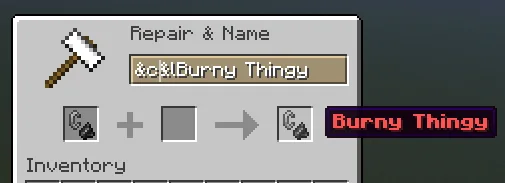
With AnvilEnhanced you can enchant your items with enchantments higher than the vanilla limit and put color in item name. No hex color support.
Direct download from Modrinth · 23,752 downloads
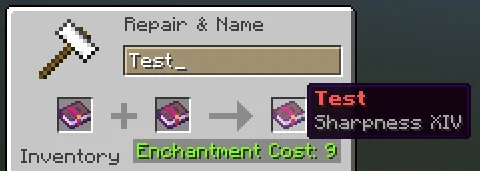
AnvilEnhanced is a plugin for Paper / Spigot servers, made by BitByLogic. With AnvilEnhanced you can enchant your items with enchantments higher than the vanilla limit and put color in item name. No hex color support.
It supports Minecraft 1.16 – 26.x. It has been downloaded 23,752 times on Modrinth. That puts it at #38 of the 103 RPG and magic plugins listed here. The last update came out on Oct 29, 2026.
AnvilEnhanced has had 15 releases on Modrinth since Aug 9, 2023. 5 of them came out in the past year. The newest is 3.0.4, released on Oct 29, 2026. It is made for Minecraft 1.16 – 26.3. It runs on Bukkit, Paper, Purpur and Spigot. The download is 97 KB.
| Version | Released | Minecraft | Type |
|---|---|---|---|
3.0.4 | Oct 29, 2026 | 1.16 – 26.3 | Release |
3.0.3 | Jan 30, 2026 | 1.16 – 26.2 | Release |
3.0.2 | Jan 24, 2026 | 1.16 – 1.16.5 | Release |
3.0.1 | Jan 24, 2026 | 1.16 – 1.16.5 | Release |
3.0.0 | Dec 2, 2025 | 1.16 – 1.21.10 | Release |
The commands named on the Modrinth page of AnvilEnhanced:
/aereloadPermission nodes named there, to give with a plugin like LuckPerms:
anvilenhanced.*anvilenhanced.admin.reloadanvilenhanced.enchant.bypassmaxlimitanvilenhanced.enchant.bypassuselimitanvilenhanced.renameanvilenhanced.coloranvilenhanced.enchant.*anvilenhanced.enchant.booksanvilenhanced.enchant.itemsanvilenhanced.enchant.item-bookanvilenhanced.enchant.use-booksText Version
Like the plugin? Check out the Premium version
With AnvilEnhanced, you can apply enchantments beyond the vanilla limits and add color to item names (legacy color codes only; hex support requires the premium version).
The Ranks folder includes a default.yml file that defines rank settings. You can set the required permission for the rank, its priority, the "Too Expensive" limit, and individual enchantment limits.
To add a new rank, create a new YAML file in the Ranks folder using the same structure as default.yml.
Default Configuration
Settings:
Color-Enabled: true
Too-Expensive-Bypass: true
Cost:
Maximum: 40
Chat-Alert: true
Alert-Message: "&7ᴇɴᴄʜᴀɴᴛ ᴄᴏꜱᴛ &8» &c%cost%"
Resource-Pack:
Enabled: true
URL: "github.com/mvez73/roman_numerals/raw/main/roman…;
#
SHA-1: "3281e3d8fa8cfdf3a47591d22dfe33f49fda0df0"
Update-Checker:
Enabled: true
Check-Interval: 12
Enchanting and repair costs are calculated using Minecraft's original anvil formula.
Learn more here: Anvil Mechanics.
To exceed the 40-level "Too Expensive" cap, enable Too-Expensive-Bypass in config.yml and adjust the limit in the rank-specific YAML file.
Thanks to @Jikoo for letting me use code from his plugin AnvilUnlocker.
Note: ProtocolLib must be installed.
Rename your items with color!
See Minecraft Formatting Codes for available options.
Note: Only legacy color codes are supported; hex colors require the premium version.
Players are prompted to install a resource pack when joining the server (configurable in config.yml).
It only adds Roman numerals beyond X (10) for enchantment levels — no other changes are made.
With this pack, Sharpness 15 will display as Sharpness XV.
Requests or help should be done in the discussion section or Discord; reviews are not monitored for support requests.
If you find the plugin useful, please give it a favorite!
Written by BitByLogic. Read it with pictures on Modrinth.
Make sure your server runs Paper and Spigot on Minecraft 1.16 – 26.x.
Download the .jar file from Modrinth and put it in the plugins folder of your server.
Restart the server. Avoid /reload, many plugins do not handle it well.
Type /plugins in the console: AnvilEnhanced should be listed in green. Its config files are created in the plugins folder on the first start.
Full guide: How to install plugins on a Minecraft server
| Resource | Downloads | Rating | Versions | Last update | Price |
|---|---|---|---|---|---|
| AnvilEnhancedthe one you looked at | 24K | – | 1.16 – 26.x | 14 days ago | Free |
| UberEnchantcoltonj96 | 209K | 4.4 | 1.18 – 26.x | Sep 18, 2026 | Free |
| FixVanillaEnchantmentsmrsaitam | 19 | – | 1.20 – 1.21 | Sep 12, 2026 | Free |
 Item LimitRose_ | 5,501 | – | 1.21 – 26.x | 21 days ago | Free |
Yes. AnvilEnhanced supports Minecraft 26.x. All supported versions: 26.x, 1.21, 1.20, 1.19, 1.18, 1.17, 1.16.
Yes. AnvilEnhanced is free to download from Modrinth.
AnvilEnhanced runs on Paper and Spigot servers.
Yes. The last update came out in the past day.
The closest ones are UberEnchant, FixVanillaEnchantments and Item Limit. Compare all alternatives
UberEnchantPlugins · 1.18 – 26.xNow with custom enchant table/anvil mechanics! Manipulate item names, lore, enchantments, and more!
Automatically fixes illegal enchantments. No lag, no manual commands required.
Item LimitPlugins · 1.21 – 26.xAs the name suggests this plugin allows you to limit any item players can only hold up to a set maximum amount of an item in their inventory. If a player has…
 EnchantsSquaredPlugins · 1.16 – 1.20
50+ Highly customizable vanilla-like enchantments. w/ WorldGuard, Geyser, & Jobs compatibility
 CustomCraftyPlugins · 1.20 – 26.x
A plugin that allows crafting recipes with NBT support for named and enchanted items
 VeinMiner EnchantmentPlugins · 1.21 – 26.x
Veinminer Addon - Adds vineminer enchantment to enchanting tables. Only tools with the enchantment can veinmine
Log in to leave a review.