NewCraftRank SitesA free website and storeMake yours ›
AshlarFree server software built on Paper, with DDoS and backdoor protection See Ashlar ›Security RadarA free check of your server's login, anti-bot and proxy settings, only with your OK See how it works ›CommunityAsk questions, share builds and find people to play with Join the forum ›
Resources / Plugins / Default Chat

Default Chat

A modern and lightweight chat management plugin for Paper servers. It features local and global channels, sound-only mention pings, native MiniMessage…

PluginsFree1.21 – 26.x
by Slavyanin_ · listed from Modrinth
Download ›

Direct download from Modrinth · 2 downloads

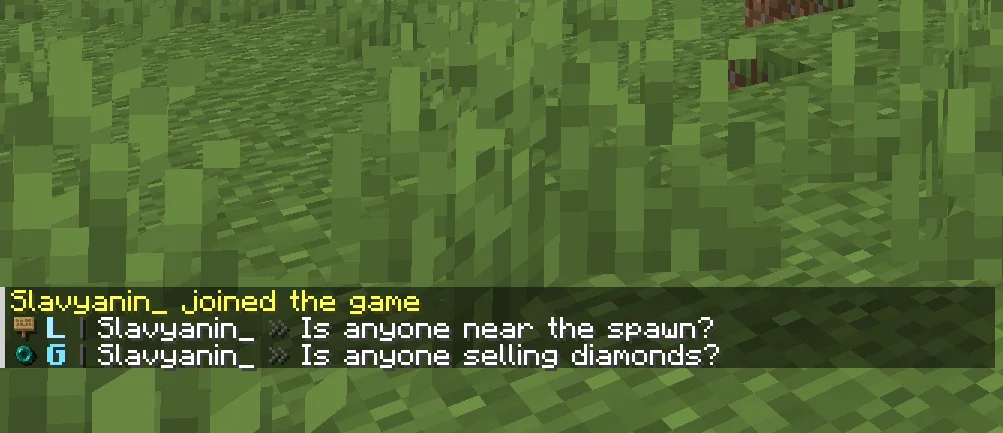
Default Chat screenshot 1

What it does

Default Chat is a plugin for Paper / Spigot servers, made by Slavyanin_. A modern and lightweight chat management plugin for Paper servers. It features local and global channels, sound-only mention pings, native MiniMessage…

It supports Minecraft 1.21 – 26.x. It has been downloaded 2 times on Modrinth. That puts it at #144 of the 149 cosmetic and display plugins listed here. The last update came out on Nov 11, 2026.

Supported versions

26.x1.21

Release history

The newest is 1.0.0, released on Nov 11, 2026. It is made for Minecraft 1.21.11 – 26.3. It runs on Bukkit, Folia, Paper and Purpur. The download is 67 KB.

VersionReleasedMinecraftType
1.0.0Nov 11, 20261.21.11 – 26.3Release

Commands

The commands named on the Modrinth page of Default Chat:

/globalchat/chat/msg

Permissions

Permission nodes named there, to give with a plugin like LuckPerms:

defaultchat.formatdefaultchat.bypass.spamdefaultchat.bypass.filter

Latest release on GitHub

Default Chat is open source. Its newest release on GitHub is DefaultChat 1.0.0, published on Nov 11, 2026.

First public release.

  • Local and global chat channels with per-world radius overrides
  • Mention highlighting with sound-only pings (no action bar)
  • MiniMessage everywhere, including a safe subset for players and sprite support
  • Cooldown, duplicate detection, rate limit, caps guard
  • Word and link filters with an allowlist
  • Chat history and async file logging
  • DefaultChatMessageEvent API
  • English and Russian language files
  • Folia-ready, one jar for Paper 1.21.11 through 26.3+
Description from the author on Modrinth

DefaultChat: Modern Chat Management for Paper

DefaultChat is a lightweight and well-structured chat plugin designed specifically for modern Paper servers. It completely replaces legacy color codes with native MiniMessage support, providing a flexible and secure communication environment. The plugin requires no dependencies, utilizes no NMS, and operates as a single JAR file.

Purpose and Design

Many existing chat plugins were designed for older Spigot versions and rely on outdated color codes. DefaultChat is built for the modern Paper API and focuses on three core aspects:

  1. Modern Formatting: Full MiniMessage support allows for gradients, rainbows, shadows, and item sprites. This formatting applies consistently across chat formats, error messages, and command outputs.
  2. Unobtrusive Interactions: Player mentions are handled via configurable sound pings rather than intrusive action bar messages or screen titles.
  3. Performance and Flexibility: The configuration is entirely based on MiniMessage, and message processing is optimized for multi-threaded environments, including full support for Folia.

Key Features

Chat Channels

  • Local Chat: Messages are only visible to players within a configurable block radius. The radius can be set individually for each world.
  • Global Chat: Activated by a configurable prefix (default !) or the /globalchat command.
  • Channel Memory: Players can switch between channels using /chat local, /chat global, or /chat toggle.
  • Vanish Support: Vanished players do not receive messages from local chat.

Mentions System

  • Player names in messages are highlighted and recognized regardless of letter case.
  • Mentioned players receive a configurable sound ping. The volume, pitch, and cooldown can be adjusted.
  • Players can toggle pings for themselves using /chat ping.
  • Pings are only sent if the player is actually within the hearing radius of the message.

Formatting and MiniMessage

  • All text elements, including chat formats, hover text, and error messages, are configured using MiniMessage templates.
  • Players with the defaultchat.format permission can use a safe subset of tags, including colors, decorations, gradients, and rainbows. Dangerous tags such as click events, hover events, fonts, score, and NBT are blocked.
  • Player names are clickable and suggest the /msg command.
  • Formatting errors are handled gracefully. If a message contains invalid syntax, it is displayed as plain text rather than breaking the chat.

Moderation and Spam Protection

  • Cooldowns and Limits: Includes message cooldowns, duplicate message prevention, and a sliding window message limit.
  • Caps Guard: Blocks or ignores messages with excessive uppercase letters.
  • Filters: Word filtering supports masking (**) or complete blocking. Link filtering can block URLs with an option to whitelist specific domains.
  • Bypass Permissions: Staff members can bypass spam and filter checks with defaultchat.bypass.spam and defaultchat.bypass.filter.

History and Logging

  • /chat history [n]: Displays the last N messages from memory for moderation purposes.
  • Asynchronous Logging: All messages are written to chat.log on a separate virtual thread, preventing disk I/O from delaying chat delivery.

Developer API

  • The plugin fires a DefaultChatMessageEvent, allowing other plugins to view, modify, cancel, or redirect messages.
  • The event is fired in the global region thread, supports component modification, and is cancellable.

Performance and Compatibility

  • Single JAR: Compiled against the oldest supported API (1.21.11) to ensure compatibility with Paper 1.21.11, 26.1, 26.1.2, 26.2, and 26.3+.
  • Folia-Ready: Fully compatible with Folia (folia-supported: true).
  • Minimal TPS Impact: Chat processing occurs in the global region thread. The configuration is loaded once and stored in immutable records, making it suitable for high-load servers.

Requirements and Installation

Requirements:

  • Platform: Paper or its forks, including Folia. Spigot and CraftBukkit are not supported.
  • Minecraft: 1.21.11, 26.1, 26.1.2, 26.2, 26.3 and newer.
  • Java: 25+
  • Dependencies: None.

Installation:

  1. Download the DefaultChat-1.0.0.jar file.
  2. Place the file into the plugins/ directory of your server.
  3. Start the server. The config.yml and language files will be generated automatically.
  4. Configure the plugin as needed and apply changes using /chat reload.

License

This project is distributed under the MIT License. Author: Slavyanin.

Written by Slavyanin_. Read it with pictures on Modrinth.

How to install Default Chat

  1. Make sure your server runs Paper and Spigot on Minecraft 1.21 – 26.x.

  2. Download the .jar file from Modrinth and put it in the plugins folder of your server.

  3. Restart the server. Avoid /reload, many plugins do not handle it well.

  4. Type /plugins in the console: Default Chat should be listed in green. Its config files are created in the plugins folder on the first start.

Full guide: How to install plugins on a Minecraft server

Compatibility

Minecraft versions
26.x, 1.21
Runs on
Paper, Spigot
Edition
Java
Needs
Nothing else
License
MIT
Price
Free
Upkeep
Actively updated (Nov 14, 2026)

Default Chat compared with similar ones Compare all alternatives

ResourceDownloadsVersionsLast updatePrice
Default Chatthe one you looked at21.21 – 26.x2 days agoFree
Simple RanksTomMustBe1232K1.20 – 26.xJun 7, 2026Free
Custom Join MessagesInsprill28K1.12 – 26.x26 days agoFree
LPC MinimessageAyont91K1.20 – 26.xJul 5, 2026Free

Questions

Does Default Chat work on Minecraft 26.x?

Yes. Default Chat supports Minecraft 26.x. All supported versions: 26.x, 1.21.

Is Default Chat free?

Yes. Default Chat is free to download from Modrinth.

Which server software does Default Chat run on?

Default Chat runs on Paper and Spigot servers.

Is Default Chat still updated?

Yes. The last update came out in the past day.

What are the best alternatives to Default Chat?

The closest ones are Simple Ranks, Custom Join Messages and LPC Minimessage. Compare all alternatives

Alternatives to Default Chat

Simple RanksPlugins · 1.20 – 26.x

Simple rank plugin allowing for custom-colored, ordered ranks in tab list, name tags, chat, and Placeholder API placeholders!

Free31,962 downloads

Custom Join MessagesPlugins · 1.12 – 26.x

Welcome players with first-join, join, and quit messages, publicly or privately, via Chat, Titles, Action Bars, Boss Bars, and Sounds. Permission-based and…

Free27,520 downloads
Compare all alternatives ›

Reviews

–★★★★★
0 reviews
50
40
30
20
10

Log in to leave a review.