
 GunshellPlugins · 1.12 – 1.21
With this plugin you can add guns, ammo, throwables and melee weapons to your server.
Free84,668 downloads
Create-like kinetics and BuildCraft-like steam for Paper: shafts, cogwheels, water wheels, presses, mixers, steam boilers, quarries and pipes, with a JEI-like…
Direct download from Modrinth · 4 downloads
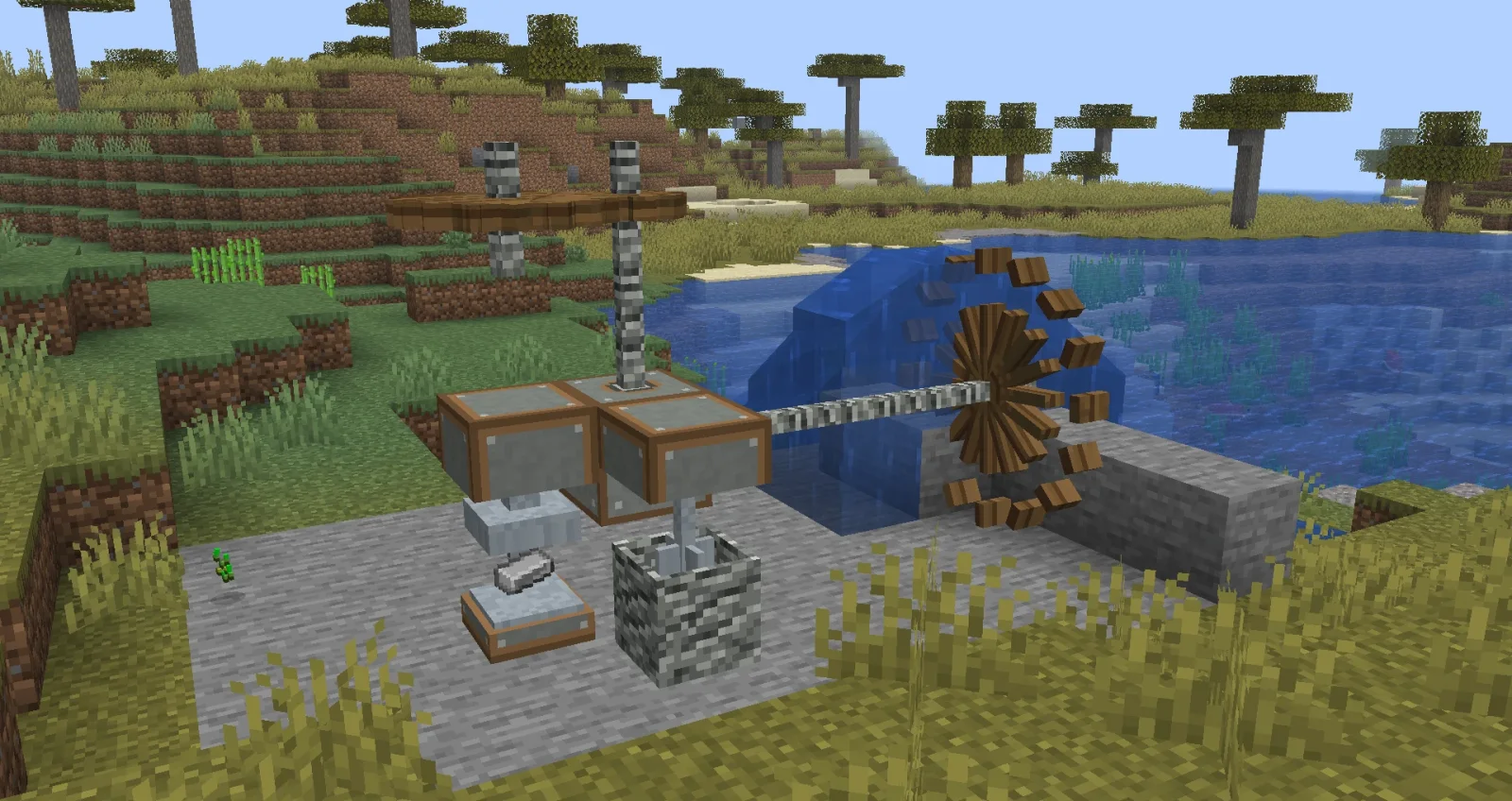
Sunspire Engineering is a plugin for Paper / Spigot servers, made by Vahatoff. Create-like kinetics and BuildCraft-like steam for Paper: shafts, cogwheels, water wheels, presses, mixers, steam boilers, quarries and pipes, with a JEI-like…
It supports Minecraft 1.20 – 26.x. It has been downloaded 4 times on Modrinth. That puts it at #63 of the 71 technology plugins listed here. The last update came out on Nov 6, 2026.
Sunspire Engineering has had 4 releases on Modrinth since Oct 25, 2026. 4 of them came out in the past year. The newest is 0.2.2, released on Nov 6, 2026. It is made for Minecraft 1.20 – 26.3. It runs on Folia, Paper and Purpur. The download is 1.6 MB.
| Version | Released | Minecraft | Type |
|---|---|---|---|
0.2.2 | Nov 6, 2026 | 1.20 – 26.3 | Beta |
0.2.1 | Oct 31, 2026 | 1.20 – 26.3 | Beta |
0.2.0 | Oct 26, 2026 | 26.3 | Beta |
0.1.0 | Oct 25, 2026 | 26.3 | Beta |
The commands named on the Modrinth page of Sunspire Engineering:
/engSunspire Engineering is a Paper / Purpur plugin with kinetic machines inspired by Create and **steam
automation** inspired by BuildCraft. Players join with a vanilla client: models, textures and GUI backgrounds are
sent as a server resource pack, which the plugin hosts by itself.
Sunspire Engineering is an independent plugin. It is not affiliated with the Create or BuildCraft teams, and it does
not contain any of their code or assets. Every model and texture was made from scratch.
with their neighbours and spin in opposite directions, and the animation is smooth.
hand crank, and a steam engine next to a boiler (32 RPM, capacity 2048).
stalls and smokes. Engineer's goggles show speed and load, and the wrench rotates or picks up parts.
Solid steam pipes connect by themselves. The valve and drive open doors and run a two-block steam lift.
layer by layer down to bedrock. Loot goes into an adjacent chest or into item pipes. Upgrades: speed, fortune,
silk touch, frame expander.
locked recipes can't be crafted.
Right-click opens the tree GUI with arrows between nodes.
recipe views for the crafting grid and for every machine.
English, Русский, Français, Italiano, Español. Set language in config.yml, or use /eng lang . All 440
strings live in plugins/SunspireEngineering/lang/*.yml and can be edited, then applied with /eng reload.
Items already in players' inventories are renamed on join.
Command · Description
/eng · Open the guide (learning trees)
/eng search [query] · JEI-like recipe search
/eng give [amount] · Give an item (op)
/eng lang · /eng reload · Change language / reload texts (op)
/eng demo · /eng stats · Build a kinetics demo stand / network stats (op)
Admin permission: sunspire.engineering.admin (op by default).
public-url to your own hosting.
Custom blocks are note-block states, and machines are display entities with barrier hitboxes. Data is stored in
chunk PDC, so there are no extra files and no database.
*Also part of the Sunspire server: with the SunspireCore plugin installed, the journal becomes a story item found in
Nether caches, and the plugins share one resource pack.*
Written by Vahatoff. Read it with pictures on Modrinth.
Make sure your server runs Paper and Spigot on Minecraft 1.20 – 26.x.
Download the .jar file from Modrinth and put it in the plugins folder of your server.
Restart the server. Avoid /reload, many plugins do not handle it well.
Type /plugins in the console: Sunspire Engineering should be listed in green. Its config files are created in the plugins folder on the first start.
Full guide: How to install plugins on a Minecraft server
| Resource | Downloads | Versions | Last update | Price |
|---|---|---|---|---|
| Sunspire Engineeringthe one you looked at | 4 | 1.20 – 26.x | 8 days ago | Free |
| GunshellJazzkuh | 85K | 1.12 – 1.21 | Feb 28, 2026 | Free |
 String DuperTrickoMods | 30K | 1.21 – 26.x | Sep 20, 2026 | Free |
 Geyser and Floodgate auto uploadernehatsu. | 155K | 1.16 – 26.x | 17 days ago | Free |
Yes. Sunspire Engineering supports Minecraft 26.x. All supported versions: 26.x, 1.21, 1.20.
Yes. Sunspire Engineering is free to download from Modrinth.
Sunspire Engineering runs on Paper and Spigot servers.
Yes. The last update came out in the past day.
The closest ones are Gunshell, String Duper and Geyser and Floodgate auto uploader. Compare all alternatives
GunshellPlugins · 1.12 – 1.21With this plugin you can add guns, ammo, throwables and melee weapons to your server.
String DuperPlugins · 1.21 – 26.xStringDuper restores classic tripwire string duping in Minecraft using a controlled tick-based system. Farms only run when the setup, water, and conditions…
Geyser and Floodgate auto uploaderPlugins · 1.16 – 26.xAn automatic updater plugin for GeyserMC / Floodgate/MCXboxBroadcast./viaversion/viabackwards/ Supports Spigot (and forks like Paper), BungeeCord, and Velocity.
 URL Custom DiscsPlugins · 1.21 – 26.x
A plugin that allows you to create and play custom music discs from YouTube URLs or MP3 files on your Minecraft server with real-time updates for players.
 OrderiumPlugins · 1.21 – 26.x
Add an order system and let players to create and deliver orders from each others! Inspired by DonutSMP.
 ItemShowcase3DPlugins · 1.21
Create rotating 3D item showcases with configurable pedestals, glass cases, item returns, and protection for Paper Minecraft servers.
Log in to leave a review.