
 Environmental Tech LegacyMods · 1.16 – 1.21
The classic Environmental Tech: multiblock void miners, solar arrays, lightning rods and nanobot beacons, as its own mod beside Environmental Tech.
Free8 downloads
A mod that restores the classic Minecraft logo before it got changed in 1.16.
Direct download from Modrinth · 6 downloads
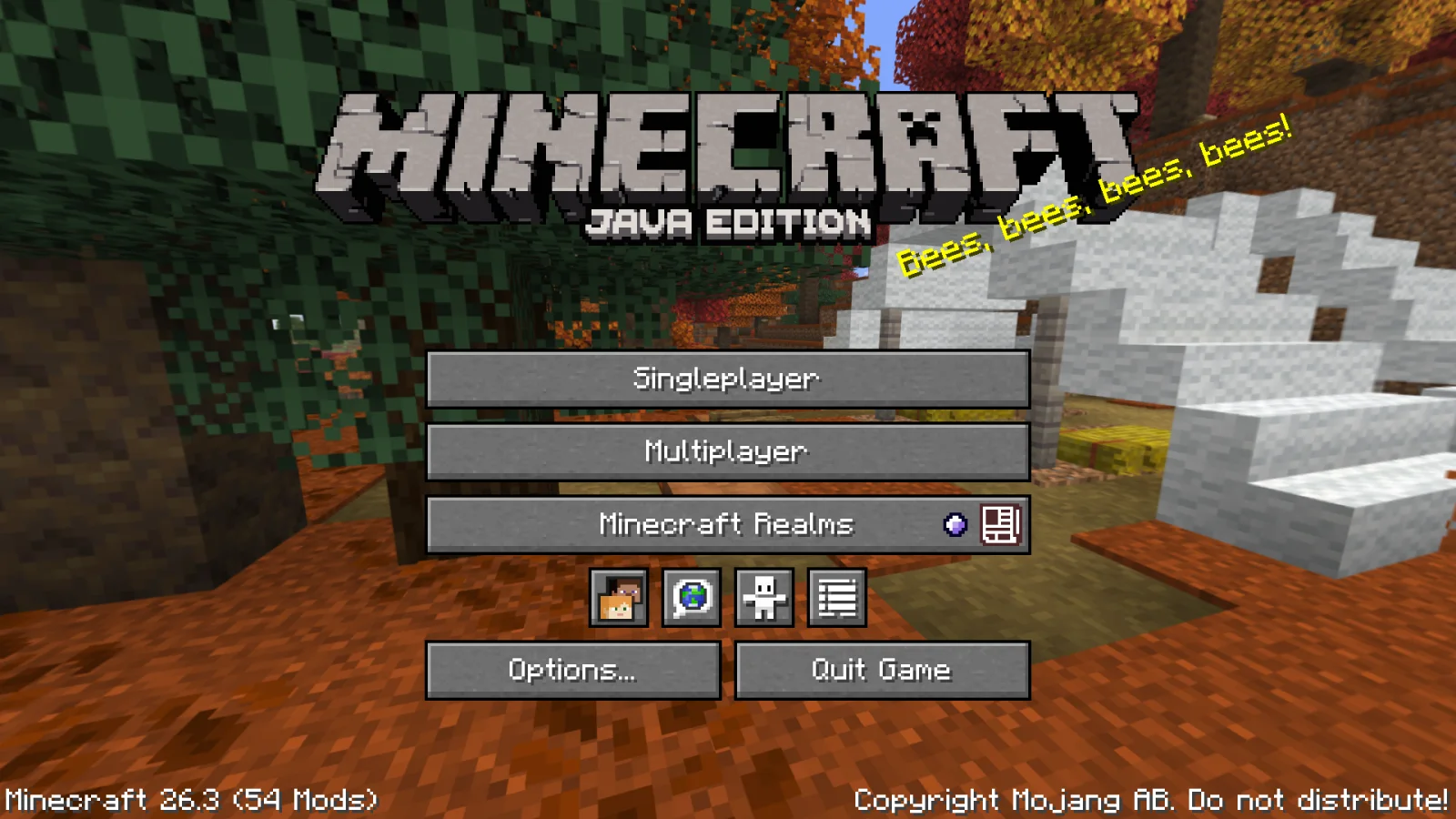
Legacy Logo is a mod made by Mazetta. A mod that restores the classic Minecraft logo before it got changed in 1.16.
It supports Minecraft 26.x. It has been downloaded 6 times on Modrinth. The last update came out on Oct 20, 2026.
Legacy Logo has had 2 releases on Modrinth since Oct 20, 2026. 2 of them came out in the past year. The newest is 1.0.1+26.3, released on Oct 20, 2026. It is made for Minecraft 26.3. It runs on Fabric. The download is 16 KB.
| Version | Released | Minecraft | Type |
|---|---|---|---|
1.0.1+26.3 | Oct 20, 2026 | 26.3 | Release |
1.0.0+26.3 | Oct 20, 2026 | 26.3 | Release |
Fork of the mod "Classic Minecraft Logo" for modern Minecraft versions since the last available version was for Minecraft 1.21.1.
Restores the old Minecraft logo from before 1.16 and the now modern 1.20+ logo. Normal resource packs can't make a pixel-perfect recreation of the old logo and this mod replicates the old way of displaying it.
You can replace this texture with resource packs if you include the texture in the old format at:
assets/legacylogo/textures/gui/title/{minecraft,edition}.png
Written by Mazetta. Read it with pictures on Modrinth.
This mod runs only on your own game. Servers do not need it, so you can use it on any server.
Install Fabric for Minecraft 26.x.
Add the mods it needs: Cloth Config API, Mod Menu and Fabric API.
Download the .jar file from Modrinth and put it in the mods folder of your .minecraft directory.
Start Minecraft with the Fabric profile.
Easier: in Prism Launcher or the Modrinth App, search for Legacy Logo in your instance's mods and click Install. It adds the loader and the mods it needs for you.
Full guide: How to install Minecraft mods
Yes. Legacy Logo supports Minecraft 26.x. All supported versions: 26.x.
Yes. Legacy Logo is free to download from Modrinth.
Client-side. Legacy Logo goes in your own mods folder and works on any server, including servers without mods.
Yes: Cloth Config API, Mod Menu, Fabric API. Install it before Legacy Logo.
Yes. The last update came out in the past day.
Environmental Tech LegacyMods · 1.16 – 1.21The classic Environmental Tech: multiblock void miners, solar arrays, lightning rods and nanobot beacons, as its own mod beside Environmental Tech.
Log in to leave a review.