
 Fast Trading ReForgedMods · 1.21
Adds a button to the villager trading GUI to repeat the current trade until it's no longer available again. (Fork of Fast Trading)
Free1 downloads

A mod that adds sea trading to Minecraft, a new dock structure for vanilla villages, periodic trader ships, new villager profession.
Direct download from Modrinth · 19 downloads
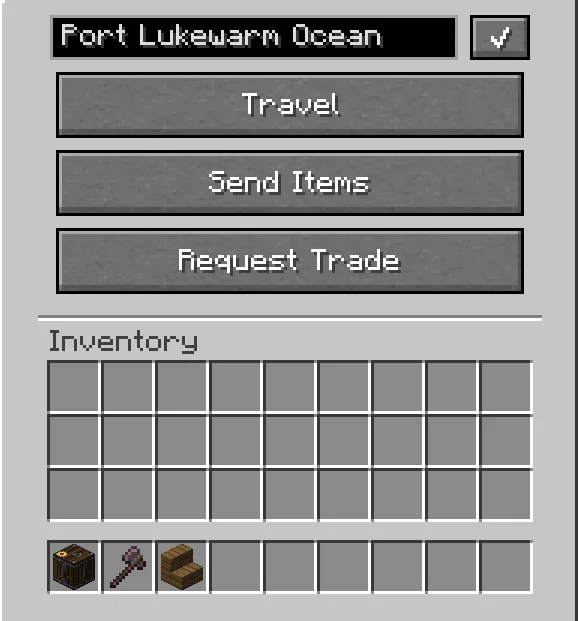
Currents of Trade is a mod made by RedLexo. A mod that adds sea trading to Minecraft, a new dock structure for vanilla villages, periodic trader ships, new villager profession.
It supports Minecraft 1.20 – 26.x. It has been downloaded 19 times on Modrinth. The last update came out on Nov 8, 2026.
Currents of Trade has had 15 releases on Modrinth since Sep 18, 2026. 15 of them came out in the past year. The newest is 1.0.61+forge-1.20.1, released on Nov 7, 2026. It is made for Minecraft 1.20.1. It runs on Forge. The download is 646 KB.
| Version | Released | Minecraft | Type |
|---|---|---|---|
1.0.61+forge-1.20.1 | Nov 7, 2026 | 1.20.1 | Release |
1.0.61+neoforge-1.21.1 | Nov 7, 2026 | 1.21.1 | Release |
1.0.61+neoforge-26.1.2 | Nov 7, 2026 | 26.1.2 | Release |
1.0.6+neoforge-1.21.1 | Nov 2, 2026 | 1.21.1 | Release |
1.0.6+forge-1.20.1 | Nov 2, 2026 | 1.20.1 | Release |
Currents of Trade is a vanilla-plus mod built around coastal logistics, harbor towns, and ocean transport.
Village Docks & Harbormasters Coastal villages now generate with wooden docks, lanterns, and harbor offices. Meet the new Harbormaster villager to trade nautical gear, buy commodities, and hear the harbor bell ring when ships arrive.
Anchor Points & Harbors Place an Anchor Point on any pier near water to register an active harbor. Name your port, manage shipping routes, and track visiting traffic from a simple interface.
Automated Cargo Shipping Dispatch unmanned Cargo Boats loaded with items between ports. Link two harbors with a Nautical Chart, insert it into the boat, and let it navigate open seas and around islands on its own.
The Sloop A pilotable wooden sailing ship designed in Minecraft’s blocky style. Features realistic buoyancy, wave sway, a working helm, and canvas sails for long voyages.
Visiting Wandering Sailors Just like wandering traders on land, traveling sea merchants periodically dock at your pier to trade exotic goods like spices, silk, fine porcelain, tea bricks, amber vials, and doubloons.
Nautical Curiosities
Written by RedLexo. Read it with pictures on Modrinth.
This mod is needed on both the server and every player who joins.
Install Forge and NeoForge for Minecraft 1.20 – 26.x.
Download the .jar file from Modrinth and put it in the mods folder of your .minecraft directory.
Start Minecraft with the Forge profile.
Easier: in Prism Launcher or the Modrinth App, search for Currents of Trade in your instance's mods and click Install. It adds the loader and the mods it needs for you.
Full guide: How to install Minecraft mods
| Resource | Downloads | Versions | Last update | Price |
|---|---|---|---|---|
| Currents of Tradethe one you looked at | 19 | 1.20 – 26.x | 7 days ago | Free |
| Fast Trading ReForgedpixelkat5 | 1 | 1.21 | 7 days ago | Free |
 Trading PostFuzs | 9.6M | 1.19 – 26.x | Sep 24, 2026 | Free |
 Bulk Villager Tradingbradcarnage | 6.3M | 1.20 | Sep 14, 2024 | Free |
Yes. Currents of Trade supports Minecraft 26.x. All supported versions: 26.x, 1.21, 1.20.
Yes. Currents of Trade is free to download from Modrinth.
Both. The server and every player need Currents of Trade installed.
Yes. The last update came out in the past day.
The closest ones are Fast Trading ReForged, Trading Post and Bulk Villager Trading. Compare all alternatives
Fast Trading ReForgedMods · 1.21Adds a button to the villager trading GUI to repeat the current trade until it's no longer available again. (Fork of Fast Trading)
Trading PostMods · 1.19 – 26.xRule the village! Trade with every villager at once!
Bulk Villager TradingMods · 1.20Bulk Villager Trading. Automatically Re-Stocks the trade UI after shift-click.
 Tepox Trade CyclerMods · 1.21 – 26.x
Tepox Trade Cycler adds a customizable, GUI-independent button to quickly reroll Villager trades while remaining compatible with resource packs and modified…
 Refresh Trades: ExpandedMods · 1.20
Expand villager trading with config-defined custom trades for any profession, level and item, built as a direct addon for Refresh Trades with full reroll…
 Trade CyclingMods · 1.19 – 26.x
Refresh villager trades without needing to break workstations
Log in to leave a review.