
 Inventory Profiles NextMods · 1.16 – 26.x
Take control over your inventory. Sort. Move matching Items. Throw all. Locked slots. Gear sets! And much more.
Free42,420,759 downloads

Protect your offhand from accidental item swaps. Configurable allowed items, inventory protection, optional sound and a hold-to-bypass key.
Direct download from Modrinth · 6 downloads
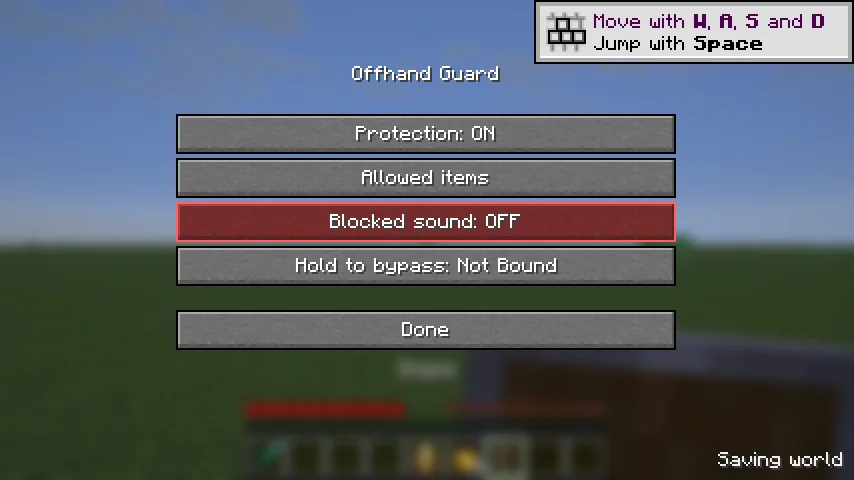
Offhand Guard is a mod made by Invisiblezappie. Protect your offhand from accidental item swaps. Configurable allowed items, inventory protection, optional sound and a hold-to-bypass key.
It supports Minecraft 1.21 – 26.x. It has been downloaded 6 times on Modrinth. The last update came out on Oct 16, 2026.
Offhand Guard has had 6 releases on Modrinth since Oct 15, 2026. 6 of them came out in the past year. The newest is 1.2.0+mc1.21.11, released on Oct 16, 2026. It is made for Minecraft 1.21.11. It runs on Fabric. The download is 92 KB.
| Version | Released | Minecraft | Type |
|---|---|---|---|
1.2.0+mc1.21.11 | Oct 16, 2026 | 1.21.11 | Release |
1.2.0+mc26.1.2 | Oct 16, 2026 | 26.1.2 | Release |
1.2.0+mc26.1.1 | Oct 16, 2026 | 26.1.1 | Release |
1.2.0+mc26.1 | Oct 15, 2026 | 26.1 | Release |
1.2.0+mc26.2 | Oct 15, 2026 | 26.2 | Release |
Keep unwanted items out of your offhand. Offhand Guard is a client-side Fabric mod that allows shields and totems of undying by default, while letting you choose your own allowed items.
Install the matching Fabric API. Install Mod Menu to open Mods > Offhand Guard > Configure. The settings order is Protection, Allowed items, Blocked sound, Hold to bypass, then Done.
Settings are saved in config/offhand-guard.json. Minecraft stores the bypass binding in options.txt.
Offhand Guard prevents accidental client input. It does not remove existing items or override inventory changes forced by a server, commands, or other mods. Compatibility with every third-party inventory mod or server plugin is not guaranteed.
All Rights Reserved.
Icon: Font Awesome Free 5.15.4 by Fonticons, Inc., licensed under CC BY 4.0. Original shield-alt icon, converted to PNG with white padding.
Written by Invisiblezappie. Read it with pictures on Modrinth.
This mod runs only on your own game. Servers do not need it, so you can use it on any server.
Install Fabric for Minecraft 1.21 – 26.x.
Add the mods it needs: Fabric API.
Download the .jar file from Modrinth and put it in the mods folder of your .minecraft directory.
Start Minecraft with the Fabric profile.
Easier: in Prism Launcher or the Modrinth App, search for Offhand Guard in your instance's mods and click Install. It adds the loader and the mods it needs for you.
Full guide: How to install Minecraft mods
| Resource | Downloads | Versions | Last update | Price |
|---|---|---|---|---|
| Offhand Guardthe one you looked at | 6 | 1.21 – 26.x | Oct 16, 2026 | Free |
| Inventory Profiles Nextblackd | 42.4M | 1.16 – 26.x | Sep 27, 2026 | Free |
 Eclipse Toolsnobub | 211 | 26.x | 4 days ago | Free |
 Guard Villagersseymourimadeit | 13.9M | 1.16 – 26.x | Oct 5, 2026 | Free |
Yes. Offhand Guard supports Minecraft 26.x. All supported versions: 26.x, 1.21.
Yes. Offhand Guard is free to download from Modrinth.
Client-side. Offhand Guard goes in your own mods folder and works on any server, including servers without mods.
Yes: Fabric API, Mod Menu. Install it before Offhand Guard.
Yes. The last update came out in the past day.
The closest ones are Inventory Profiles Next, Eclipse Tools and Guard Villagers. Compare all alternatives
Inventory Profiles NextMods · 1.16 – 26.xTake control over your inventory. Sort. Move matching Items. Throw all. Locked slots. Gear sets! And much more.
Eclipse ToolsMods · 26.xZoom, freecam, fullbright, inventory sort, item lock, chest finder, better chat, auto tool and an automatic librarian reroller.
Guard VillagersMods · 1.16 – 26.xVillage Pest Control
 Paladins & PriestsMods · 1.19 – 26.x
✨ Protect and heal your friends as a Paladin or a Priest
 Difficulty LockMods · 1.16 – 26.x
🔒 Sets a difficulty in any world, optionally locked, or force a hardcore mode requirement.
 COBBLEVERSE: Badges & TrophiesMods · 1.21
Adds Pokémon Gym Badges and League Trophies from the Kanto, Johto, Hoenn and Sinnoh regions, with more coming soon!
Log in to leave a review.