
 IMBlockerMods · 1.16 – 26.x
A mod for Minecraft helping control input method
Free14,779,253 downloads

Shows where in each tick your inputs were pressed
Direct download from Modrinth · 14 downloads
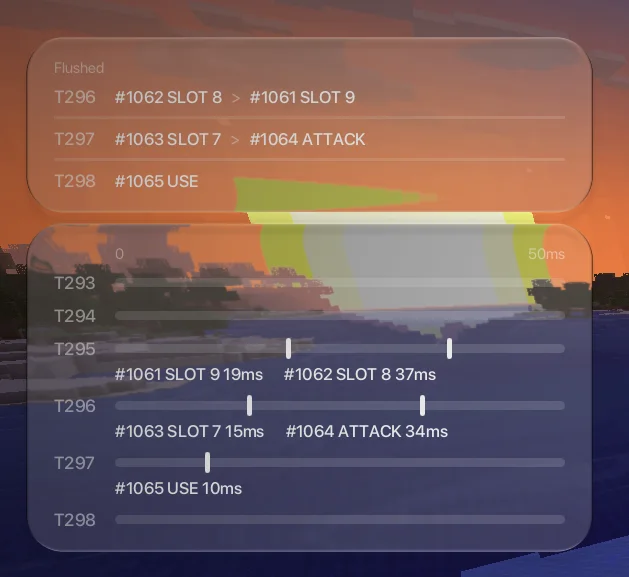
Visual Inputs is a mod made by Walksy. Shows where in each tick your inputs were pressed.
It supports Minecraft 1.21 – 26.x. It has been downloaded 14 times on Modrinth. The last update came out on Nov 11, 2026.
Visual Inputs has had 11 releases on Modrinth since Nov 11, 2026. 11 of them came out in the past year. The newest is 1.0.0+26.3, released on Nov 11, 2026. It is made for Minecraft 26.3. It runs on Fabric. The download is 54 KB.
| Version | Released | Minecraft | Type |
|---|---|---|---|
1.0.0+26.3 | Nov 11, 2026 | 26.3 | Release |
1.0.0+26.2 | Nov 11, 2026 | 26.2 | Release |
1.0.0+26.1-26.1.2 | Nov 11, 2026 | 26.1, 26.1.1, 26.1.2 | Release |
1.0.0+1.21.11 | Nov 11, 2026 | 1.21.11 | Release |
1.0.0+1.21.9-1.21.10 | Nov 11, 2026 | 1.21.9, 1.21.10 | Release |
This mod shows which keys and buttons you pressed, and where in each game tick they were actually pressed. This allows newer players to understand how Minecraft orders inputs, and can also be used to visually see when your inputs are landing within each tick, which is useful when trying to perform mechanics that require precise input timings for pvp etc.
Credits
Written by Walksy. Read it with pictures on Modrinth.
This mod runs only on your own game. Servers do not need it, so you can use it on any server.
Install Fabric for Minecraft 1.21 – 26.x.
Add the mods it needs: WalksyLib.
Download the .jar file from Modrinth and put it in the mods folder of your .minecraft directory.
Start Minecraft with the Fabric profile.
Easier: in Prism Launcher or the Modrinth App, search for Visual Inputs in your instance's mods and click Install. It adds the loader and the mods it needs for you.
Full guide: How to install Minecraft mods
| Resource | Downloads | Versions | Last update | Price |
|---|---|---|---|---|
| Visual Inputsthe one you looked at | 14 | 1.21 – 26.x | 6 days ago | Free |
| IMBlockerreserveword | 14.8M | 1.16 – 26.x | 6 days ago | Free |
 MacOS Input Fixeshamarb123 | 4.2M | 1.16 – 26.x | Oct 5, 2026 | Free |
 NonConflictKeysTachibanaSherry | 3.1M | 1.12 – 1.19 | May 22, 2023 | Free |
Yes. Visual Inputs supports Minecraft 26.x. All supported versions: 26.x, 1.21.
Yes. Visual Inputs is free to download from Modrinth.
Client-side. Visual Inputs goes in your own mods folder and works on any server, including servers without mods.
Yes: WalksyLib. Install it before Visual Inputs.
Yes. The last update came out in the past day.
The closest ones are IMBlocker, MacOS Input Fixes and NonConflictKeys. Compare all alternatives
IMBlockerMods · 1.16 – 26.xA mod for Minecraft helping control input method
MacOS Input FixesMods · 1.16 – 26.xThis mod fixes many Minecraft macOS input bugs. It makes scrolling with shift work properly on macOS, left click + control = left click (instead of right…
NonConflictKeysMods · 1.12 – 1.19Make keybindings with the same input key no longer conflict
 IxerisMods · 1.16 – 26.x
Buffered raw input and threaded event polling
 Armor HudMods · 1.20 – 26.x
The Armor HUD Mod adds a visual overlay to Minecraft that displays your armor's condition with color-coded durability bars. This makes it easier to keep track…
 Visual WorkbenchMods · 1.19 – 26.x
Items stay inside of crafting tables and are also rendered on top. It's really fancy!
Log in to leave a review.