
 Create Aeronautics: Freeze StaffMods · 1.21
Create Aeronautics Freeze Staff adds a single tool for taking a Simulated contraption out logic — recovering TPS on worlds with many contraptions.
Free71 downloads

A compatibility bridge that enables FTB Ultimine on Sable's simulated blocks
Direct download from Modrinth · 22 downloads
Create Aeronautics: Ultimine Compatibility is a mod made by duble. A compatibility bridge that enables FTB Ultimine on Sable's simulated blocks.
It supports Minecraft 1.21. It has been downloaded 22 times on Modrinth. The last update came out on Sep 27, 2026.
The newest is 1.0.0, released on Sep 27, 2026. It is made for Minecraft 1.21.1. It runs on NeoForge. The download is 16 KB.
| Version | Released | Minecraft | Type |
|---|---|---|---|
1.0.0 | Sep 27, 2026 | 1.21.1 | Release |
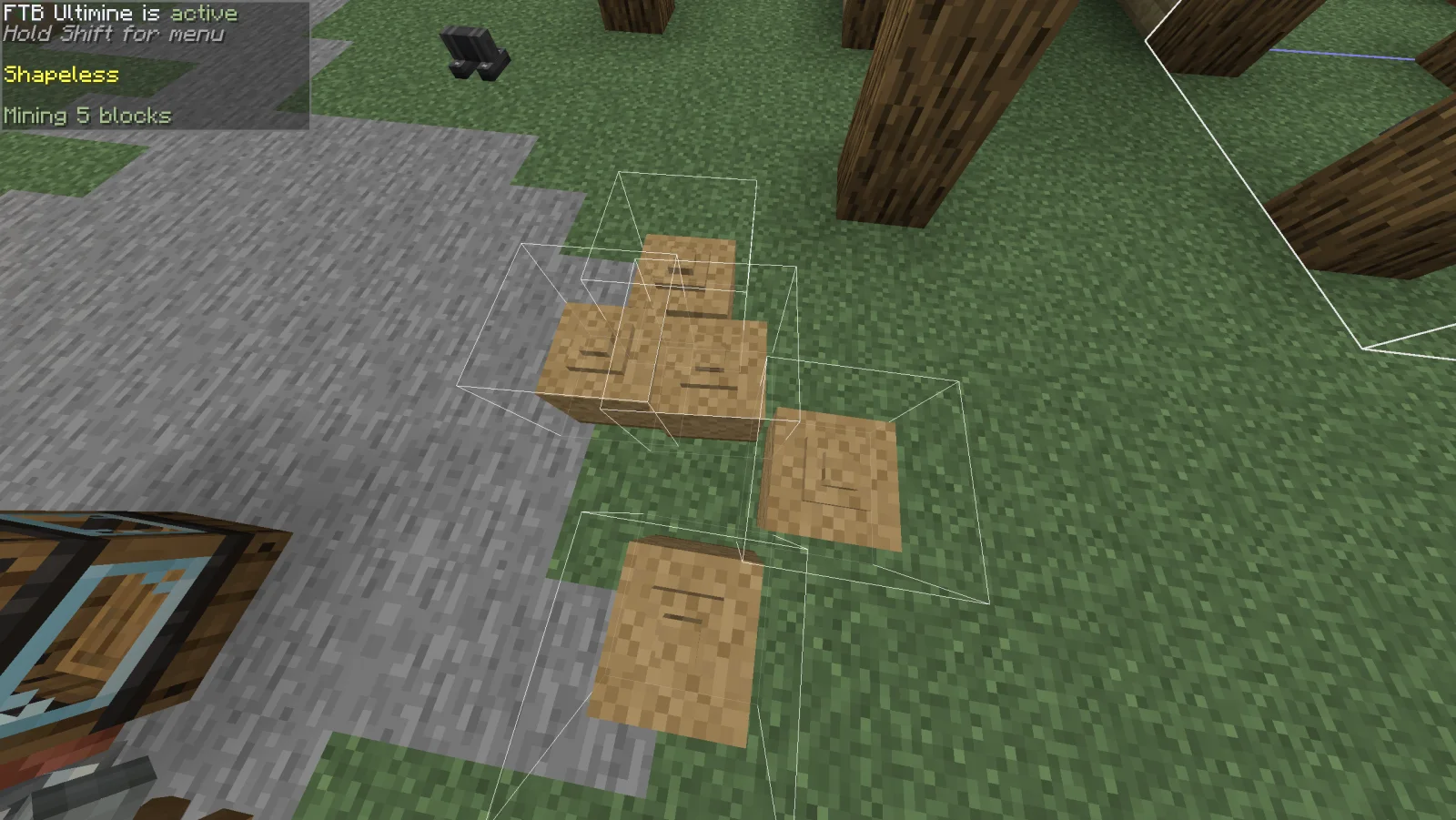
This mod adds compatibility between simulated blocks and FTB Ultimine.
Without this mod, Ultimine works with physics blocks, but suffers from visual glitches. This addon fixes those issues, ensuring proper block selection outlines and smooth functionality even when multiple bodies are close together.
Written by duble. Read it with pictures on Modrinth.
This mod is needed on both the server and every player who joins.
Install NeoForge for Minecraft 1.21.
Add the mods it needs: Create.
Download the .jar file from Modrinth and put it in the mods folder of your .minecraft directory.
Start Minecraft with the NeoForge profile.
Easier: in Prism Launcher or the Modrinth App, search for Create Aeronautics: Ultimine Compatibility in your instance's mods and click Install. It adds the loader and the mods it needs for you.
Full guide: How to install Minecraft mods
| Resource | Downloads | Versions | Last update | Price |
|---|---|---|---|---|
| Create Aeronautics: Ultimine Compatibilitythe one you looked at | 22 | 1.21 | Sep 27, 2026 | Free |
| Create Aeronautics: Freeze StaffDovorol | 71 | 1.21 | 9 days ago | Free |
 SableBridgeKdnschaut | 31 | 1.21 | 19 days ago | Free |
 Create Aeronauticsryanhcode | 9.5M | 1.21 | Aug 29, 2026 | Free |
Not yet. The newest version it supports is Minecraft 1.21.
Yes. Create Aeronautics: Ultimine Compatibility is free to download from Modrinth.
Both. The server and every player need Create Aeronautics: Ultimine Compatibility installed.
Yes: Create Aeronautics, Create. Install it before Create Aeronautics: Ultimine Compatibility.
Yes. The last update came out in the past day.
The closest ones are Create Aeronautics: Freeze Staff, SableBridge and Create Aeronautics. Compare all alternatives
Create Aeronautics: Freeze StaffMods · 1.21Create Aeronautics Freeze Staff adds a single tool for taking a Simulated contraption out logic — recovering TPS on worlds with many contraptions.
SableBridgeMods · 1.21Bringing Sable physics to Pojav Launcher
Create AeronauticsMods · 1.21Build anything from airships to planes and cars!
 Create: TransFEMods · 1.21
TransFE is a Minecraft compatibility mod that bridges FE (Forge Energy) power systems with the electrical simulation from Create: Power Grid and Create: TFMG…
 Forerunner bridges and barriersMods · 1.18 – 26.x
Halo-inspired hard light bridges, fluid-blocking barriers and long-distance redstone beams.
 Bridging ModMods · 1.17 – 26.x
Reacharound Placement / Bedrock Bridging for Fabric, Forge & Quilt with a few extra tweaks
Log in to leave a review.