
 Fast Item FramesMods · 1.20 – 26.x
Supercharged item frames! Less lag, better performance, and now they can change color and vanish!
Free4,060,474 downloads

Smoother motion for Minecraft 26.3: inserts a generated frame between every two real frames, with camera reprojection and even pacing.
Direct download from Modrinth · 5 downloads
Source and ownership. This page was generated automatically from public data that Modrinth provides through its public API. The name, descriptions, images, trademarks and all other content of this project belong to BRUNU and their respective owners. CraftRank is not the author of this project and is not affiliated with, endorsed or sponsored by its author or by Modrinth.
Hosting and distribution. CraftRank does not host, store, upload or distribute the download files of this project, and no such file is kept on CraftRank's servers. Every download is provided directly by Modrinth from its own servers; the Download button only links to the file there. The license stated on Modrinth is MIT.
Use of public APIs. Modrinth, Hangar (PaperMC) and SpigotMC (through the Spiget API) make their APIs publicly available to third-party websites and applications. Modrinth's Terms of Use give API users a license to download, display and query content through their own services (section “API Usage”), and creators who publish on Modrinth grant Modrinth and its licensees the right to display and distribute their content to third parties (section “User Contributions”). CraftRank uses these APIs in line with the platforms' published rules: it identifies itself in every request and respects their rate limits.
No warranty. The information on this page is provided "as is", without any warranty. Downloading and using this project is at your own risk and subject to the license and terms of its author.
Copyright notices (DMCA). Only the copyright owner or someone authorised to act for them may file a notice, and it must come from a person of legal age or from their parent or legal guardian. A valid notice sent to abuse@craftrank.org must contain: the link of this page; the work claimed to be infringed; your full name, postal address, phone number and e-mail; a statement that you believe in good faith that the use is not authorised by the owner, its agent or the law; a statement, under penalty of perjury, that the notice is accurate and that you are the owner or authorised to act for them; and your physical or electronic signature. Incomplete notices are not processed. Valid notices are acted on within 48 hours, with no need to go through Google.
False notices. Anyone who knowingly misrepresents that material is infringing is liable for the damages caused, including costs and attorneys' fees (17 U.S.C. § 512(f)). Notices filed in bad faith or by someone who does not hold the rights are kept on record and will be contested.
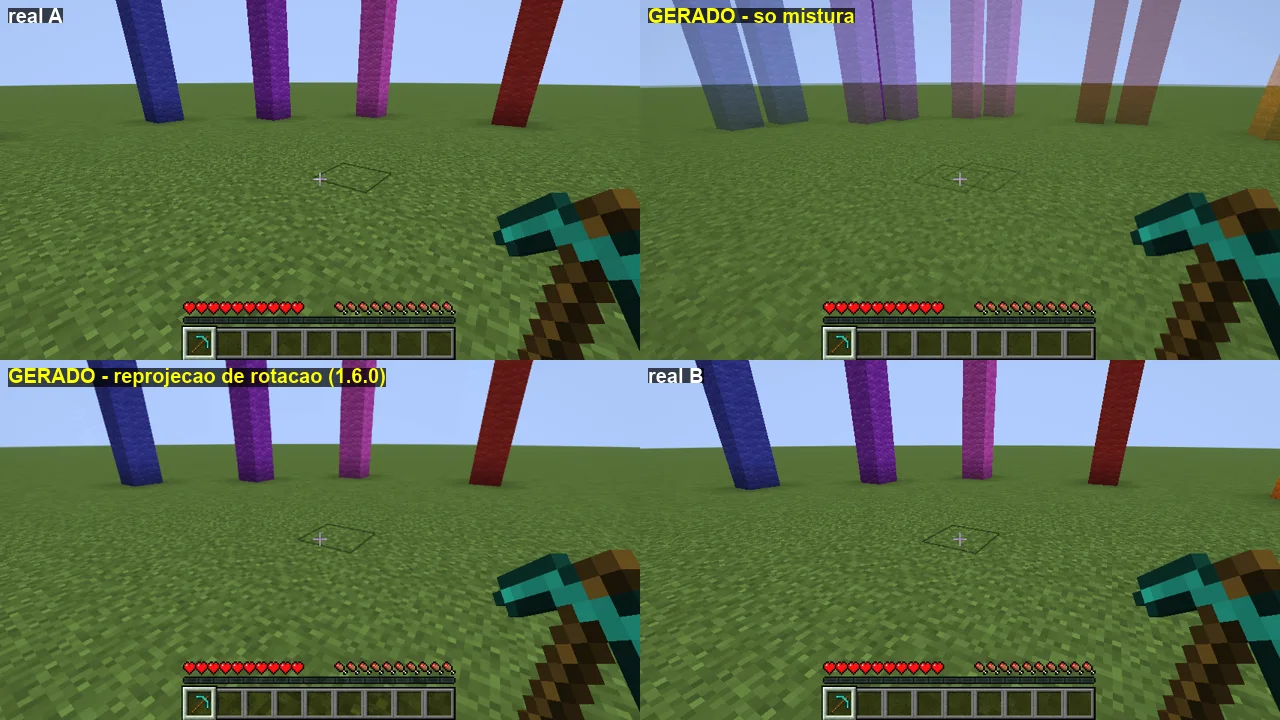
Blend Frames is a mod made by BRUNU. Smoother motion for Minecraft 26.3: inserts a generated frame between every two real frames, with camera reprojection and even pacing.
It supports Minecraft 26.x. It has been downloaded 5 times on Modrinth. The last update came out on Nov 7, 2026.
The newest is 1.7.0, released on Nov 7, 2026. It is made for Minecraft 26.3. It runs on Fabric. The download is 41 KB.
| Version | Released | Minecraft | Type |
|---|---|---|---|
1.7.0 | Nov 7, 2026 | 26.3 | Release |
Smoother motion for Minecraft 26.3 by inserting a generated frame between every two real frames.
Blend Frames shows an in-between image after each rendered frame. It doubles (2x) or adds 50% (1.5x) to the number of frames that reach your screen, which mainly helps when your real FPS is below your monitor's refresh rate.
Frame blending makes motion look more continuous; it does not add real FPS. The F3/FPS counter keeps showing real frames, and generating frames costs a little performance (about 0.25 ms per frame on an RTX 5060).
Tested with Sodium 0.9.2, Sodium Extra 0.9.4, Iris 1.11.7 (with and without the BSL shader pack), Voxy 0.2.20 (OpenGL and a Vulkan fork) and Mod Menu 21, on both the OpenGL and Vulkan backends.
Movimento mais suave no Minecraft 26.3, gerando um frame entre cada dois frames reais.
A mistura de frames deixa o movimento mais contínuo, mas não aumenta o FPS real. Andar, mobs, partículas e água continuam misturados. Com um shaderpack do Iris, a reprojeção se desliga sozinha.
Written by BRUNU. Read it with pictures on Modrinth.
This mod runs only on your own game. Servers do not need it, so you can use it on any server.
Install Fabric for Minecraft 26.x.
Add the mods it needs: Fabric API.
Download the .jar file from Modrinth and put it in the mods folder of your .minecraft directory.
Start Minecraft with the Fabric profile.
Easier: in Prism Launcher or the Modrinth App, search for Blend Frames in your instance's mods and click Install. It adds the loader and the mods it needs for you.
Full guide: How to install Minecraft mods
| Resource | Downloads | Versions | Last update | Price |
|---|---|---|---|---|
| Blend Framesthe one you looked at | 5 | 26.x | 16 days ago | Free |
| Fast Item FramesFuzs | 4.1M | 1.20 – 26.x | Sep 22, 2026 | Free |
 Paginated Advancements & Custom FramesDaFuqs | 19.1M | 1.18 – 26.x | 18 days ago | Free |
| Relics: Frame FixNEOCODDER | 26 | 1.21 | 27 days ago | Free |
Yes. Blend Frames supports Minecraft 26.x. All supported versions: 26.x.
Yes. Blend Frames is free to download from Modrinth.
Client-side. Blend Frames goes in your own mods folder and works on any server, including servers without mods.
Yes: Sodium Extra, Fabric API, Mod Menu, Sodium. Install it before Blend Frames.
Yes. The last update came out in the past day.
The closest ones are Fast Item Frames, Paginated Advancements & Custom Frames and Relics: Frame Fix. Compare all alternatives
Fast Item FramesMods · 1.20 – 26.xSupercharged item frames! Less lag, better performance, and now they can change color and vanish!
Paginated Advancements & Custom FramesMods · 1.18 – 26.xBetter advancements screen
Small mod. Fix Relics & GeckoLib frame bug.
 Create: FramedMods · 1.18 – 1.21
A Create mod addon that adds more Framed Glass variants.
 GnetumMods · 1.12 – 26.x
Distribute HUD updates over multiple frames to improve performance
 HearthwoodMods · 1.16 – 26.x
Build with timber beams, palisades, braces, patterned frames and log piles in the wood types available in your game. Light them with braziers, chandeliers…
Log in to leave a review.