
 Radial WheelMods · 26.x
Long-press the shortcut key to resolve conflicts between multiple mod shortcuts in the form of a radial menu.
Free6 downloads
Customizable radial macro wheel. Quick command execution, multi-layered wheel HUD, and built-in macro manager.
Direct download from Modrinth · 8 downloads
Source and ownership. This page was generated automatically from public data that Modrinth provides through its public API. The name, descriptions, images, trademarks and all other content of this project belong to PrimityArtur and their respective owners. CraftRank is not the author of this project and is not affiliated with, endorsed or sponsored by its author or by Modrinth.
Hosting and distribution. CraftRank does not host, store, upload or distribute the download files of this project, and no such file is kept on CraftRank's servers. Every download is provided directly by Modrinth from its own servers; the Download button only links to the file there. The license stated on Modrinth is MIT.
Use of public APIs. Modrinth, Hangar (PaperMC) and SpigotMC (through the Spiget API) make their APIs publicly available to third-party websites and applications. Modrinth's Terms of Use give API users a license to download, display and query content through their own services (section “API Usage”), and creators who publish on Modrinth grant Modrinth and its licensees the right to display and distribute their content to third parties (section “User Contributions”). CraftRank uses these APIs in line with the platforms' published rules: it identifies itself in every request and respects their rate limits.
No warranty. The information on this page is provided "as is", without any warranty. Downloading and using this project is at your own risk and subject to the license and terms of its author.
Copyright notices (DMCA). Only the copyright owner or someone authorised to act for them may file a notice, and it must come from a person of legal age or from their parent or legal guardian. A valid notice sent to abuse@craftrank.org must contain: the link of this page; the work claimed to be infringed; your full name, postal address, phone number and e-mail; a statement that you believe in good faith that the use is not authorised by the owner, its agent or the law; a statement, under penalty of perjury, that the notice is accurate and that you are the owner or authorised to act for them; and your physical or electronic signature. Incomplete notices are not processed. Valid notices are acted on within 48 hours, with no need to go through Google.
False notices. Anyone who knowingly misrepresents that material is infringing is liable for the damages caused, including costs and attorneys' fees (17 U.S.C. § 512(f)). Notices filed in bad faith or by someone who does not hold the rights are kept on record and will be contested.
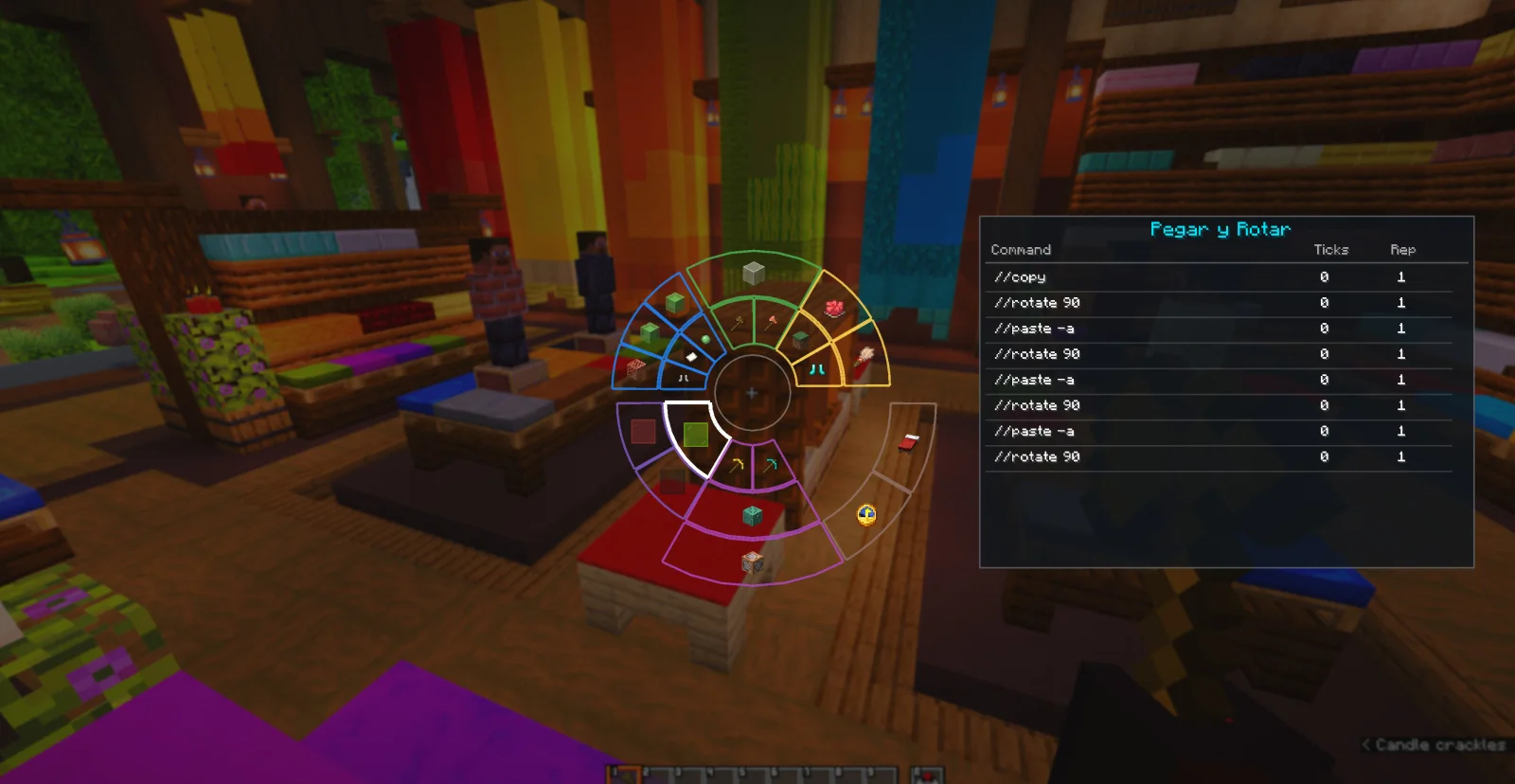
Command Macros Wheel is a mod made by PrimityArtur. Customizable radial macro wheel. Quick command execution, multi-layered wheel HUD, and built-in macro manager.
It supports Minecraft 26.x. It has been downloaded 8 times on Modrinth. The last update came out on Oct 24, 2026.
Command Macros Wheel has had 2 releases on Modrinth since Sep 28, 2026. 2 of them came out in the past year. The newest is v1.0.0-26.3, released on Oct 24, 2026. It is made for Minecraft 26.3. It runs on Fabric. The download is 316 KB.
| Version | Released | Minecraft | Type |
|---|---|---|---|
v1.0.0-26.3 | Oct 24, 2026 | 26.3 | Release |
1.0.0-26.2 | Sep 28, 2026 | 26.2 | Release |
Customizable radial macro wheel for Minecraft Fabric.
Quick command execution, multi-layered wheel HUD, and built-in macro manager.
CommandMacrosWheel is a client-side Fabric mod that adds an interactive radial wheel interface to organize and trigger Minecraft commands, chat messages, and macro sequences with ease.
Works in both Creative and Survival modes, as well as on multiplayer servers.
Shortcut / Action · Action
Left Alt (Hold) · Open Radial Wheel HUD (configurable)
K · Open Main Editor & Settings (configurable)
Left Click · Execute hovered macro on the wheel
Right Click · Open hovered macro directly in Editor
X · Quick-execute hovered macro
Shift + Scroll · Select command step in Navigate / Cycle & Navigate mode
Ctrl + Z · Undo last action in Editor
Ctrl + Y / Ctrl + Shift + Z · Redo action in Editor
Esc · Close HUD or Editor
Client-side only — works on multiplayer servers without server installation.
Written by PrimityArtur. Read it with pictures on Modrinth.
This mod runs only on your own game. Servers do not need it, so you can use it on any server.
Install Fabric for Minecraft 26.x.
Add the mods it needs: Fabric Language Kotlin and Fabric API.
Download the .jar file from Modrinth and put it in the mods folder of your .minecraft directory.
Start Minecraft with the Fabric profile.
Easier: in Prism Launcher or the Modrinth App, search for Command Macros Wheel in your instance's mods and click Install. It adds the loader and the mods it needs for you.
Full guide: How to install Minecraft mods
| Resource | Downloads | Versions | Last update | Price |
|---|---|---|---|---|
| Command Macros Wheelthe one you looked at | 8 | 26.x | Oct 24, 2026 | Free |
| Radial WheelSeiuTake | 6 | 26.x | Sep 27, 2026 | Free |
 Accessories Compatibility LayerBlodhgarm | 6.2M | 1.21 | Oct 17, 2026 | Free |
 Chat Tools70CentsApple | 5.4M | 1.16 – 26.x | Oct 13, 2026 | Free |
Yes. Command Macros Wheel supports Minecraft 26.x. All supported versions: 26.x.
Yes. Command Macros Wheel is free to download from Modrinth.
Client-side. Command Macros Wheel goes in your own mods folder and works on any server, including servers without mods.
Yes: Fabric Language Kotlin, Fabric API. Install it before Command Macros Wheel.
Yes. The last update came out in the past day.
The closest ones are Radial Wheel, Accessories Compatibility Layer and Chat Tools. Compare all alternatives
Radial WheelMods · 26.xLong-press the shortcut key to resolve conflicts between multiple mod shortcuts in the form of a radial menu.
Accessories Compatibility LayerMods · 1.21Modifies commonly used Accessory API's to work with Accessories, unifying a modpack under one Accessory API
Chat ToolsMods · 1.16 – 26.xTimestamp, translators, notifier, macros, chat bubbles, chat filter; everything you need is here!
 Command KeysMods · 1.19 – 26.x
A powerful command macro mod.
 Ping WheelMods · 1.18 – 26.x
Allows players to temporarily mark locations and entities
 Better Mount HUDMods · 1.17 – 26.x
Improves the ingame HUD while riding a mount
Log in to leave a review.