
 Vanilla Plus ShaderShaderlar · 1.16 – 1.21
A shaderpack that gives Minecraft a modern visual overhaul while staying faithful to its original look.
Ücretsiz2,761,939 indirme

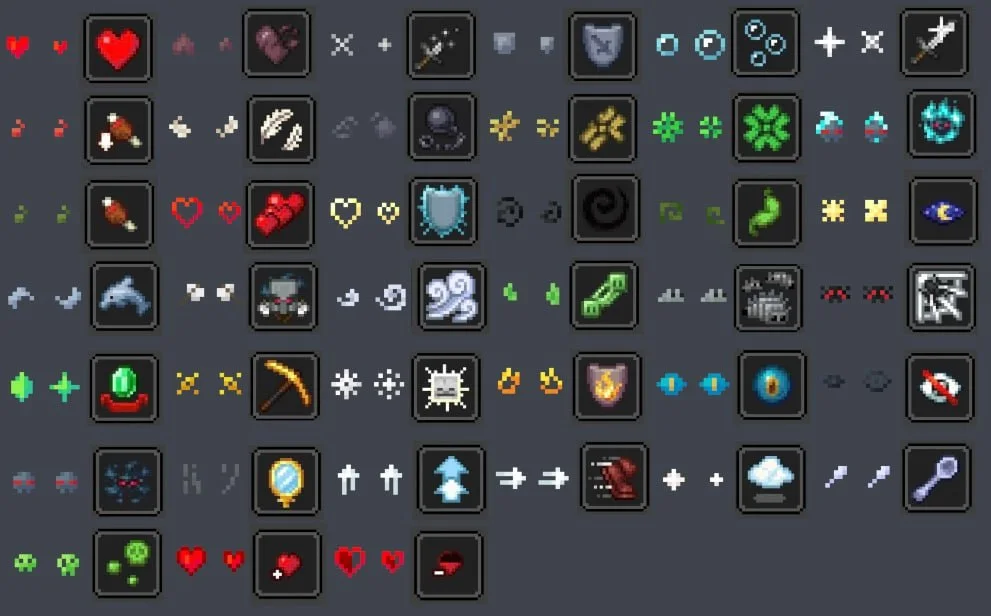

Unique Particle Effects, AlphaLeoli tarafından yapılmış bir shader paketi. Gives a different look to each potion particle. Creator friendly.
Desteklediği sürümler: Minecraft 1.20 – 1.21. Modrinth üzerinde 9,038 kez indirildi. Son güncelleme 09.10.2025 tarihinde çıktı.
Unique Particle Effects, 01.09.2025 tarihinden beri Modrinth üzerinde 3 sürüm yayınladı. Son bir yılda hiçbiri çıkmadı. En yenisi 08.10.2025 tarihinde çıkan 1.0.2. Minecraft 1.20.2 – 1.21.10 için yapıldı. Minecraft üzerinde çalışır. İndirme boyutu 27 KB.
| Sürüm | Yayın tarihi | Minecraft | Tür |
|---|---|---|---|
1.0.2 | 08.10.2025 | 1.20.2 – 1.21.10 | Kararlı |
1.0.1 | 05.09.2025 | 1.20.5 – 1.21.8 | Kararlı |
1.0.0 | 01.09.2025 | 1.20.5 – 1.21.8 | Kararlı |
The above image shows 4 different particle types. From left to right, the particle types are Infestation, Poison, Water Breathing and Fire Resistance (A few of my favorites).
For more example images, head to the gallery
This pack uses vanilla's core shader system in order to make a way for creators to change the texture of each potion particle to something unique. It is easy to use, fast and lightweight, and is compatible with many Minecraft versions, including the latest versions of the game. Below there is some more information on how to use it.
All textures included in this pack are from the Particle Effects mod (created by LopyMine and KlashRaick), and I have been given permission to use them in this pack. All included textures are licensed under the LGPL-3.0-only license, whereas the code in this texture pack is licensed as CC-BY-NC-SA-4.0
If you want to know more about how this works, or have questions about other vanilla shader related things, you can join my discord and ask in there :)
If you would like to create your own unique particle textures, this is the guide for you.
This is how the default "effect_5" texture looks that is included in the pack, for reference:
Note that you cannot use the example image above for a starting point. For that, download the pack and use the default textures included.
Here are some things to keep in mind when creating textures for this pack:
Join My Discord
Check out The Repository
Yazan: AlphaLeoli. Resimli halini Modrinth sayfasında oku.
Minecraft sürümün için Iris (Sodium ile) ya da OptiFine kur: shaderlar bunlardan birine ihtiyaç duyar.
.zip dosyasını Modrinth üzerinden indir. Zipten çıkarma.
Minecraft'ta Seçenekler, Görüntü Ayarları, Shader Paketleri'ni aç ve Shader Paketi Klasörünü Aç'a tıkla.
.zip dosyasını o klasöre bırak, listeden Unique Particle Effects seç ve Bitti'ye tıkla.
Shaderlar ekran kartını zorlar. Oyun yavaşlarsa shader ayarlarından daha düşük bir profil seç.
| Kaynak | İndirmeler | Sürümler | Son güncelleme | Fiyat |
|---|---|---|---|---|
 Unique Particle Effectsbaktığın | 9,038 | 1.20 – 1.21 | 9 Eki 2025 | Ücretsiz |
| Vanilla Plus ShaderRRe36 | 2.8M | 1.16 – 1.21 | 28 Şub 2025 | Ücretsiz |
 ReverieTheCMK | 439K | 1.20 – 26.x | 4 Eki 2026 | Ücretsiz |
| Cinematic Color CorrectionBestsoft100 | 39K | 1.8 – 1.21 | 20 Eyl 2024 | Ücretsiz |
Henüz değil. Desteklediği en yeni sürüm Minecraft 1.21.
Evet. Unique Particle Effects, Modrinth üzerinden ücretsiz indirilebilir.
Evet. Son güncelleme son 24 saat içinde çıktı.
En yakın olanlar Vanilla Plus Shader, Reverie ve Cinematic Color Correction. Tüm alternatifleri karşılaştır
Vanilla Plus ShaderShaderlar · 1.16 – 1.21A shaderpack that gives Minecraft a modern visual overhaul while staying faithful to its original look.
ReverieShaderlar · 1.20 – 26.xShader with a foggy and warm look. It leverages new features added by Iris for effects previously impossible to achieve.
This shader gives the game a more cinematic look by changing the color and adding a Bloom effect.
Yorum yazmak için giriş yap.