
 Vanilla Plus ShaderShadery · 1.16 – 1.21
A shaderpack that gives Minecraft a modern visual overhaul while staying faithful to its original look.
Za darmoPobrania: 2,761,939

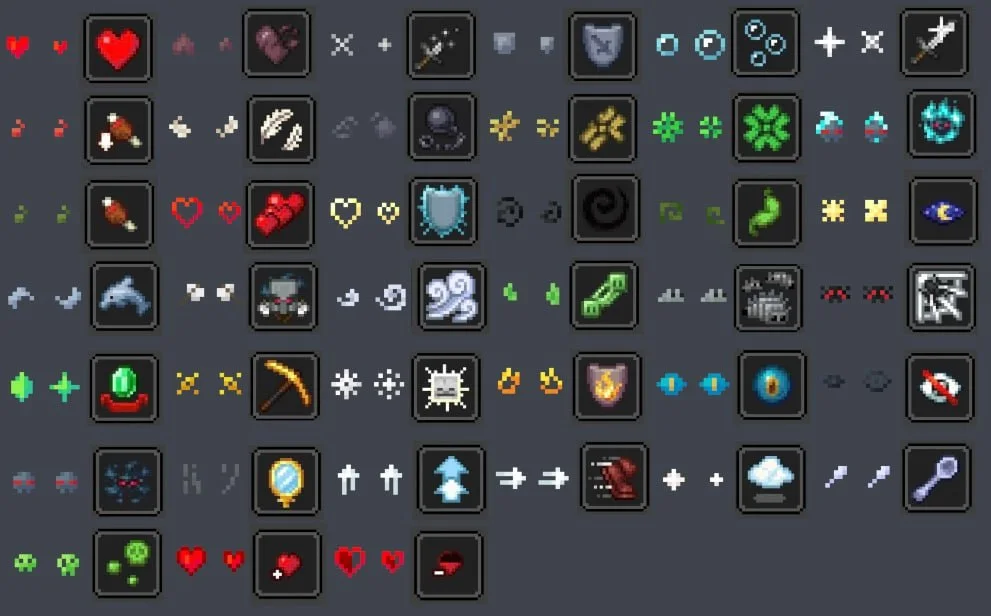

Unique Particle Effects to paczka shaderów, autor: AlphaLeoli. Gives a different look to each potion particle. Creator friendly.
Obsługiwane wersje: Minecraft 1.20 – 1.21. Liczba pobrań w serwisie Modrinth: 9,038. Ostatnia aktualizacja: 09.10.2025.
Unique Particle Effects ma 3 wydań na Modrinth od 01.09.2025. Żadna nie wyszła w ostatnim roku. Najnowsza to 1.0.2, wydana 08.10.2025. Jest zrobiona dla Minecraft 1.20.2 – 1.21.10. Działa na Minecraft. Plik ma 27 KB.
| Wersja | Wydano | Minecraft | Typ |
|---|---|---|---|
1.0.2 | 08.10.2025 | 1.20.2 – 1.21.10 | Wydanie |
1.0.1 | 05.09.2025 | 1.20.5 – 1.21.8 | Wydanie |
1.0.0 | 01.09.2025 | 1.20.5 – 1.21.8 | Wydanie |
The above image shows 4 different particle types. From left to right, the particle types are Infestation, Poison, Water Breathing and Fire Resistance (A few of my favorites).
For more example images, head to the gallery
This pack uses vanilla's core shader system in order to make a way for creators to change the texture of each potion particle to something unique. It is easy to use, fast and lightweight, and is compatible with many Minecraft versions, including the latest versions of the game. Below there is some more information on how to use it.
All textures included in this pack are from the Particle Effects mod (created by LopyMine and KlashRaick), and I have been given permission to use them in this pack. All included textures are licensed under the LGPL-3.0-only license, whereas the code in this texture pack is licensed as CC-BY-NC-SA-4.0
If you want to know more about how this works, or have questions about other vanilla shader related things, you can join my discord and ask in there :)
If you would like to create your own unique particle textures, this is the guide for you.
This is how the default "effect_5" texture looks that is included in the pack, for reference:
Note that you cannot use the example image above for a starting point. For that, download the pack and use the default textures included.
Here are some things to keep in mind when creating textures for this pack:
Join My Discord
Check out The Repository
Autor: AlphaLeoli. Z obrazkami na Modrinth.
Zainstaluj Iris (z Sodium) albo OptiFine dla swojej wersji Minecrafta: shadery potrzebują jednego z nich.
Pobierz plik .zip z Modrinth. Nie rozpakowuj go.
W Minecrafcie otwórz Opcje, potem Ustawienia grafiki, potem Shadery i kliknij Otwórz folder shaderów.
Wrzuć plik .zip do tego folderu, wybierz Unique Particle Effects z listy i kliknij Gotowe.
Shadery mocno obciążają kartę graficzną. Jeśli gra zwalnia, wybierz niższy profil w ustawieniach shadera.
| Zasób | Pobrania | Wersje | Aktualizacja | Cena |
|---|---|---|---|---|
 Unique Particle Effectsten, który oglądałeś | 9,038 | 1.20 – 1.21 | 9 paź 2025 | Za darmo |
| Vanilla Plus ShaderRRe36 | 2.8M | 1.16 – 1.21 | 28 lut 2025 | Za darmo |
 ReverieTheCMK | 439K | 1.20 – 26.x | 4 paź 2026 | Za darmo |
| Cinematic Color CorrectionBestsoft100 | 39K | 1.8 – 1.21 | 20 wrz 2024 | Za darmo |
Jeszcze nie. Najnowsza obsługiwana wersja to Minecraft 1.21.
Tak. Unique Particle Effects można pobrać za darmo z serwisu Modrinth.
Tak. Ostatnia aktualizacja wyszła w ciągu ostatniej doby.
Najbliższe to Vanilla Plus Shader, Reverie i Cinematic Color Correction. Porównaj wszystkie alternatywy
Vanilla Plus ShaderShadery · 1.16 – 1.21A shaderpack that gives Minecraft a modern visual overhaul while staying faithful to its original look.
ReverieShadery · 1.20 – 26.xShader with a foggy and warm look. It leverages new features added by Iris for effects previously impossible to achieve.
This shader gives the game a more cinematic look by changing the color and adding a Bloom effect.
Zaloguj się, aby wystawić opinię.