NouveauCraftRank SitesSite web et boutique gratuitsCrée la tienne ›
AshlarLogiciel serveur gratuit basé sur Paper, avec protection DDoS et anti-backdoor Voir Ashlar ›Security RadarA free check of your server's login, anti-bot and proxy settings, only with your OK Voir comment ça marche ›CommunautéPose des questions, partage tes constructions et trouve des joueurs Rejoindre le forum ›
Ressources / Mods / Inventory Assist

Inventory Assist

Sort and manage your inventory.

ModsGratuit1.20 – 26.x
par scarabx · repris depuis Modrinth
Télécharger ›

Téléchargement direct depuis Modrinth · 32 téléchargements
Inventory Assist, capture 1

Ce qu'il fait

Inventory Assist (mod) est une création de scarabx. Sort and manage your inventory.

Versions prises en charge : Minecraft 1.20 – 26.x. On compte 32 téléchargements sur Modrinth. La dernière mise à jour date du 09/10/2026.

Versions prises en charge

26.x1.20

Historique des versions

Inventory Assist a publié 2 versions sur Modrinth depuis le 09/10/2026. 2 sont sorties au cours de l'année passée. La plus récente est 1.0.0+1.20.1, sortie le 09/10/2026. Elle est faite pour Minecraft 1.20.1. Elle fonctionne sur Fabric. Le téléchargement fait 103 KB.

VersionPubliéMinecraftType
1.0.0+1.20.109/10/20261.20.1Stable
1.0.0+26.309/10/202626.3Stable
Description de l'auteur sur Modrinth

Inventory Assist

Sort your inventory in one click, then watch your items fly exactly where they belong.

Why Inventory Assist?

  • See it happen. Send an item and the inventory closes by itself, so you can watch it fly to its chest. Items only appear at the destination once they land, so what you see is what happened.
  • Flights show the amount. One item flies as one item. A full stack flies as a small pile. You can tell what is moving at a glance.
  • Chests that think in categories. Send puts an item in the nearest chest that already holds the same kind of thing (weapons, tools, food, blocks and so on). No such chest? The nearest empty one. Otherwise the nearest with room.
  • Auto Trash that is hard to regret. Pick up to 18 items to throw away automatically. What it deleted last waits in a pile you can take back.
  • Safe by design. Favourited items are never sorted away, deposited, sent or trashed.

Inventory screen

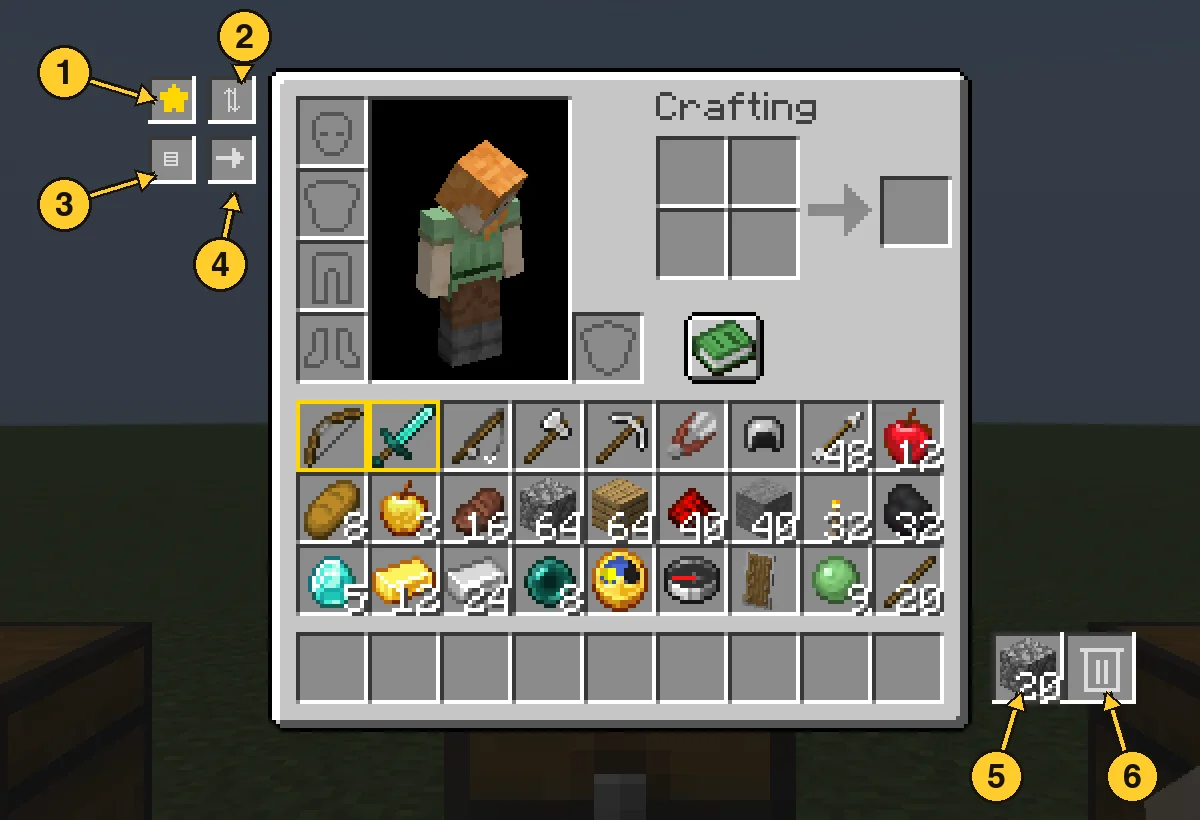
  1. Favourite star: switch it on, then click items to protect them. Favourites get a gold border and stay put through every action below.
  2. Sort: groups your items by category, with a colour highlight so you can see the order it chose.
  3. Quick Stack: sends items you carry to the nearby chests that already hold the same item.
  4. Send: switch it on, then click an item to send one, or Shift-click to send the whole stack. It flies to the best chest and your inventory closes so you can watch. Hotbar items and favourites are never sent.
  5. Trash slot: left click drops your whole held stack in, right click drops one. Throw the same item in again and it stacks up to a full stack. A different item replaces it. Click it with an empty hand to take the item back.
  6. Auto Trash slot: left click opens the 18 slot filter panel. Right click with an empty hand takes back what Auto Trash collected.

Chest screen

  1. Sort: tidies the chest by category.
  2. Loot All: takes everything into your main inventory. Your hotbar is left alone.
  3. Quick Stack to Nearby Chests: the same button, right from the chest screen.
  4. Deposit All: empties your main inventory into the chest (favourites stay).
  5. Restock: tops up your stacks from the chest, hotbar included.

Every move flies first and lands second. If your inventory is full, what did not fit waits in a small bar on screen instead of disappearing.

Auto Trash

Open the panel and click a filter slot with an item in your hand to set it. Anything matching a filter is deleted from your main inventory within half a second, and the latest deleted item is kept in the pile. Click a filter with an empty hand to clear it. Favourites are never touched.

  1. Auto Trash slot: left click opens the panel, right click with an empty hand takes the pile back.
  2. Filter slots: 18 of them. Setting a filter does not use up the item you hold.

Good to know

  • Works with vanilla chests, double chests and other mods' chests that use normal containers.
  • Mod Menu support. Install on both the client and the server.
  • Requires Fabric API.
  • Available for Minecraft 1.20.1 and 26.3 with the same features.

Écrite par scarabx. À lire avec les images sur Modrinth.

Comment installer Inventory Assist

  1. Ce mod est nécessaire sur le serveur et chez chaque joueur qui rejoint.

  2. Installe Fabric pour Minecraft 1.20 – 26.x.

  3. Ajoute les mods dont il a besoin : API Fabric.

  4. Télécharge le fichier .jar depuis Modrinth et place-le dans le dossier mods de ton répertoire .minecraft.

  5. Lance Minecraft avec le profil Fabric.

  6. Plus simple : dans Prism Launcher ou la Modrinth App, cherche Inventory Assist dans les mods de ton instance et clique sur Install. Le loader et les mods requis sont ajoutés pour toi.

Compatibilité

Versions de Minecraft
26.x, 1.20
Fonctionne sur
Fabric
Où il fonctionne
Client et serveur
Édition
Java
Nécessite
API Mod Menu, Fabric
Licence
Utilisation gratuite
Prix
Gratuit
Suivi
Mis à jour activement (13/11/2026)

Inventory Assist comparé à des ressources similaires Comparer toutes les alternatives

RessourceTéléchargementsVersionsMise à jourPrix
Inventory Assistcelle que tu regardais321.20 – 26.x9 oct. 2026Gratuit
Inventory Profiles Nextblackd42.3M1.16 – 26.x27 sept. 2026Gratuit
Client SortNotRyken6.5M1.20 – 26.x26 sept. 2026Gratuit
Inventory ManagementRoundaround3.8M1.18 – 26.x20 sept. 2026Gratuit

Questions

Est-ce que Inventory Assist fonctionne sur Minecraft 26.x ?

Oui. Inventory Assist prend en charge Minecraft 26.x. Toutes les versions prises en charge : 26.x, 1.20.

Est-ce que Inventory Assist est gratuit ?

Oui. Inventory Assist se télécharge gratuitement sur Modrinth.

Inventory Assist est-il côté client ou côté serveur ?

Les deux. Le serveur et chaque joueur doivent avoir Inventory Assist installé.

Inventory Assist a-t-il besoin d'autre chose ?

Oui : Mod Menu, Fabric API. Installe-le avant Inventory Assist.

Inventory Assist est-il encore mis à jour ?

Oui. La dernière mise à jour date des dernières 24 heures.

Quelles sont les meilleures alternatives à Inventory Assist ?

Les plus proches sont Inventory Profiles Next, Client Sort et Inventory Management. Comparer toutes les alternatives

Alternatives à Inventory Assist

Eclipse ToolsMods · 26.x

Zoom, freecam, fullbright, inventory sort, item lock, chest finder, better chat, auto tool and an automatic librarian reroller.
Gratuit209 téléchargements
StashifyMods · 1.21

Sort your inventory into nearby chests, barrels and shulker boxes with a single key.

Gratuit7 téléchargements
Comparer toutes les alternatives ›

Avis

–★★★★★
0 avis
50
40
30
20
10

Connecte-toi pour laisser un avis.