NoweCraftRank SitesDarmowa strona i sklepZrób swoją ›
AshlarDarmowe oprogramowanie serwera oparte na Paper, z ochroną przed DDoS i backdoorami Zobacz Ashlar ›SpołecznośćZadawaj pytania, dziel się budowlami i znajdź ludzi do gry Dołącz do forum ›
Zasoby / Mody / Inventory Assist

Inventory Assist

Sort and manage your inventory.

ModyZa darmo1.20 – 26.x
autor: scarabx · pobrane z Modrinth
Pobierz ›

Bezpośrednie pobieranie z Modrinth · 7 pobrań

Inventory Assist, zrzut ekranu 1

Co robi

Inventory Assist to mod, autor: scarabx. Sort and manage your inventory.

Obsługiwane wersje: Minecraft 1.20 – 26.x. Liczba pobrań w serwisie Modrinth: 7. Ostatnia aktualizacja: 09.10.2026.

Obsługiwane wersje

26.x1.20

Historia wersji

Inventory Assist ma 2 wydań na Modrinth od 09.10.2026. 2 z nich wyszło w ostatnim roku. Najnowsza to 1.0.0+1.20.1, wydana 09.10.2026. Jest zrobiona dla Minecraft 1.20.1. Działa na Fabric. Plik ma 103 KB.

WersjaWydanoMinecraftTyp
1.0.0+1.20.109.10.20261.20.1Wydanie
1.0.0+26.309.10.202626.3Wydanie
Opis autora na Modrinth

Inventory Assist

Sort your inventory in one click, then watch your items fly exactly where they belong.

Why Inventory Assist?

  • See it happen. Send an item and the inventory closes by itself, so you can watch it fly to its chest. Items only appear at the destination once they land, so what you see is what happened.
  • Flights show the amount. One item flies as one item. A full stack flies as a small pile. You can tell what is moving at a glance.
  • Chests that think in categories. Send puts an item in the nearest chest that already holds the same kind of thing (weapons, tools, food, blocks and so on). No such chest? The nearest empty one. Otherwise the nearest with room.
  • Auto Trash that is hard to regret. Pick up to 18 items to throw away automatically. What it deleted last waits in a pile you can take back.
  • Safe by design. Favourited items are never sorted away, deposited, sent or trashed.

Inventory screen

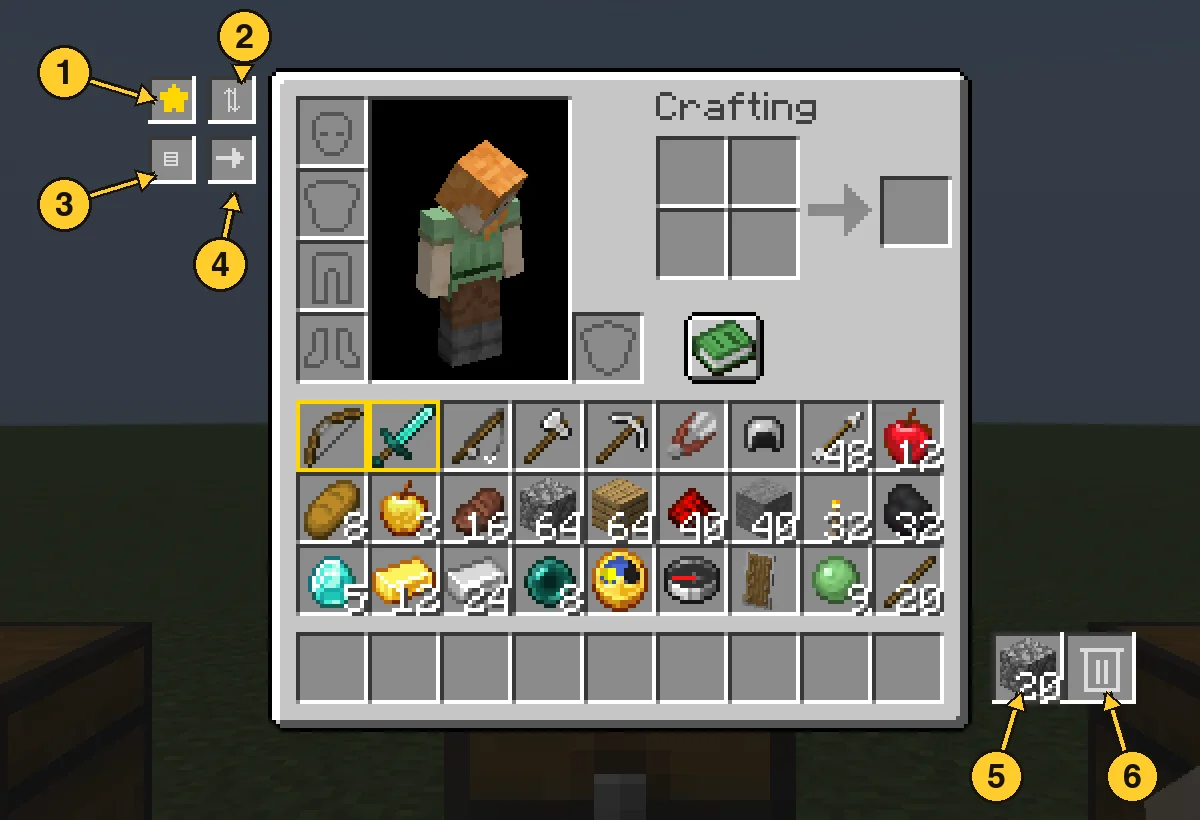
  1. Favourite star: switch it on, then click items to protect them. Favourites get a gold border and stay put through every action below.
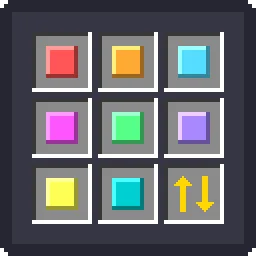
  2. Sort: groups your items by category, with a colour highlight so you can see the order it chose.
  3. Quick Stack: sends items you carry to the nearby chests that already hold the same item.
  4. Send: switch it on, then click an item to send one, or Shift-click to send the whole stack. It flies to the best chest and your inventory closes so you can watch. Hotbar items and favourites are never sent.
  5. Trash slot: left click drops your whole held stack in, right click drops one. Throw the same item in again and it stacks up to a full stack. A different item replaces it. Click it with an empty hand to take the item back.
  6. Auto Trash slot: left click opens the 18 slot filter panel. Right click with an empty hand takes back what Auto Trash collected.

Chest screen

  1. Sort: tidies the chest by category.
  2. Loot All: takes everything into your main inventory. Your hotbar is left alone.
  3. Quick Stack to Nearby Chests: the same button, right from the chest screen.
  4. Deposit All: empties your main inventory into the chest (favourites stay).
  5. Restock: tops up your stacks from the chest, hotbar included.

Every move flies first and lands second. If your inventory is full, what did not fit waits in a small bar on screen instead of disappearing.

Auto Trash

Open the panel and click a filter slot with an item in your hand to set it. Anything matching a filter is deleted from your main inventory within half a second, and the latest deleted item is kept in the pile. Click a filter with an empty hand to clear it. Favourites are never touched.

  1. Auto Trash slot: left click opens the panel, right click with an empty hand takes the pile back.
  2. Filter slots: 18 of them. Setting a filter does not use up the item you hold.

Good to know

  • Works with vanilla chests, double chests and other mods' chests that use normal containers.
  • Mod Menu support. Install on both the client and the server.
  • Requires Fabric API.
  • Available for Minecraft 1.20.1 and 26.3 with the same features.

Autor: scarabx. Z obrazkami na Modrinth.

Jak zainstalować Inventory Assist

  1. Ten mod jest potrzebny na serwerze i u każdego gracza, który dołącza.

  2. Zainstaluj Fabric dla Minecraft 1.20 – 26.x.

  3. Dodaj potrzebne mody: API Fabric.

  4. Pobierz plik .jar z Modrinth i wrzuć go do folderu mods w katalogu .minecraft.

  5. Uruchom Minecraft z profilem Fabric.

  6. Prościej: w Prism Launcher lub Modrinth App wyszukaj Inventory Assist w modach swojej instancji i kliknij Install. Loader i potrzebne mody zostaną dodane za ciebie.

Kompatybilność

Wersje Minecraft
26.x, 1.20
Działa na
Fabric
Gdzie działa
Klient i serwer
Edycja
Java
Wymaga
API Mod Menu, Fabric
Licencja
Do darmowego użytku
Cena
Za darmo
Utrzymanie
Aktywnie aktualizowany (11.11.2026)

Inventory Assist w porównaniu z podobnymi Porównaj wszystkie alternatywy

ZasóbPobraniaWersjeAktualizacjaCena
Inventory Assistten, który oglądałeś71.20 – 26.x9 paź 2026Za darmo
Inventory Profiles Nextblackd42.3M1.16 – 26.x27 wrz 2026Za darmo
Client SortNotRyken6.5M1.20 – 26.x26 wrz 2026Za darmo
Inventory ManagementRoundaround3.8M1.18 – 26.x20 wrz 2026Za darmo

Pytania

Czy Inventory Assist działa w wersji Minecrafta 26.x?

Tak. Inventory Assist działa w wersji Minecrafta 26.x. Wszystkie obsługiwane wersje: 26.x, 1.20.

Czy Inventory Assist jest za darmo?

Tak. Inventory Assist można pobrać za darmo z serwisu Modrinth.

Czy Inventory Assist działa po stronie klienta czy serwera?

Obie. Serwer i każdy gracz muszą mieć zainstalowany Inventory Assist.

Czy Inventory Assist potrzebuje czegoś jeszcze?

Tak: Mod Menu, Fabric API. Zainstaluj to przed Inventory Assist.

Czy Inventory Assist jest nadal aktualizowany?

Tak. Ostatnia aktualizacja wyszła w ciągu ostatniej doby.

Jakie są najlepsze alternatywy dla Inventory Assist?

Najbliższe to Inventory Profiles Next, Client Sort i Inventory Management. Porównaj wszystkie alternatywy

Alternatywy dla Inventory Assist

Eclipse ToolsMody · 26.x

Zoom, freecam, fullbright, inventory sort, item lock, chest finder, better chat, auto tool and an automatic librarian reroller.
Za darmoPobrania: 182
StashifyMody · 1.21

Sort your inventory into nearby chests, barrels and shulker boxes with a single key.

Za darmoPobrania: 7
Porównaj wszystkie alternatywy ›

Opinie

–★★★★★
Opinie: 0
50
40
30
20
10

Zaloguj się, aby wystawić opinię.