
 Inventory Profiles NextMods · 1.16 – 26.x
Take control over your inventory. Sort. Move matching Items. Throw all. Locked slots. Gear sets! And much more.
Kostenlos42,296,920 Downloads
Sort and manage your inventory.
Direkter Download von Modrinth · 7 Downloads
Inventory Assist (Mod) stammt von scarabx. Sort and manage your inventory.
Unterstützt wird Minecraft 1.20 – 26.x. Auf Modrinth gibt es 7 Downloads. Das letzte Update erschien am 09.10.2026.
Inventory Assist hat seit 09.10.2026 2 Versionen auf Modrinth veröffentlicht. 2 davon erschienen im letzten Jahr. Die neueste ist 1.0.0+1.20.1, erschienen am 09.10.2026. Sie ist für Minecraft 1.20.1 gemacht. Sie läuft auf Fabric. Der Download ist 103 KB groß.
| Version | Veröffentlicht | Minecraft | Typ |
|---|---|---|---|
1.0.0+1.20.1 | 09.10.2026 | 1.20.1 | Release |
1.0.0+26.3 | 09.10.2026 | 26.3 | Release |
Sort your inventory in one click, then watch your items fly exactly where they belong.
Every move flies first and lands second. If your inventory is full, what did not fit waits in a small bar on screen instead of disappearing.
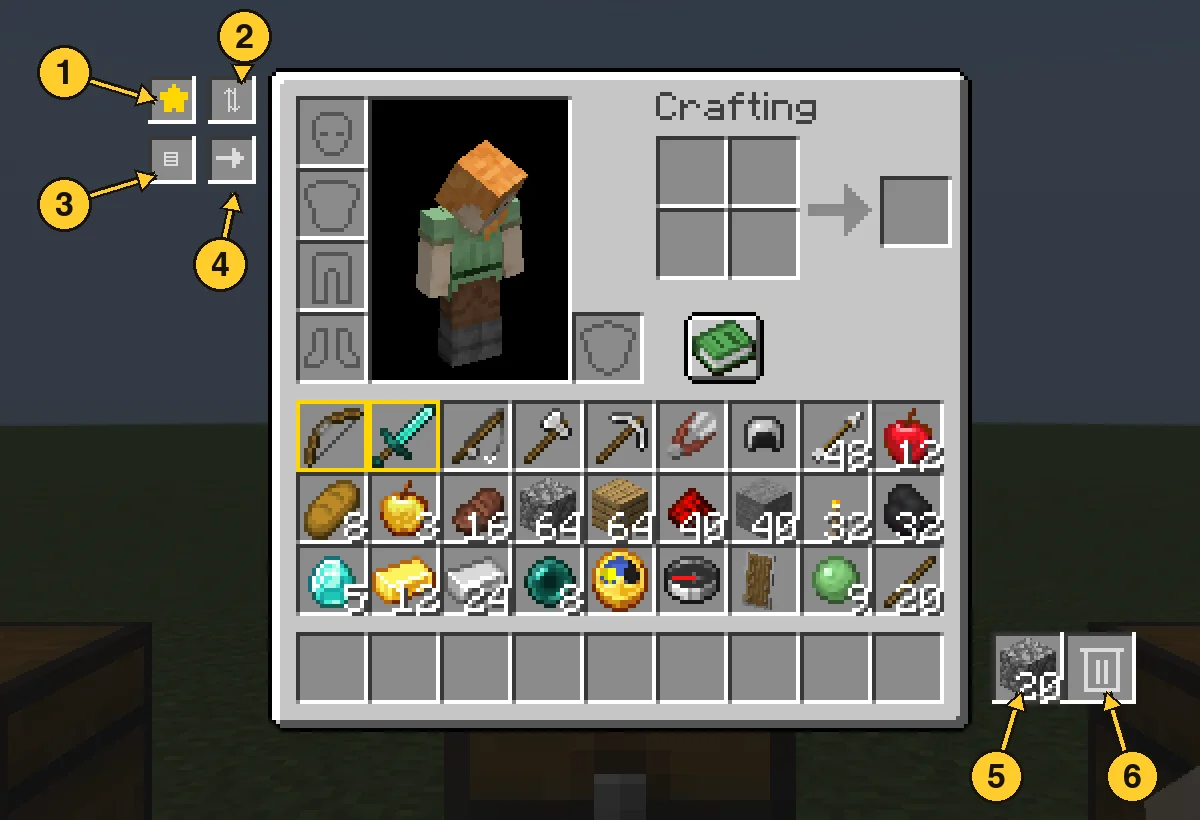
Open the panel and click a filter slot with an item in your hand to set it. Anything matching a filter is deleted from your main inventory within half a second, and the latest deleted item is kept in the pile. Click a filter with an empty hand to clear it. Favourites are never touched.
Geschrieben von scarabx. Mit Bildern auf Modrinth lesen.
Diese Mod wird auf dem Server und bei jedem Spieler gebraucht.
Installiere Fabric für Minecraft 1.20 – 26.x.
Füge die benötigten Mods hinzu: Fabric API.
Lade die .jar-Datei von Modrinth herunter und lege sie in den mods-Ordner deines .minecraft-Verzeichnisses.
Starte Minecraft mit dem Fabric-Profil.
Einfacher: Suche in Prism Launcher oder der Modrinth App in den Mods deiner Instanz nach Inventory Assist und klicke auf Install. Loader und benötigte Mods werden für dich hinzugefügt.
| Ressource | Downloads | Versionen | Letztes Update | Preis |
|---|---|---|---|---|
| Inventory Assistdie du angesehen hast | 7 | 1.20 – 26.x | 9. Okt. 2026 | Kostenlos |
| Inventory Profiles Nextblackd | 42.3M | 1.16 – 26.x | 27. Sept. 2026 | Kostenlos |
 Client SortNotRyken | 6.5M | 1.20 – 26.x | 26. Sept. 2026 | Kostenlos |
 Inventory ManagementRoundaround | 3.8M | 1.18 – 26.x | 20. Sept. 2026 | Kostenlos |
Ja. Inventory Assist unterstützt Minecraft 26.x. Alle unterstützten Versionen: 26.x, 1.20.
Ja. Inventory Assist kannst du kostenlos bei Modrinth herunterladen.
Beides. Der Server und jeder Spieler brauchen Inventory Assist.
Ja: Mod Menu, Fabric API. Installiere es vor Inventory Assist.
Ja. Das letzte Update kam innerhalb des letzten Tages.
Am ähnlichsten sind Inventory Profiles Next, Client Sort und Inventory Management. Alle Alternativen vergleichen
Inventory Profiles NextMods · 1.16 – 26.xTake control over your inventory. Sort. Move matching Items. Throw all. Locked slots. Gear sets! And much more.
Client SortMods · 1.20 – 26.xVersatile and easy inventory sorting.
Inventory ManagementMods · 1.18 – 26.xSort and transfer items with the click of a button.
 Eclipse ToolsMods · 26.x
Zoom, freecam, fullbright, inventory sort, item lock, chest finder, better chat, auto tool and an automatic librarian reroller.
 StashifyMods · 1.21
Sort your inventory into nearby chests, barrels and shulker boxes with a single key.
Logg dich ein, um eine Bewertung zu schreiben.