YeniCraftRank SitesÜcretsiz web sitesi ve mağazaKendininkini yap ›
AshlarPaper tabanlı, DDoS ve arka kapı korumalı ücretsiz sunucu yazılımı Ashlar'ı gör ›ToplulukSoru sor, yapılarını paylaş ve birlikte oynayacak kişiler bul Foruma katıl ›
Kaynaklar / Modlar / Inventory Assist

Inventory Assist

Sort and manage your inventory.

ModlarÜcretsiz1.20 – 26.x
geliştiren: scarabx · Modrinth üzerinden listelendi
İndir ›

Modrinth üzerinden doğrudan indirme · 7 indirme

Inventory Assist ekran görüntüsü 1

Ne yapar

Inventory Assist, scarabx tarafından yapılmış bir mod. Sort and manage your inventory.

Desteklediği sürümler: Minecraft 1.20 – 26.x. Modrinth üzerinde 7 kez indirildi. Son güncelleme 09.10.2026 tarihinde çıktı.

Desteklenen sürümler

26.x1.20

Sürüm geçmişi

Inventory Assist, 09.10.2026 tarihinden beri Modrinth üzerinde 2 sürüm yayınladı. Bunların 2 tanesi son bir yılda çıktı. En yenisi 09.10.2026 tarihinde çıkan 1.0.0+1.20.1. Minecraft 1.20.1 için yapıldı. Fabric üzerinde çalışır. İndirme boyutu 103 KB.

SürümYayın tarihiMinecraftTür
1.0.0+1.20.109.10.20261.20.1Kararlı
1.0.0+26.309.10.202626.3Kararlı
Yazarın Modrinth açıklaması

Inventory Assist

Sort your inventory in one click, then watch your items fly exactly where they belong.

Why Inventory Assist?

  • See it happen. Send an item and the inventory closes by itself, so you can watch it fly to its chest. Items only appear at the destination once they land, so what you see is what happened.
  • Flights show the amount. One item flies as one item. A full stack flies as a small pile. You can tell what is moving at a glance.
  • Chests that think in categories. Send puts an item in the nearest chest that already holds the same kind of thing (weapons, tools, food, blocks and so on). No such chest? The nearest empty one. Otherwise the nearest with room.
  • Auto Trash that is hard to regret. Pick up to 18 items to throw away automatically. What it deleted last waits in a pile you can take back.
  • Safe by design. Favourited items are never sorted away, deposited, sent or trashed.

Inventory screen

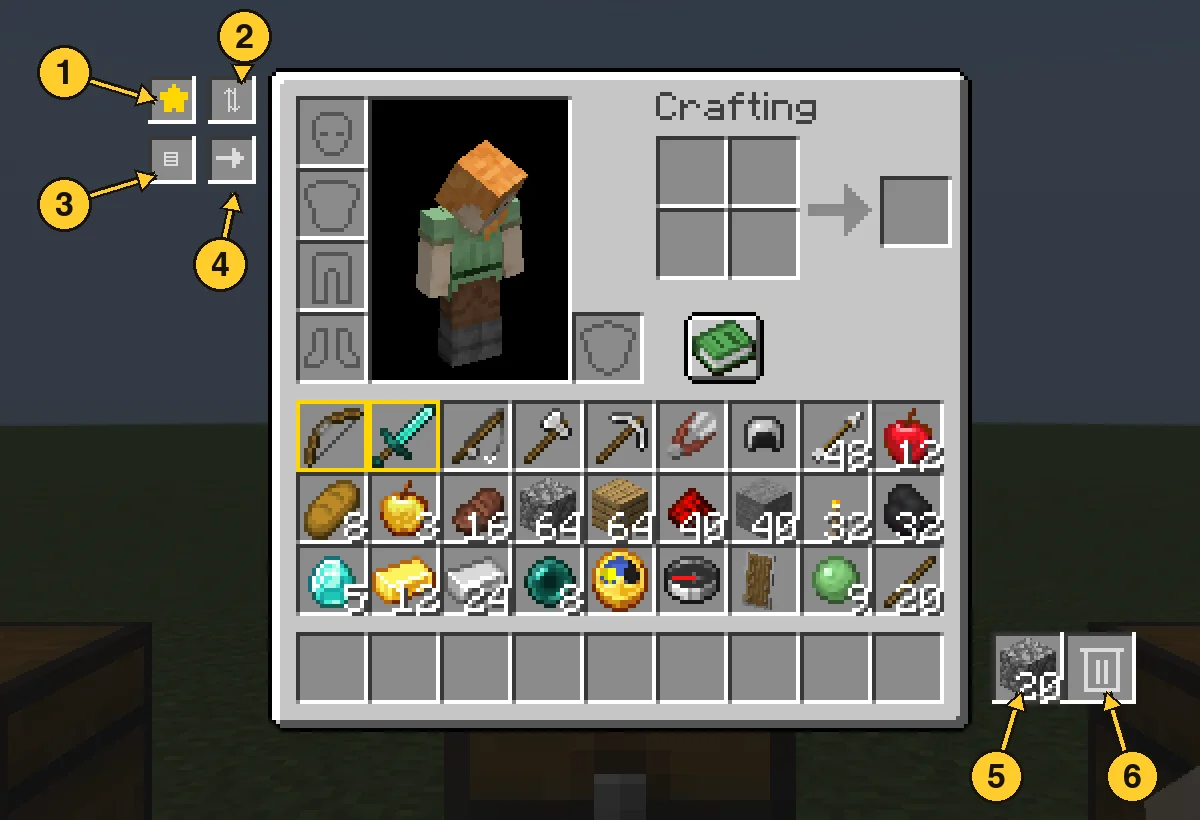
  1. Favourite star: switch it on, then click items to protect them. Favourites get a gold border and stay put through every action below.
  2. Sort: groups your items by category, with a colour highlight so you can see the order it chose.
  3. Quick Stack: sends items you carry to the nearby chests that already hold the same item.
  4. Send: switch it on, then click an item to send one, or Shift-click to send the whole stack. It flies to the best chest and your inventory closes so you can watch. Hotbar items and favourites are never sent.
  5. Trash slot: left click drops your whole held stack in, right click drops one. Throw the same item in again and it stacks up to a full stack. A different item replaces it. Click it with an empty hand to take the item back.
  6. Auto Trash slot: left click opens the 18 slot filter panel. Right click with an empty hand takes back what Auto Trash collected.

Chest screen

  1. Sort: tidies the chest by category.
  2. Loot All: takes everything into your main inventory. Your hotbar is left alone.
  3. Quick Stack to Nearby Chests: the same button, right from the chest screen.
  4. Deposit All: empties your main inventory into the chest (favourites stay).
  5. Restock: tops up your stacks from the chest, hotbar included.

Every move flies first and lands second. If your inventory is full, what did not fit waits in a small bar on screen instead of disappearing.

Auto Trash

Open the panel and click a filter slot with an item in your hand to set it. Anything matching a filter is deleted from your main inventory within half a second, and the latest deleted item is kept in the pile. Click a filter with an empty hand to clear it. Favourites are never touched.

  1. Auto Trash slot: left click opens the panel, right click with an empty hand takes the pile back.
  2. Filter slots: 18 of them. Setting a filter does not use up the item you hold.

Good to know

  • Works with vanilla chests, double chests and other mods' chests that use normal containers.
  • Mod Menu support. Install on both the client and the server.
  • Requires Fabric API.
  • Available for Minecraft 1.20.1 and 26.3 with the same features.

Yazan: scarabx. Resimli halini Modrinth sayfasında oku.

Inventory Assist nasıl kurulur

  1. Bu mod hem sunucuda hem de giren her oyuncuda gerekli.

  2. Minecraft 1.20 – 26.x için Fabric kur.

  3. İhtiyaç duyduğu modları ekle: Fabric API.

  4. .jar dosyasını Modrinth üzerinden indir ve .minecraft klasöründeki mods klasörüne koy.

  5. Minecraft'ı Fabric profiliyle başlat.

  6. Daha kolayı: Prism Launcher veya Modrinth App'te instance'ının modlarında Inventory Assist ara ve Install'a tıkla. Mod yükleyiciyi ve gereken modları senin için ekler.

Uyumluluk

Minecraft sürümleri
26.x, 1.20
Çalıştığı yer
Fabric
Nerede çalışır
İstemci ve sunucu
Sürüm türü
Java
Gerekenler
Mod Menu, Fabric API
Lisans
Kullanımı ücretsiz
Fiyat
Ücretsiz
Bakım
Aktif olarak güncelleniyor (11.11.2026)

Inventory Assist ve benzerleri karşılaştırması Tüm alternatifleri karşılaştır

KaynakİndirmelerSürümlerSon güncellemeFiyat
Inventory Assistbaktığın71.20 – 26.x9 Eki 2026Ücretsiz
Inventory Profiles Nextblackd42.3M1.16 – 26.x27 Eyl 2026Ücretsiz
Client SortNotRyken6.5M1.20 – 26.x26 Eyl 2026Ücretsiz
Inventory ManagementRoundaround3.8M1.18 – 26.x20 Eyl 2026Ücretsiz

Sorular

Inventory Assist, Minecraft 26.x ile çalışır mı?

Evet. Inventory Assist, Minecraft 26.x sürümünü destekliyor. Desteklenen tüm sürümler: 26.x, 1.20.

Inventory Assist ücretsiz mi?

Evet. Inventory Assist, Modrinth üzerinden ücretsiz indirilebilir.

Inventory Assist istemci tarafı mı, sunucu tarafı mı?

İkisi de. Hem sunucuda hem de giren her oyuncuda Inventory Assist kurulu olmalı.

Inventory Assist başka bir şeye ihtiyaç duyar mı?

Evet: Mod Menu, Fabric API. Bunu Inventory Assist öncesinde kur.

Inventory Assist hâlâ güncelleniyor mu?

Evet. Son güncelleme son 24 saat içinde çıktı.

Inventory Assist için en iyi alternatifler neler?

En yakın olanlar Inventory Profiles Next, Client Sort ve Inventory Management. Tüm alternatifleri karşılaştır

Inventory Assist alternatifleri

Eclipse ToolsModlar · 26.x

Zoom, freecam, fullbright, inventory sort, item lock, chest finder, better chat, auto tool and an automatic librarian reroller.
Ücretsiz182 indirme
StashifyModlar · 1.21

Sort your inventory into nearby chests, barrels and shulker boxes with a single key.

Ücretsiz7 indirme
Tüm alternatifleri karşılaştır ›

Yorumlar

–★★★★★
0 yorum
50
40
30
20
10

Yorum yazmak için giriş yap.