
 Inventory Profiles NextMods · 1.16 – 26.x
Take control over your inventory. Sort. Move matching Items. Throw all. Locked slots. Gear sets! And much more.
Gratis42,296,920 descargas
Sort and manage your inventory.
Descarga directa desde Modrinth · 32 descargas
Inventory Assist (mod) es obra de scarabx. Sort and manage your inventory.
Es compatible con Minecraft 1.20 – 26.x. Se ha descargado 32 veces en Modrinth. La última actualización salió el 09/10/2026.
Inventory Assist ha publicado 2 versiones en Modrinth desde el 09/10/2026. 2 salieron en el último año. La más reciente es 1.0.0+1.20.1, publicada el 09/10/2026. Está hecha para Minecraft 1.20.1. Funciona en Fabric. La descarga ocupa 103 KB.
| Versión | Publicado | Minecraft | Tipo |
|---|---|---|---|
1.0.0+1.20.1 | 09/10/2026 | 1.20.1 | Estable |
1.0.0+26.3 | 09/10/2026 | 26.3 | Estable |
Sort your inventory in one click, then watch your items fly exactly where they belong.
Every move flies first and lands second. If your inventory is full, what did not fit waits in a small bar on screen instead of disappearing.
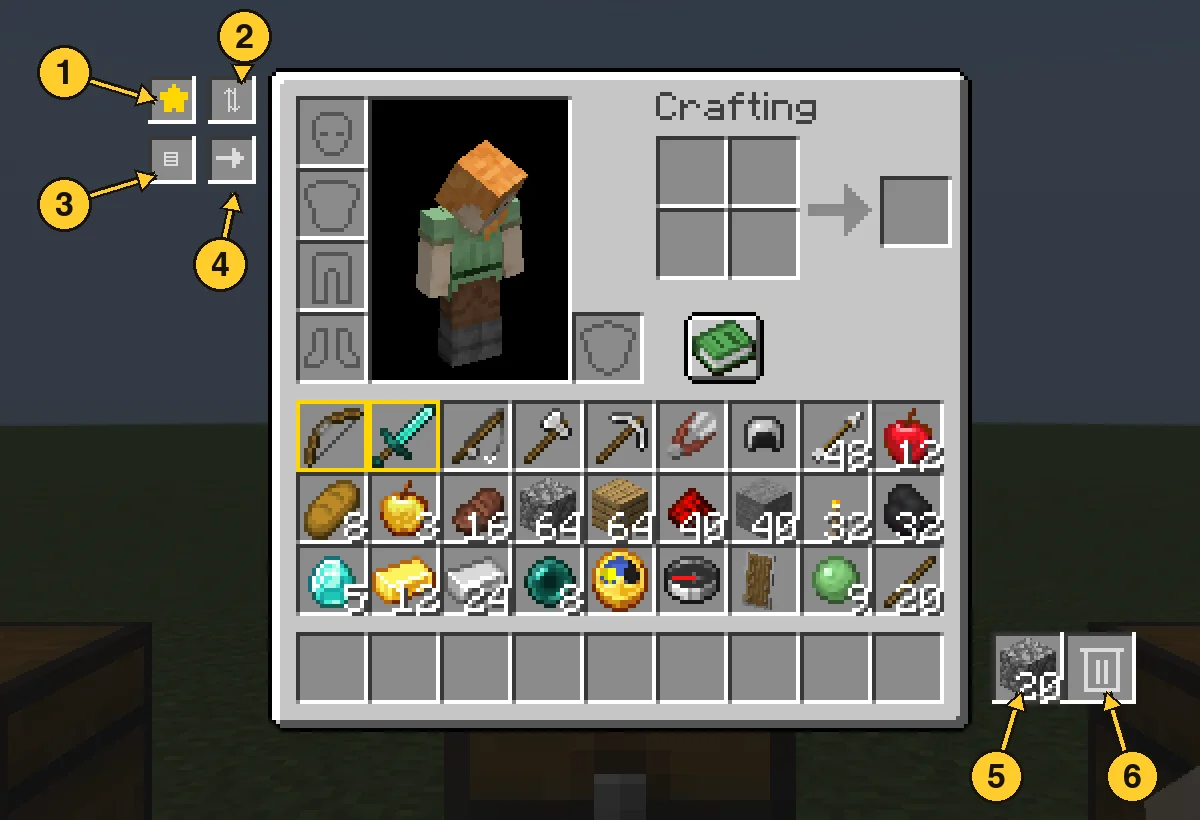
Open the panel and click a filter slot with an item in your hand to set it. Anything matching a filter is deleted from your main inventory within half a second, and the latest deleted item is kept in the pile. Click a filter with an empty hand to clear it. Favourites are never touched.
Escrita por scarabx. Léela con imágenes en Modrinth.
Este mod hace falta en el servidor y en cada jugador que entra.
Instala Fabric para Minecraft 1.20 – 26.x.
Añade los mods que necesita: API de Fabric.
Descarga el archivo .jar desde Modrinth y ponlo en la carpeta mods de tu directorio .minecraft.
Inicia Minecraft con el perfil de Fabric.
Más fácil: en Prism Launcher o la Modrinth App, busca Inventory Assist en los mods de tu instancia y haz clic en Install. Añade el loader y los mods que necesita por ti.
| Recurso | Descargas | Versiones | Última actualización | Precio |
|---|---|---|---|---|
| Inventory Assistel que estabas viendo | 32 | 1.20 – 26.x | 9 oct 2026 | Gratis |
| Inventory Profiles Nextblackd | 42.3M | 1.16 – 26.x | 27 sept 2026 | Gratis |
 Client SortNotRyken | 6.5M | 1.20 – 26.x | 26 sept 2026 | Gratis |
 Inventory ManagementRoundaround | 3.8M | 1.18 – 26.x | 20 sept 2026 | Gratis |
Sí. Inventory Assist es compatible con Minecraft 26.x. Todas las versiones compatibles: 26.x, 1.20.
Sí. Inventory Assist se puede descargar gratis desde Modrinth.
Ambos. El servidor y cada jugador necesitan Inventory Assist instalado.
Sí: Mod Menu, Fabric API. Instálalo antes de Inventory Assist.
Sí. La última actualización salió en el último día.
Los más parecidos son Inventory Profiles Next, Client Sort y Inventory Management. Comparar todas las alternativas
Inventory Profiles NextMods · 1.16 – 26.xTake control over your inventory. Sort. Move matching Items. Throw all. Locked slots. Gear sets! And much more.
Client SortMods · 1.20 – 26.xVersatile and easy inventory sorting.
Inventory ManagementMods · 1.18 – 26.xSort and transfer items with the click of a button.
 Eclipse ToolsMods · 26.x
Zoom, freecam, fullbright, inventory sort, item lock, chest finder, better chat, auto tool and an automatic librarian reroller.
 StashifyMods · 1.21
Sort your inventory into nearby chests, barrels and shulker boxes with a single key.
Inicia sesión para dejar una reseña.