NovoCraftRank SitesSite e loja grátisFaça a sua ›
AshlarSoftware de servidor grátis baseado no Paper, com proteção contra DDoS e backdoors Ver o Ashlar ›Security RadarA free check of your server's login, anti-bot and proxy settings, only with your OK Veja como funciona ›ComunidadeFaça perguntas, compartilhe construções e encontre gente para jogar Entrar no fórum ›
Recursos / Mods / Inventory Assist

Inventory Assist

Sort and manage your inventory.

ModsGrátis1.20 – 26.x
por scarabx · listado a partir do Modrinth
Baixar ›

Download direto do Modrinth · 32 downloads

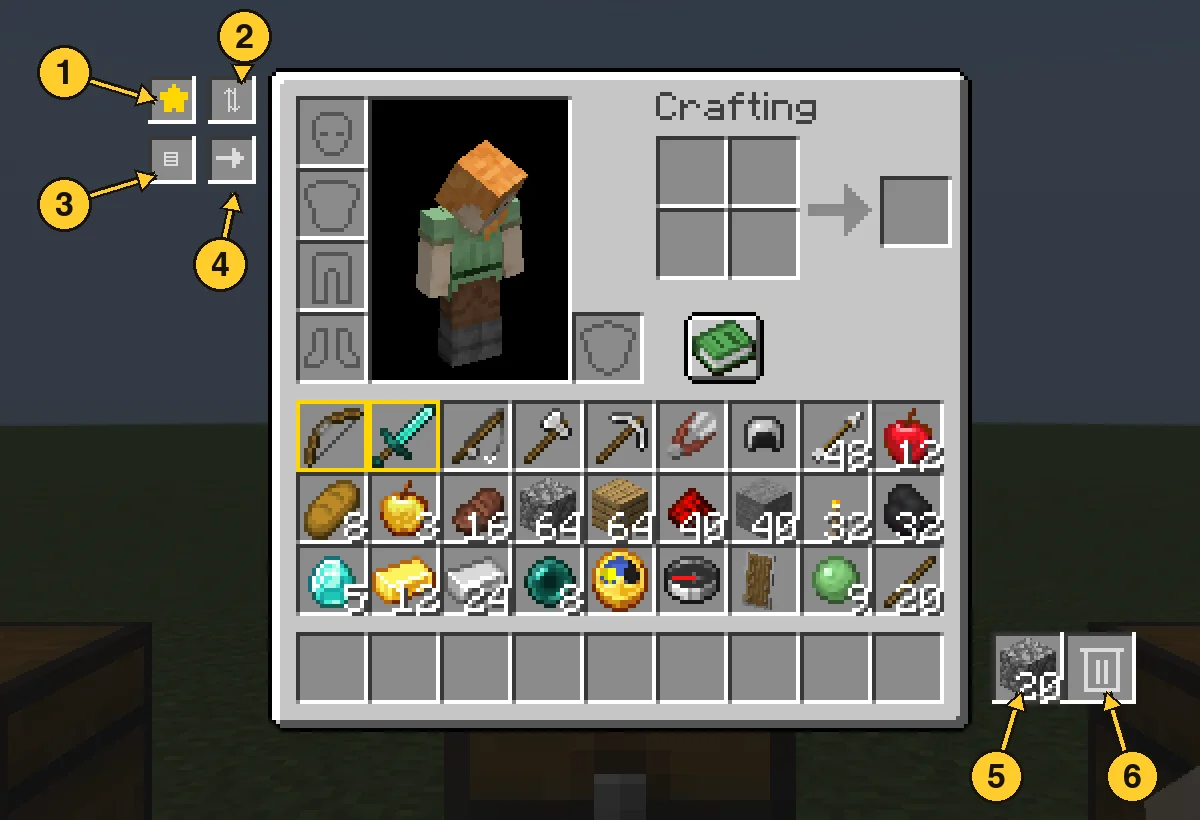
Inventory Assist, captura 1

O que ele faz

Inventory Assist (mod) é obra de scarabx. Sort and manage your inventory.

É compatível com o Minecraft 1.20 – 26.x. Tem 32 downloads em Modrinth. A última atualização saiu em 09/10/2026.

Versões suportadas

26.x1.20

Histórico de versões

Inventory Assist teve 2 versões no Modrinth desde 09/10/2026. 2 saíram no último ano. A mais recente é 1.0.0+1.20.1, lançada em 09/10/2026. Ela é feita para o Minecraft 1.20.1. Ela roda em Fabric. O download tem 103 KB.

VersãoLançadoMinecraftTipo
1.0.0+1.20.109/10/20261.20.1Estável
1.0.0+26.309/10/202626.3Estável
Descrição do autor no Modrinth

Inventory Assist

Sort your inventory in one click, then watch your items fly exactly where they belong.

Why Inventory Assist?

  • See it happen. Send an item and the inventory closes by itself, so you can watch it fly to its chest. Items only appear at the destination once they land, so what you see is what happened.
  • Flights show the amount. One item flies as one item. A full stack flies as a small pile. You can tell what is moving at a glance.
  • Chests that think in categories. Send puts an item in the nearest chest that already holds the same kind of thing (weapons, tools, food, blocks and so on). No such chest? The nearest empty one. Otherwise the nearest with room.
  • Auto Trash that is hard to regret. Pick up to 18 items to throw away automatically. What it deleted last waits in a pile you can take back.
  • Safe by design. Favourited items are never sorted away, deposited, sent or trashed.

Inventory screen

  1. Favourite star: switch it on, then click items to protect them. Favourites get a gold border and stay put through every action below.
  2. Sort: groups your items by category, with a colour highlight so you can see the order it chose.
  3. Quick Stack: sends items you carry to the nearby chests that already hold the same item.
  4. Send: switch it on, then click an item to send one, or Shift-click to send the whole stack. It flies to the best chest and your inventory closes so you can watch. Hotbar items and favourites are never sent.
  5. Trash slot: left click drops your whole held stack in, right click drops one. Throw the same item in again and it stacks up to a full stack. A different item replaces it. Click it with an empty hand to take the item back.
  6. Auto Trash slot: left click opens the 18 slot filter panel. Right click with an empty hand takes back what Auto Trash collected.

Chest screen

  1. Sort: tidies the chest by category.
  2. Loot All: takes everything into your main inventory. Your hotbar is left alone.
  3. Quick Stack to Nearby Chests: the same button, right from the chest screen.
  4. Deposit All: empties your main inventory into the chest (favourites stay).
  5. Restock: tops up your stacks from the chest, hotbar included.

Every move flies first and lands second. If your inventory is full, what did not fit waits in a small bar on screen instead of disappearing.

Auto Trash

Open the panel and click a filter slot with an item in your hand to set it. Anything matching a filter is deleted from your main inventory within half a second, and the latest deleted item is kept in the pile. Click a filter with an empty hand to clear it. Favourites are never touched.

  1. Auto Trash slot: left click opens the panel, right click with an empty hand takes the pile back.
  2. Filter slots: 18 of them. Setting a filter does not use up the item you hold.

Good to know

  • Works with vanilla chests, double chests and other mods' chests that use normal containers.
  • Mod Menu support. Install on both the client and the server.
  • Requires Fabric API.
  • Available for Minecraft 1.20.1 and 26.3 with the same features.

Escrita por scarabx. Leia com imagens no Modrinth.

Como instalar Inventory Assist

  1. Este mod é necessário no servidor e em cada jogador que entra.

  2. Instale Fabric para o Minecraft 1.20 – 26.x.

  3. Adicione os mods que ele precisa: API do Fabric.

  4. Baixe o arquivo .jar pelo Modrinth e coloque na pasta mods do seu diretório .minecraft.

  5. Abra o Minecraft com o perfil Fabric.

  6. Mais fácil: no Prism Launcher ou no Modrinth App, procure Inventory Assist nos mods da sua instância e clique em Install. Ele adiciona o loader e os mods necessários para você.

Compatibilidade

Versões do Minecraft
26.x, 1.20
Roda em
Fabric
Onde roda
Cliente e servidor
Edição
Java
Precisa de
API do Mod Menu, Fabric
Licença
Uso gratuito
Preço
Grátis
Manutenção
Atualizado ativamente (13/11/2026)

Inventory Assist comparado com similares Comparar todas as alternativas

RecursoDownloadsVersõesÚltima atualizaçãoPreço
Inventory Assisto que você estava vendo321.20 – 26.x9 out 2026Grátis
Inventory Profiles Nextblackd42.3M1.16 – 26.x27 set 2026Grátis
Client SortNotRyken6.5M1.20 – 26.x26 set 2026Grátis
Inventory ManagementRoundaround3.8M1.18 – 26.x20 set 2026Grátis

Perguntas

Inventory Assist funciona no Minecraft 26.x?

Sim. Inventory Assist é compatível com o Minecraft 26.x. Todas as versões compatíveis: 26.x, 1.20.

Inventory Assist é grátis?

Sim. Você pode baixar Inventory Assist de graça em Modrinth.

Inventory Assist é do lado do cliente ou do servidor?

Os dois. O servidor e cada jogador precisam ter Inventory Assist instalado.

Inventory Assist precisa de mais alguma coisa?

Sim: Mod Menu, Fabric API. Instale antes de Inventory Assist.

Inventory Assist ainda recebe atualizações?

Sim. A última atualização saiu no último dia.

Quais são as melhores alternativas a Inventory Assist?

Os mais parecidos são Inventory Profiles Next, Client Sort e Inventory Management. Comparar todas as alternativas

Alternativas ao Inventory Assist

Eclipse ToolsMods · 26.x

Zoom, freecam, fullbright, inventory sort, item lock, chest finder, better chat, auto tool and an automatic librarian reroller.
Grátis209 downloads
StashifyMods · 1.21

Sort your inventory into nearby chests, barrels and shulker boxes with a single key.

Grátis7 downloads
Comparar todas as alternativas ›

Avaliações

–★★★★★
0 avaliações
50
40
30
20
10

Entre para deixar uma avaliação.