
 VHS OverlayShadery · 1.21
VHS Effects shader with Overlay (Classic REC, date and time)
Za darmoPobrania: 33,131

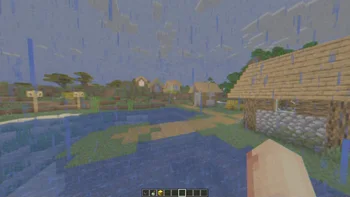

RetroVision to paczka shaderów, autor: marctgamer. Add a VHS TV Effects Shader and MORE.
Obsługiwane wersje: Minecraft 1.8 – 1.21. Liczba pobrań w serwisie Modrinth: 188,470. Ostatnia aktualizacja: 26.12.2025.
RetroVision ma 12 wydań na Modrinth od 05.07.2024. 2 z nich wyszło w ostatnim roku. Najnowsza to 1.80.1, wydana 26.12.2025. Jest zrobiona dla Minecraft 1.10 – 1.20.3. Działa na Iris i Optifine. Plik ma 253 KB.
| Wersja | Wydano | Minecraft | Typ |
|---|---|---|---|
1.80.1 | 26.12.2025 | 1.10 – 1.20.3 | Wydanie |
1.80 | 20.12.2025 | 1.10 – 1.20.3 | Wydanie |
1.70 | 01.11.2024 | 1.20.4 – 1.21.3 | Wydanie |
1.65 | 28.09.2024 | 1.12 – 1.21.1 | Wydanie |
1.60 | 22.09.2024 | 1.12.1 – 1.21.1 | Wydanie |
The RetroVision Shader is a unique Minecraft shader that transforms the game's visuals into a retro-inspired, VHS-like aesthetic. It applies a variety of visual effects to create a Dreamcore aesthetic while maintaining the core Minecraft experience. This shader evokes a sense of nostalgia, allowing players to relive the charm of classic gaming while exploring the blocky landscapes of Minecraft.
You Can…
You Cannot…
If you want to contact
Contact to: marctgamer@gmail.com
Explore the world of Minecraft through a nostalgic lens with RetroVision, where every pixel tells a story of creativity and memory. Dive into a unique gaming experience that combines the familiar with the fantastical, and transform your Minecraft adventures today!
Autor: marctgamer. Z obrazkami na Modrinth.
Zainstaluj Iris (z Sodium) albo OptiFine dla swojej wersji Minecrafta: shadery potrzebują jednego z nich.
Pobierz plik .zip z Modrinth. Nie rozpakowuj go.
W Minecrafcie otwórz Opcje, potem Ustawienia grafiki, potem Shadery i kliknij Otwórz folder shaderów.
Wrzuć plik .zip do tego folderu, wybierz RetroVision z listy i kliknij Gotowe.
Shadery mocno obciążają kartę graficzną. Jeśli gra zwalnia, wybierz niższy profil w ustawieniach shadera.
| Zasób | Pobrania | Wersje | Aktualizacja | Cena |
|---|---|---|---|---|
 RetroVisionten, który oglądałeś | 188K | 1.8 – 1.21 | 26 gru 2025 | Za darmo |
| VHS Overlaylidlevolkan | 33K | 1.21 | 3 wrz 2025 | Za darmo |
 Found VHS Tapeskyreyreyes | 7,039 | 1.16 – 1.21 | 13 sie 2026 | Za darmo |
 Voyager shader 2.06ix7even | 766K | 1.16 – 1.21 | 23 maj 2024 | Za darmo |
Jeszcze nie. Najnowsza obsługiwana wersja to Minecraft 1.21.
Tak. RetroVision można pobrać za darmo z serwisu Modrinth.
Tak. Ostatnia aktualizacja wyszła w ciągu ostatniej doby.
Najbliższe to VHS Overlay, Found VHS Tapes i Voyager shader 2.0. Porównaj wszystkie alternatywy
VHS OverlayShadery · 1.21VHS Effects shader with Overlay (Classic REC, date and time)
Found VHS TapesShadery · 1.16 – 1.21Found VHS Tapes is a liminal horror Minecraft shader featuring 11 atmospheric profiles and customizable VHS/CRT effects, fog, lighting, color grading, camera…
Voyager shader 2.0Shadery · 1.16 – 1.21A shader that add realism for Minecraft with a good look
 CTR VCRShadery · 1.12 – 26.x
Retro stylized shader that brings artifacts from CRT and VCR / VHS
 MC VHSShadery · 1.19 – 1.21
A relatively simple shader for minecraft, made to emulate the look of old VHS recordings.
 ReverieShadery · 1.20 – 26.x
Shader with a foggy and warm look. It leverages new features added by Iris for effects previously impossible to achieve.
Zaloguj się, aby wystawić opinię.