
 CobbleFurniesMody · 1.21
CobbleFurnies is here to bring your creations to life with beautifully crafted, Cobblemon-inspired furniture that blends seamlessly into your Minecraft world!
Za darmoPobrania: 8,145,331
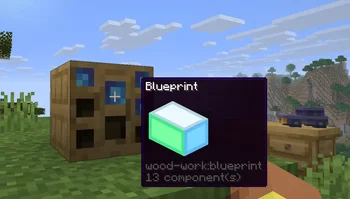
Wood Work to mod, autor: Oybek. Turn your own Blockbench models into placeable furniture and decorations. You design a piece in an in-game editor, then craft it from planks and nails. No…
Obsługiwane wersje: Minecraft 1.21. Liczba pobrań w serwisie Modrinth: 12. Ostatnia aktualizacja: 12.10.2026.
Najnowsza to 1.0.0, wydana 12.10.2026. Jest zrobiona dla Minecraft 1.21.11. Działa na Fabric. Plik ma 223 KB.
| Wersja | Wydano | Minecraft | Typ |
|---|---|---|---|
1.0.0 | 12.10.2026 | 1.21.11 | Wydanie |
Design your own furniture. Draw it in Blockbench, build it at a workbench, and place it in the world with its own hitbox, rotation, connections and seat.
Tip: always upload textures before the models that use them. A model is linked to the textures you have already uploaded, so if a texture is missing at that moment, the model will show a missing texture and you will have to upload the model again.
Install the mod on the server and players don't need any extra files: models and textures are sent to them automatically when they join. Files uploaded through a blueprint appear for everyone online right away. Uploaded files get a short random ID prefix, so two players can upload files with the same name, and the prefix is hidden in the editor.
Autor: Oybek. Z obrazkami na Modrinth.
Ten mod jest potrzebny na serwerze i u każdego gracza, który dołącza.
Zainstaluj Fabric dla Minecraft 1.21.
Pobierz plik .jar z Modrinth i wrzuć go do folderu mods w katalogu .minecraft.
Uruchom Minecraft z profilem Fabric.
Prościej: w Prism Launcher lub Modrinth App wyszukaj Wood Work w modach swojej instancji i kliknij Install. Loader i potrzebne mody zostaną dodane za ciebie.
| Zasób | Pobrania | Wersje | Aktualizacja | Cena |
|---|---|---|---|---|
 Wood Workten, który oglądałeś | 12 | 1.21 | 12 paź 2026 | Za darmo |
| CobbleFurniesLunazStudios | 8.1M | 1.21 | 29 cze 2026 | Za darmo |
 Macaw's Furnituresketchmacaw | 7.4M | 1.16 – 26.x | 29 wrz 2026 | Za darmo |
 Carved WoodIm_Maker | 4.5M | 1.20 – 26.x | 9 wrz 2026 | Za darmo |
Jeszcze nie. Najnowsza obsługiwana wersja to Minecraft 1.21.
Tak. Wood Work można pobrać za darmo z serwisu Modrinth.
Obie. Serwer i każdy gracz muszą mieć zainstalowany Wood Work.
Tak. Ostatnia aktualizacja wyszła w ciągu ostatniej doby.
Najbliższe to CobbleFurnies, Macaw's Furniture i Carved Wood. Porównaj wszystkie alternatywy
CobbleFurniesMody · 1.21CobbleFurnies is here to bring your creations to life with beautifully crafted, Cobblemon-inspired furniture that blends seamlessly into your Minecraft world!
Macaw's FurnitureMody · 1.16 – 26.xDecorate your world with wardrobes, drawers, chairs, desks, couches, chaise, sinks, tables and more...!
Carved WoodMody · 1.20 – 26.xAdds new sets of wooden blocks and new variants of existing wooden blocks!
 More DelightMody · 1.19 – 26.x
Extra meals, knives, and ingredients for Farmer's Delight that improve your culinary experience.
 Immortalers DelightMody · 1.20 – 1.21
Ancient plants, ancient tools, and the expansion of ancient diets!
 Joy of PaintingMody · 1.12 – 26.x
This mod lets you craft a blank canvas and a palette, with which you can paint your own pictures and hang them on a wall like the vanilla paintings.
Zaloguj się, aby wystawić opinię.