
 CobbleFurniesМоды · 1.21
CobbleFurnies is here to bring your creations to life with beautifully crafted, Cobblemon-inspired furniture that blends seamlessly into your Minecraft world!
БесплатноЗагрузок: 8,152,376
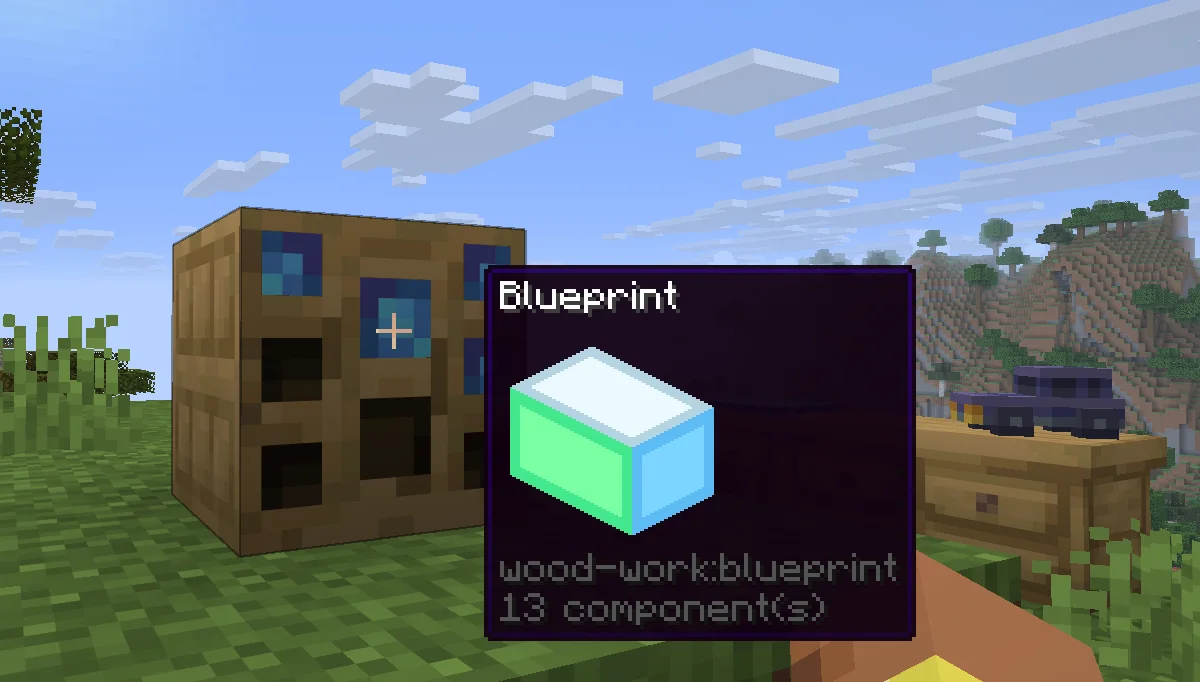
Wood Work — мод от Oybek. Turn your own Blockbench models into placeable furniture and decorations. You design a piece in an in-game editor, then craft it from planks and nails. No…
Поддерживаемые версии: Minecraft 1.21. Скачиваний на Modrinth: 12. Последнее обновление: 12.10.2026.
Новейшая — 1.0.0, вышла 12.10.2026. Она сделана для Minecraft 1.21.11. Работает на Fabric. Размер файла — 223 KB.
| Версия | Выпущен | Minecraft | Тип |
|---|---|---|---|
1.0.0 | 12.10.2026 | 1.21.11 | Релиз |
Design your own furniture. Draw it in Blockbench, build it at a workbench, and place it in the world with its own hitbox, rotation, connections and seat.
Tip: always upload textures before the models that use them. A model is linked to the textures you have already uploaded, so if a texture is missing at that moment, the model will show a missing texture and you will have to upload the model again.
Install the mod on the server and players don't need any extra files: models and textures are sent to them automatically when they join. Files uploaded through a blueprint appear for everyone online right away. Uploaded files get a short random ID prefix, so two players can upload files with the same name, and the prefix is hidden in the editor.
Автор: Oybek. С картинками — на Modrinth.
Этот мод нужен и на сервере, и у каждого игрока.
Установи Fabric для Minecraft 1.21.
Скачай .jar-файл с Modrinth и положи его в папку mods в каталоге .minecraft.
Запусти Minecraft с профилем Fabric.
Проще: в Prism Launcher или Modrinth App найдите Wood Work в модах своей сборки и нажмите Install. Загрузчик и нужные моды добавятся сами.
| Ресурс | Загрузки | Версии | Обновление | Цена |
|---|---|---|---|---|
 Wood Workтот, что ты смотрел | 12 | 1.21 | 12 окт. 2026 | Бесплатно |
| CobbleFurniesLunazStudios | 8.2M | 1.21 | 29 июн. 2026 | Бесплатно |
 Macaw's Furnituresketchmacaw | 7.5M | 1.16 – 26.x | 29 сент. 2026 | Бесплатно |
 Carved WoodIm_Maker | 4.5M | 1.20 – 26.x | 9 сент. 2026 | Бесплатно |
Пока нет. Последняя поддерживаемая версия — Minecraft 1.21.
Да. Wood Work можно бесплатно скачать на Modrinth.
И там, и там. Wood Work нужен и на сервере, и у каждого игрока.
Да. Последнее обновление вышло за последние сутки.
Ближе всего к нему CobbleFurnies, Macaw's Furniture и Carved Wood. Сравнить все альтернативы
CobbleFurniesМоды · 1.21CobbleFurnies is here to bring your creations to life with beautifully crafted, Cobblemon-inspired furniture that blends seamlessly into your Minecraft world!
Macaw's FurnitureМоды · 1.16 – 26.xDecorate your world with wardrobes, drawers, chairs, desks, couches, chaise, sinks, tables and more...!
Carved WoodМоды · 1.20 – 26.xAdds new sets of wooden blocks and new variants of existing wooden blocks!
 More DelightМоды · 1.19 – 26.x
Extra meals, knives, and ingredients for Farmer's Delight that improve your culinary experience.
 Immortalers DelightМоды · 1.20 – 1.21
Ancient plants, ancient tools, and the expansion of ancient diets!
 Joy of PaintingМоды · 1.12 – 26.x
This mod lets you craft a blank canvas and a palette, with which you can paint your own pictures and hang them on a wall like the vanilla paintings.
Войди, чтобы оставить отзыв.