
 CobbleFurniesMods · 1.21
CobbleFurnies is here to bring your creations to life with beautifully crafted, Cobblemon-inspired furniture that blends seamlessly into your Minecraft world!
Kostenlos8,145,331 Downloads
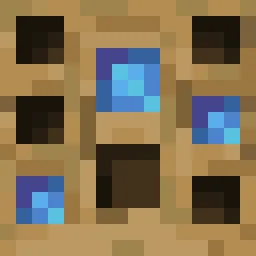
Turn your own Blockbench models into placeable furniture and decorations. You design a piece in an in-game editor, then craft it from planks and nails. No…
Direkter Download von Modrinth · 5 Downloads
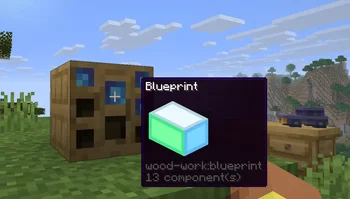
Wood Work (Mod) stammt von Oybek. Turn your own Blockbench models into placeable furniture and decorations. You design a piece in an in-game editor, then craft it from planks and nails. No…
Unterstützt wird Minecraft 1.21. Auf Modrinth gibt es 5 Downloads. Das letzte Update erschien am 12.10.2026.
Die neueste ist 1.0.0, erschienen am 12.10.2026. Sie ist für Minecraft 1.21.11 gemacht. Sie läuft auf Fabric. Der Download ist 223 KB groß.
| Version | Veröffentlicht | Minecraft | Typ |
|---|---|---|---|
1.0.0 | 12.10.2026 | 1.21.11 | Release |
Design your own furniture. Draw it in Blockbench, build it at a workbench, and place it in the world with its own hitbox, rotation, connections and seat.
Tip: always upload textures before the models that use them. A model is linked to the textures you have already uploaded, so if a texture is missing at that moment, the model will show a missing texture and you will have to upload the model again.
Install the mod on the server and players don't need any extra files: models and textures are sent to them automatically when they join. Files uploaded through a blueprint appear for everyone online right away. Uploaded files get a short random ID prefix, so two players can upload files with the same name, and the prefix is hidden in the editor.
Geschrieben von Oybek. Mit Bildern auf Modrinth lesen.
Diese Mod wird auf dem Server und bei jedem Spieler gebraucht.
Installiere Fabric für Minecraft 1.21.
Lade die .jar-Datei von Modrinth herunter und lege sie in den mods-Ordner deines .minecraft-Verzeichnisses.
Starte Minecraft mit dem Fabric-Profil.
Einfacher: Suche in Prism Launcher oder der Modrinth App in den Mods deiner Instanz nach Wood Work und klicke auf Install. Loader und benötigte Mods werden für dich hinzugefügt.
| Ressource | Downloads | Versionen | Letztes Update | Preis |
|---|---|---|---|---|
| Wood Workdie du angesehen hast | 5 | 1.21 | 12. Okt. 2026 | Kostenlos |
| CobbleFurniesLunazStudios | 8.1M | 1.21 | 29. Juni 2026 | Kostenlos |
 Macaw's Furnituresketchmacaw | 7.4M | 1.16 – 26.x | 29. Sept. 2026 | Kostenlos |
 Carved WoodIm_Maker | 4.5M | 1.20 – 26.x | 9. Sept. 2026 | Kostenlos |
Noch nicht. Die neueste unterstützte Version ist Minecraft 1.21.
Ja. Wood Work kannst du kostenlos bei Modrinth herunterladen.
Beides. Der Server und jeder Spieler brauchen Wood Work.
Ja. Das letzte Update kam innerhalb des letzten Tages.
Am ähnlichsten sind CobbleFurnies, Macaw's Furniture und Carved Wood. Alle Alternativen vergleichen
CobbleFurniesMods · 1.21CobbleFurnies is here to bring your creations to life with beautifully crafted, Cobblemon-inspired furniture that blends seamlessly into your Minecraft world!
Macaw's FurnitureMods · 1.16 – 26.xDecorate your world with wardrobes, drawers, chairs, desks, couches, chaise, sinks, tables and more...!
Carved WoodMods · 1.20 – 26.xAdds new sets of wooden blocks and new variants of existing wooden blocks!
 More DelightMods · 1.19 – 26.x
Extra meals, knives, and ingredients for Farmer's Delight that improve your culinary experience.
 Immortalers DelightMods · 1.20 – 1.21
Ancient plants, ancient tools, and the expansion of ancient diets!
 Joy of PaintingMods · 1.12 – 26.x
This mod lets you craft a blank canvas and a palette, with which you can paint your own pictures and hang them on a wall like the vanilla paintings.
Logg dich ein, um eine Bewertung zu schreiben.