
 Create: Better SchematicsMods · 1.21
Adds in many fixes and new features to Create’s schematic system.
Grátis1 downloads
Better Effect Hud is a highly customizable Minecraft mod, that adds many features, like Timer and Potency widgets, a duration bar, a warning vignette and more!
Download direto do Modrinth · 1 downloads
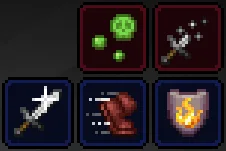
Better Effect HUD (mod) é obra de FriedBacon0. Better Effect Hud is a highly customizable Minecraft mod, that adds many features, like Timer and Potency widgets, a duration bar, a warning vignette and more!
É compatível com o Minecraft 26.x. Tem 1 downloads em Modrinth. A última atualização saiu em 30/10/2026.
A mais recente é 1.0.0, lançada em 30/10/2026. Ela é feita para o Minecraft 26.3. Ela roda em Fabric. O download tem 114 KB.
| Versão | Lançado | Minecraft | Tipo |
|---|---|---|---|
1.0.0 | 30/10/2026 | 26.3 | Estável |
Better Effect Hud is a highly customizable Minecraft mod, that adds many features, like timer and potency widgets, a duration bar, a warning vignette and more!
All Features
Escrita por FriedBacon0. Leia com imagens no Modrinth.
Este mod roda só no seu jogo. Os servidores não precisam dele, então você pode usar em qualquer servidor.
Instale Fabric para o Minecraft 26.x.
Adicione os mods que ele precisa: API do Fabric e Mod Menu.
Baixe o arquivo .jar pelo Modrinth e coloque na pasta mods do seu diretório .minecraft.
Abra o Minecraft com o perfil Fabric.
Mais fácil: no Prism Launcher ou no Modrinth App, procure Better Effect HUD nos mods da sua instância e clique em Install. Ele adiciona o loader e os mods necessários para você.
| Recurso | Downloads | Versões | Última atualização | Preço |
|---|---|---|---|---|
| Better Effect HUDo que você estava vendo | 1 | 26.x | há 14 dias | Grátis |
| Create: Better SchematicsOurCreation | 1 | 1.21 | há 3 dias | Grátis |
 InventoryHUD+DmitryLovin | 11.2M | 1.8 – 26.x | há 19 dias | Grátis |
 Item Scrollermasa | 3.1M | 1.8 – 26.x | 28 set 2026 | Grátis |
Sim. Better Effect HUD é compatível com o Minecraft 26.x. Todas as versões compatíveis: 26.x.
Sim. Você pode baixar Better Effect HUD de graça em Modrinth.
Do lado do cliente. Better Effect HUD vai na sua própria pasta mods e funciona em qualquer servidor, inclusive sem mods.
Sim: Fabric API, Mod Menu. Instale antes de Better Effect HUD.
Sim. A última atualização saiu no último dia.
Os mais parecidos são Create: Better Schematics, InventoryHUD+ e Item Scroller. Comparar todas as alternativas
Create: Better SchematicsMods · 1.21Adds in many fixes and new features to Create’s schematic system.
InventoryHUD+Mods · 1.8 – 26.xAdds your main inventory, potion effects and your equipments to your HUD. And few other features.
Item ScrollerMods · 1.8 – 26.xA client mod that adds many shortcuts to move items easier and craft faster in inventory screens
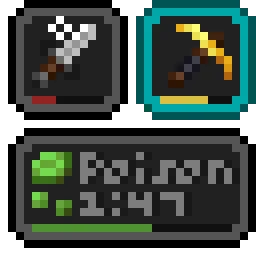 Status Effect BarsMods · 1.17 – 26.x
Adds customizable bars to the status effects overlay to show the remaining duration of effects.
 HyLobbyMods · 1.8 – 26.x
Minecraft mod for Hypixel adding lobby related features like middle click gui items, sound silencer and quickjoin
 Create Aeronautics: Freeze StaffMods · 1.21
Create Aeronautics Freeze Staff adds a single tool for taking a Simulated contraption out logic — recovering TPS on worlds with many contraptions.
Entre para deixar uma avaliação.