
 Pegasus ShadersShaders · 1.19 – 26.x
A shader that blends high performance range with new features, and lots of stylistic range!
Free950,066 downloads
This shader allows you to be able to have way more Minecraft colour features
Direct download from Modrinth · 34 downloads
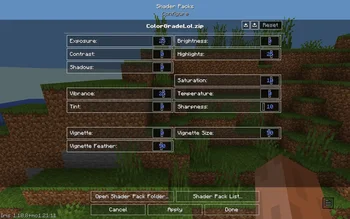
ColorGrade is a shader pack made by ColanderKid. This shader allows you to be able to have way more Minecraft colour features.
It supports Minecraft 1.21. It has been downloaded 34 times on Modrinth. The last update came out on Oct 29, 2026.
The newest is 1.0, released on Oct 29, 2026. It is made for Minecraft 1.21.11. It runs on Iris and Optifine. The download is 12 KB.
| Version | Released | Minecraft | Type |
|---|---|---|---|
1.0 | Oct 29, 2026 | 1.21.11 | Release |
Introducing Color Grade, a new Minecraft mod designed to completely transform the way you experience the game visually.
With a wide range of tools for adjusting colors, lighting, contrast, and more, you can customize Minecraft's appearance to match your own style. Whether you're going for vibrant colors, a cinematic atmosphere, or something completely unique, Color Grade gives you the freedom to make it happen.
This is the first version of Color Grade, and it's just the beginning. Expect more improvements, features, and possibilities as development continues.
Thanks for checking out Color Grade!
Written by ColanderKid. Read it with pictures on Modrinth.
Install Iris (with Sodium) or OptiFine for your Minecraft version: shaders need one of them.
Download the .zip file from Modrinth. Do not unzip it.
In Minecraft, open Options, then Video Settings, then Shader Packs, and click Open Shader Pack Folder.
Drop the .zip file into that folder, pick ColorGrade in the list and click Done.
Shaders are heavy on the graphics card. If the game gets slow, pick a lower profile in the shader settings.
| Resource | Downloads | Versions | Last update | Price |
|---|---|---|---|---|
| ColorGradethe one you looked at | 34 | 1.21 | 13 days ago | Free |
| Pegasus Shaderstimetravelbeard | 950K | 1.19 – 26.x | Oct 3, 2026 | Free |
 ReverieTheCMK | 438K | 1.20 – 26.x | Oct 4, 2026 | Free |
 Stracciatella ShadersDrDesten | 177K | 1.8 – 1.21 | Feb 10, 2026 | Free |
Not yet. The newest version it supports is Minecraft 1.21.
Yes. ColorGrade is free to download from Modrinth.
Yes. The last update came out in the past day.
The closest ones are Pegasus Shaders, Reverie and Stracciatella Shaders. Compare all alternatives
Pegasus ShadersShaders · 1.19 – 26.xA shader that blends high performance range with new features, and lots of stylistic range!
ReverieShaders · 1.20 – 26.xShader with a foggy and warm look. It leverages new features added by Iris for effects previously impossible to achieve.
Stracciatella ShadersShaders · 1.8 – 1.21A vanilla-style shader with colored lights, many quality of life features and visual improvements aiming for the highest performance.
 Vanilla AdvancedShaders · 1.20
A high-performance shader meant to both look good and run on low-end computers! Might have some bugs on older GPUs. Feedback is appreciated!
 Sinus ShaderShaders · 1.8 – 26.x
A Shader that renders Minecraft in a Sine Wave Function. Looks very cursed, why would you want that? Customizable frequency and attitude. Have fun with the…
 Foxy shaderShaders · 1.20 – 26.x
An in-development shader with global ray tracing and some interesting features.
Log in to leave a review.