
 Embellished StoneResource packs · 1.16 – 1.20
For use with the Advancement Plaques mod, gives them a look of embellished stone.
Free529,855 downloads
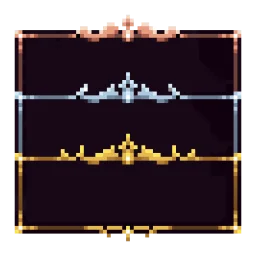
Adds 10 various custom frames for use with Legendary Tooltips.
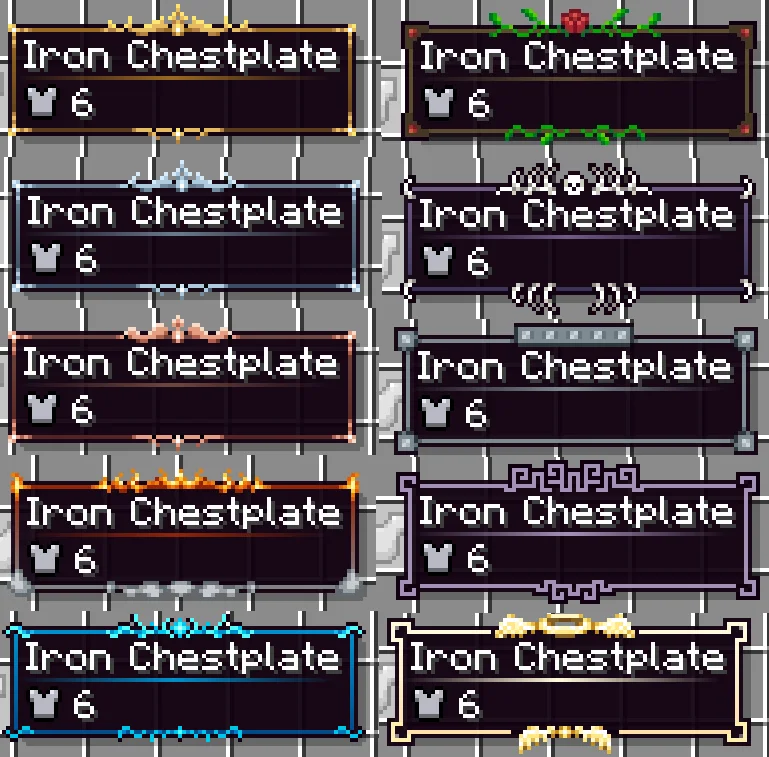
Eclectic Trove is a resource pack made by Grend. Adds 10 various custom frames for use with Legendary Tooltips.
It supports Minecraft 1.12 – 1.20. It has been downloaded 545,730 times on Modrinth. The last update came out on Feb 19, 2025.
Eclectic Trove has had 12 releases on Modrinth since Nov 15, 2022. None of them came out in the past year. The newest is 1.3.0-noconfig, released on Feb 19, 2025. It is made for Minecraft 1.20, 1.20.1. It runs on Minecraft. The download is 13 KB.
| Version | Released | Minecraft | Type |
|---|---|---|---|
1.3.0-noconfig | Feb 19, 2025 | 1.20, 1.20.1 | Release |
1.3.0 | Feb 19, 2025 | 1.20, 1.20.1 | Release |
1.3.0-noconfig | Feb 19, 2025 | 1.19, 1.19.1, 1.19.2 | Release |
1.3.0 | Feb 19, 2025 | 1.19, 1.19.1, 1.19.2 | Release |
1.2.0-noconfig | Oct 30, 2023 | 1.20, 1.20.1 | Release |
This resource pack requires the mod Legendary
Tooltips. Download it here:
https://modrinth.com/mod/legendary-tooltips
This resource pack replaces the default "level 0" border built into Legendary Tooltips, and provides 9 additional
custom borders for use as you see fit for your game/modpack. If you would like to use this resource pack
without worrying about configuration, download the "noconfig" version of the pack. This version contains a
built-in configuration that works well for vanilla and some mods.
If you would like more granular control over what items show what borders, please note that you will need to
configure Legendary Tooltips yourself. Documentation can be found here,
please read that first.
The borders in this pack are quite varied (see images). Here are all of the borders included, with their associated
configuration numbers:
0. Gold frame
1. Silver frame
2.
Copper frame
3. Smoke and flames
4. Water / Ice
5. Rose and vines
6. Bones / death
7. Iron plating / machinery
8. Purple geometric motif
9. Holy (halo / wings)
The suggested border colors are as follows. I highly suggest these are used--copy / paste this section into the
border colors section of Legendary Tooltips' configuration file.
FORGE
Legendary Tooltips version 1.3 and later
level0_colors =
["20_#FF996922_#FF996922_#FF996922_#FF996922_#FF996922_#FF996922_#FF996922_#FF996922_#FF996922_#FF996922_#FF996922_#FF996922_#FF996922+v64-s32_#FF996922",
"20_#FF5A3A1D_#FF5A3A1D_#FF5A3A1D_#FF5A3A1D_#FF5A3A1D_#FF5A3A1D_#FF5A3A1D_#FF5A3A1D_#FF5A3A1D_#FF5A3A1D_#FF5A3A1D_#FF5A3A1D_#FF5A3A1D_#FF996922+v64-s32",
"#D0996922-v155", "#F45A3A1D-v55"]
level1_colors =
["20_#FF697C8C_#FF697C8C_#FF697C8C_#FF697C8C_#FF697C8C_#FF697C8C_#FF697C8C_#FF697C8C_#FF697C8C_#FF697C8C_#FF697C8C_#FF697C8C_#FF697C8C+v48-s16_#FF697C8C",
"20_#FF3A4C61_#FF3A4C61_#FF3A4C61_#FF3A4C61_#FF3A4C61_#FF3A4C61_#FF3A4C61_#FF3A4C61_#FF3A4C61_#FF3A4C61_#FF3A4C61_#FF3A4C61_#FF3A4C61_#FF3A4C61+v48-s16",
"#D0697C8C-v155", "#F43A4C61-v65"]
level2_colors =
["20_#FF70453D_#FF70453D_#FF70453D_#FF70453D_#FF70453D_#FF70453D_#FF70453D_#FF70453D_#FF70453D_#FF70453D_#FF70453D_#FF70453D_#FF70453D+v64-s32_#FF70453D",
"20_#FF542323_#FF542323_#FF542323_#FF542323_#FF542323_#FF542323_#FF542323_#FF542323_#FF542323_#FF542323_#FF542323_#FF542323_#FF542323_#FF542323+v64-s32",
"#D070453D-v155", "#F4542323-v60"]
level3_colors =
["30_#FF912307_orangered-s45-v25_#FF912307+v50_#FF912307+r25+s50-v55",
"30_#FF818385-v15_#FF818385+r5+g5+v45_#FF818385-v45_#FF818385+r25+g25", "30_#FF912307-v105-a36_#F0120A00",
"#F8818385-v100"]
level4_colors = ["24_#FF008FCC-v25_#FF008FCC+s25+v85",
"24_#FF044B8A-v30_#FF044B8A+s25+v55", "#D0008FCC-v160", "#F8044B8A-v75"]
level5_colors =
["#FF5C4C2D", "#FF5C4C2D", "#F0160A00", "#F0160A00"]
level6_colors = ["#FF705A87",
"#FF705A87-v70+s15", "#E8705A87-v85+s15", "#F4705A87-v120+s35"]
level7_colors =
["#FF7D8A91", "#FF7D8A91", "#F07D8A91-v125+s35", "#F47D8A91-v100+s55"]
level8_colors =
["#FFA591B6", "#FFA591B6", "#E4A591B6-v155+s35", "#F4A591B6-v145+s35"]
level9_colors =
["15_#FFFFFADB-v20+s35_#FFFFFADB+v30-s20", "15_#FFFFDFAD-v20+s35_#FFFFDFAD+v30-s20", "#D8FFFADB-v245",
"#F4FFDFAD-v210+s90"]
Minecraft 1.16.5 and later
#Range: 0 ~ 4294967295
level0_start_color = 4288244002
#Range: 0 ~ 4294967295
level0_end_color = 4284168989
#Range: 0 ~ 4294967295
level1_start_color = 4285103244
#Range: 0 ~ 4294967295
level1_end_color = 4282010721
#Range: 0 ~ 4294967295
level2_start_color = 4285547837
#Range: 0 ~ 4294967295
level2_end_color = 4283704099
#Range: 0 ~ 4294967295
level3_start_color = 4287701767
#Range: 0 ~ 4294967295
level3_end_color = 4286677893
#Range: 0 ~ 4294967295
level4_start_color = 4278226892
#Range: 0 ~ 4294967295
level4_end_color = 4278471562
#Range: 0 ~ 4294967295
level5_start_color = 4284238893
#Range: 0 ~ 4294967295
level5_end_color = 4284238893
#Range: 0 ~ 4294967295
level6_start_color = 4285553287
#Range: 0 ~ 4294967295
level6_end_color = 4281939286
#Range: 0 ~ 4294967295
level7_start_color = 4286417553
#Range: 0 ~ 4294967295
level7_end_color = 4286417553
#Range: 0 ~ 4294967295
level8_start_color = 4289040822
#Range: 0 ~ 4294967295
level8_end_color = 4289040822
#Range: 0 ~ 4294967295
level9_start_color = 4294965979
#Range: 0 ~ 4294967295
level9_end_color = 4294959021
Minecraft 1.12.2 ONLY
colors {
# [default: #FF996922]
S:level0_start_color=#FF996922
# [default: #FF5A3A1D]
S:level0_end_color=#FF5B3B1D
# [default: #FF996922]
S:level1_start_color=#FF697C8C
# [default: #FF5A3A1D]
S:level1_end_color=#FF3A4C61
# [default: #FF996922]
S:level2_start_color=#FF70453D
# [default: #FF5A3A1D]
S:level2_end_color=#FF542323
# [default: #FF996922]
S:level3_start_color=#FF912307
# [default: #FF5A3A1D]
S:level3_end_color=#FF818385
# [default: #FF996922]
S:level4_start_color=#FF008FCC
# [default: #FF5A3A1D]
S:level4_end_color=#FF044B8A
# [default: #FF996922]
S:level5_start_color=#FF5C4C2D
# [default: #FF5A3A1D]
S:level5_end_color=#FF5C4C2D
# [default: #FF996922]
S:level6_start_color=#FF705A87
# [default: #FF5A3A1D]
S:level6_end_color=#FF393556
# [default: #FF996922]
S:level7_start_color=#FF7D8A91
# [default: #FF5A3A1D]
S:level7_end_color=#FF7D8A91
# [default: #FF996922]
S:level8_start_color=#FFA591B6
# [default: #FF5A3A1D]
S:level8_end_color=#FFA591B6
# [default: #FF996922]
S:level9_start_color=#FFFFFADB
# [default: #FF5A3A1D]
S:level9_end_color=#FFFFDFAD
# [default: #FF996922]
S:level10_start_color=#FF996922
# [default: #FF5A3A1D]
S:level10_end_color=#FF5A3A1D
# [default: #FF996922]
S:level11_start_color=#FF996922
# [default: #FF5A3A1D]
S:level11_end_color=#FF5A3A1D
# [default: #FF996922]
S:level12_start_color=#FF996922
# [default: #FF5A3A1D]
S:level12_end_color=#FF5A3A1D
# [default: #FF996922]
S:level13_start_color=#FF996922
# [default: #FF5A3A1D]
S:level13_end_color=#FF5A3A1D
# [default: #FF996922]
S:level14_start_color=#FF996922
# [default: #FF5A3A1D]
S:level14_end_color=#FF5A3A1D
# [default: #FF996922]
S:level15_start_color=#FF996922
# [default: #FF5A3A1D]
S:level15_end_color=#FF5A3A1D
# [default: #F0160A00]
S:level0_bg_color=#F01C1103
# [default: #F0160A00]
S:level1_bg_color=#F0080F1A
# [default: #F0160A00]
S:level2_bg_color=#F014070B
# [default: #F0160A00]
S:level3_bg_color=#F01C0700
# [default: #F0160A00]
S:level4_bg_color=#F0001a30
# [default: #F0160A00]
S:level5_bg_color=#F0160A00
# [default: #F0160A00]
S:level6_bg_color=#F0130D1A
# [default: #F0160A00]
S:level7_bg_color=#F0182024
# [default: #F0160A00]
S:level8_bg_color=#F018131C
# [default: #F0160A00]
S:level9_bg_color=#F01A160B
# [default: #F0160A00]
S:level10_bg_color=#F0160A00
# [default: #F0160A00]
S:level11_bg_color=#F0160A00
# [default: #F0160A00]
S:level12_bg_color=#F0160A00
# [default: #F0160A00]
S:level13_bg_color=#F0160A00
# [default: #F0160A00]
S:level14_bg_color=#F0160A00
# [default: #F0160A00]
S:level15_bg_color=#F0160A00
}
FABRIC
Legendary Tooltips version 1.2 and later
#Range: 0 ~ 4294967295
level0_start_color = 4288244002
#Range: 0 ~ 4294967295
level0_end_color = 4284168989
#Range: 0 ~ 4294967295
level1_start_color = 4285103244
#Range: 0 ~ 4294967295
level1_end_color = 4282010721
#Range: 0 ~ 4294967295
level2_start_color = 4285547837
#Range: 0 ~ 4294967295
level2_end_color = 4283704099
#Range: 0 ~ 4294967295
level3_start_color = 4287701767
#Range: 0 ~ 4294967295
level3_end_color = 4286677893
#Range: 0 ~ 4294967295
level4_start_color = 4278226892
#Range: 0 ~ 4294967295
level4_end_color = 4278471562
#Range: 0 ~ 4294967295
level5_start_color = 4284238893
#Range: 0 ~ 4294967295
level5_end_color = 4284238893
#Range: 0 ~ 4294967295
level6_start_color = 4285553287
#Range: 0 ~ 4294967295
level6_end_color = 4281939286
#Range: 0 ~ 4294967295
level7_start_color = 4286417553
#Range: 0 ~ 4294967295
level7_end_color = 4286417553
#Range: 0 ~ 4294967295
level8_start_color = 4289040822
#Range: 0 ~ 4294967295
level8_end_color = 4289040822
#Range: 0 ~ 4294967295
level9_start_color = 4294965979
#Range: 0 ~ 4294967295
level9_end_color = 4294959021
Legendary Tooltips before version 1.2
"startColors": [ 4288244002, 4285103244, 4285547837, 4287701767, 4278226892, 4284238893,
4285553287, 4286417553, 4289040822, 4294965979, 4288244002, 4288244002, 4288244002, 4288244002, 4288244002,
4288244002 ], "endColors": [ 4284168989, 4282010721, 4283704099, 4286677893, 4278471562, 4284238893,
4281939286, 4286417553, 4289040822, 4294959021, 4284103197, 4284103197, 4284103197, 4284103197, 4284103197,
4284103197 ],
You are free to use this resource pack in modpacks.
Problems, feature request, something else? [Join us on
Discord!](discord.gg/S5NQjbXPnb)
Written by Grend. Read it with pictures on Modrinth.
Download the .zip file from Modrinth. Do not unzip it.
In Minecraft, open Options, then Resource Packs, then Open Pack Folder.
Drop the .zip file into that folder and go back to the game.
Move Eclectic Trove to the right-hand list and click Done.
It is made for Minecraft 1.12 – 1.20. On other versions Minecraft marks it as incompatible, but it often still works.
| Resource | Downloads | Versions | Last update | Price |
|---|---|---|---|---|
| Eclectic Trovethe one you looked at | 546K | 1.12 – 1.20 | Feb 19, 2025 | Free |
| Embellished StoneGrend | 530K | 1.16 – 1.20 | Oct 31, 2023 | Free |
 Jakotens' Pokémon Trainer CosmeticsJakotens | 3.1M | 1.20 – 1.21 | Dec 4, 2024 | Free |
 Oh Snapmuddiemodels | 156K | 1.20 – 1.21 | Sep 27, 2026 | Free |
Not yet. The newest version it supports is Minecraft 1.20.
Yes. Eclectic Trove is free to download from Modrinth.
Yes: Legendary Tooltips. Install it before Eclectic Trove.
Yes. The last update came out in the past day.
The closest ones are Embellished Stone, Jakotens' Pokémon Trainer Cosmetics and Oh Snap. Compare all alternatives
Embellished StoneResource packs · 1.16 – 1.20For use with the Advancement Plaques mod, gives them a look of embellished stone.
Jakotens' Pokémon Trainer CosmeticsResource packs · 1.20 – 1.21This resource pack includes custom hats and player skins for most playable characters from the main series Pokémon games from generations 1-8, perfect for…
Oh SnapResource packs · 1.20 – 1.21This Ressource pack remakes the Exposure Camera and Album in the Cobblemon Style
 Canon PC WallpapersResource packs · 1.21
This addon adds a variety of wallpapers from Generations 3 through 9 to Cobblemon, via the new Wallpaper Addon Systems.
 Fishing Rod 3DResource packs · 1.19 – 1.21
Vanilla + Fishing Rod 3D
 Geometric Font LegacyResource packs · 1.8 – 1.20
A sharp, clean remake of the default mojangles font for all resolutions.
Log in to leave a review.