
 Cobblemon Interface: RecoloredResource packs · 1.20 – 1.21
Changes the colors of the Cobblemon Interface resoucepack to match the Pokémon health and exp bar colors from Cobblemon.
Free602,130 downloads
Add cobblemon elements to your HUD, like replacing your hunger bar with sitrus berries
Direct download from Modrinth · 532,167 downloads


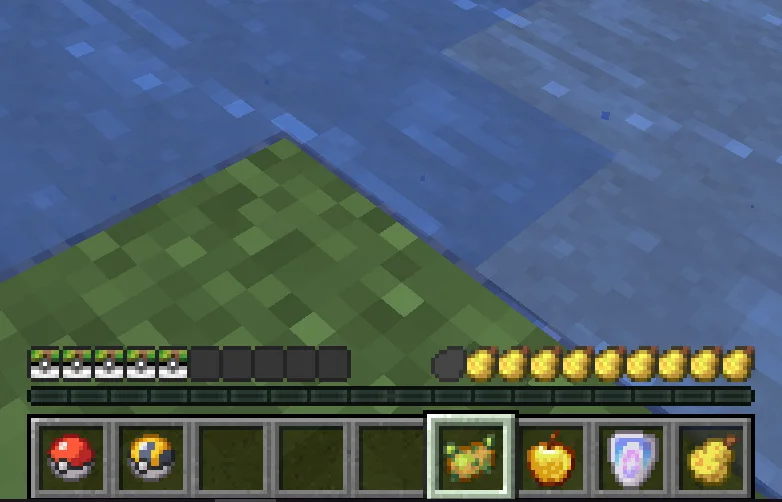
Cobblemon HUD is a resource pack made by TheLii. Add cobblemon elements to your HUD, like replacing your hunger bar with sitrus berries.
It supports Minecraft 1.21. It has been downloaded 532,167 times on Modrinth. The last update came out on Jul 28, 2025.
The newest is 1.0, released on Jul 28, 2025. It is made for Minecraft 1.21.1. It runs on Minecraft. The download is 188 KB.
| Version | Released | Minecraft | Type |
|---|---|---|---|
1.0 | Jul 28, 2025 | 1.21.1 | Release |
This resource pack transforms your minecraft HUD into a cobblemon theme, perfect for use with cobblemon modpacks.
Hunger bar -> sitrus berry
Health -> pokeball
Armor -> ability shield
Mounts -> heavy ball
Compatible with AppleSkin
Hardcore:Various ancient balls
This package does not require any mods and you can add it to your modpack.
My English is not good, the above content is generated by Google Translate. Please forgive me if there are any errors.
Written by TheLii. Read it with pictures on Modrinth.
Download the .zip file from Modrinth. Do not unzip it.
In Minecraft, open Options, then Resource Packs, then Open Pack Folder.
Drop the .zip file into that folder and go back to the game.
Move Cobblemon HUD to the right-hand list and click Done.
It is made for Minecraft 1.21. On other versions Minecraft marks it as incompatible, but it often still works.
Full guide: How to install Minecraft resource packs
| Resource | Downloads | Versions | Last update | Price |
|---|---|---|---|---|
| Cobblemon HUDthe one you looked at | 532K | 1.21 | Jul 28, 2025 | Free |
| Cobblemon Interface: RecoloredVinnyStalck | 602K | 1.20 – 1.21 | Apr 8, 2025 | Free |
 Jirniy's Pink HUDjirniyuwu | 16K | 1.21 – 26.x | 25 days ago | Free |
 PocketLCDizqou_ | 2 | 1.21 – 26.x | 1 day ago | Free |
Not yet. The newest version it supports is Minecraft 1.21.
Yes. Cobblemon HUD is free to download from Modrinth.
Yes. The last update came out in the past day.
The closest ones are Cobblemon Interface: Recolored, Jirniy's Pink HUD and PocketLCD. Compare all alternatives
Cobblemon Interface: RecoloredResource packs · 1.20 – 1.21Changes the colors of the Cobblemon Interface resoucepack to match the Pokémon health and exp bar colors from Cobblemon.
Jirniy's Pink HUDResource packs · 1.21 – 26.xmodifies most of the hud icons (such as hearts, hunger, etc) to be more pink and cutesy :3
PocketLCDResource packs · 1.21 – 26.xTurns your inventory, HUD and menus into a 4-shade green LCD screen. Pixel hearts, battery hunger, blinking cursor, scanlines and a dithered title panorama.
 Cobblemon InterfaceResource packs · 1.19 – 1.21
Cobblemon inspired GUI Textures and Sounds
 Cobblemon Interface: ModdedResource packs · 1.20 – 1.21
Mod support for the Cobblemon Interface resourcepack
 Recolourful Containers GUI + HUDResource packs · 1.19 – 26.x
Do you want more immersive, more interesting, more colourful GUIs and HUD? Than this pack is for you!
Log in to leave a review.