
 QuarterShaders · 1.16 – 1.20
Quarter is a shader pack that will turn your entire Minecraft world into a small, rectangle in the corner of your screen.
Free13,628 downloads
Make the world turn to Winter
Opens Modrinth · 19,072 downloads there
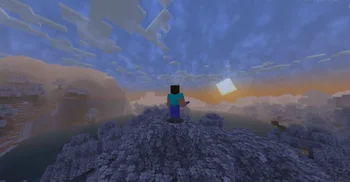
Make the world turn to Winter
Snow Default is a shader pack made by marctgamer. It supports Minecraft 1.16 – 1.21. It has been downloaded 19,072 times on Modrinth. The last update came out on Dec 25, 2024.
Snow Default has had 3 releases on Modrinth since Sep 26, 2024. None of them came out in the past year. The newest is 1.2, released on Dec 25, 2024. It is made for Minecraft 1.17 – 1.21.4. It runs on Iris. The download is 60 KB.
| Version | Released | Minecraft | Type |
|---|---|---|---|
1.2 | Dec 25, 2024 | 1.17 – 1.21.4 | Alpha |
1.1 | Oct 5, 2024 | 1.16.4 – 1.21.1 | Alpha |
1.0 | Sep 26, 2024 | 1.16.2 – 1.21.1 | Alpha |
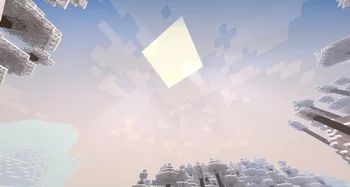
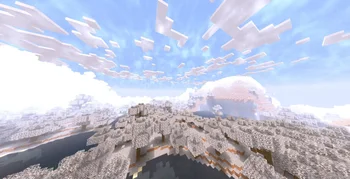
Transform your Minecraft world into a winter wonderland with the Snow Default shader! This unique shader pack enhances your game with stunning visual effects, delivering a captivating snowy aesthetic while preserving the classic Minecraft experience.
Used BSL Shaders
Please keep in mind that this shader is currently in Alpha. As such, you may encounter some bugs or unexpected behavior. Your feedback is invaluable as we work toward refining and enhancing the shader.
If you want to contact
Contact to: marctgamer@gmail.com
Embrace the winter season in Minecraft and immerse yourself in a snowy paradise with Snow Default!
Written by marctgamer. Read it with pictures on Modrinth.
Install Iris (with Sodium) or OptiFine for your Minecraft version: shaders need one of them.
Download the .zip file from Modrinth. Do not unzip it.
In Minecraft, open Options, then Video Settings, then Shader Packs, and click Open Shader Pack Folder.
Drop the .zip file into that folder, pick Snow Default in the list and click Done.
Shaders are heavy on the graphics card. If the game gets slow, pick a lower profile in the shader settings.
Not yet. The newest version it supports is Minecraft 1.21.
Yes. Snow Default is free to download from Modrinth.
Yes. The last update came out in the past day.
QuarterShaders · 1.16 – 1.20Quarter is a shader pack that will turn your entire Minecraft world into a small, rectangle in the corner of your screen.
Log in to leave a review.