
 Starter KitMods · 1.16 – 26.x
📦 Give all new players joining the world configurable starter gear, items, potion effects, Curios and Trinkets slots and/or commands. Compatible with FTB Team…
Free10,753,907 downloads
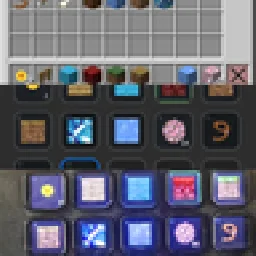
Use your Stream Deck as a customizable Minecraft controller for hotbar slots, inventory management, actions, shortcuts, commands, and more.

Use your Stream Deck as a customizable Minecraft controller for hotbar slots, inventory management, actions, shortcuts, commands, and more.
StreamDeckMacros is a resource made by ariel.galnur. It supports Minecraft 1.21. It has been downloaded 20 times on Modrinth. The last update came out on Aug 29, 2026.
The newest is 0.1.0, released on Aug 29, 2026. It is made for Minecraft 1.21.11. It runs on Fabric. The download is 913 KB.
| Version | Released | Minecraft | Type |
|---|---|---|---|
0.1.0 | Aug 29, 2026 | 1.21.11 | Release |
StreamDeckMacros is open source. Its newest release on GitHub is DeckCraft Hotbar v0.1.0, published on Aug 29, 2026.
Mirrors your Minecraft 1.21.11 (Fabric) hotbar onto an Elgato Stream Deck, and lets you select hotbar slots by pressing a key.
Client-side only · localhost only · no automation.
They are two halves of one thing. Neither does anything alone.
Download
Where it goes
deckcraft-hotbar-0.1.0.jar
your .minecraft/mods folder (with Fabric API)
com.fluffybacon.deckcraft-hotbar.streamDeckPlugin
double-click it — installs into the Stream Deck app
Requirements: Minecraft 1.21.11 + Fabric Loader + Fabric API, Java 21, Stream Deck app 6.5+, and Stream Deck hardware.
On its first launch the plugin generates item icons from your own Minecraft installation, in the background — usually under a minute. Keys show item names until it finishes, then repaint with real art. If Minecraft isn't installed for your user, keys simply keep showing names, which works fine.
Read all release notes on GitHub
allows the use of stream deck devices with minecrft.
Turn your Elgato Stream Deck into a live Minecraft inventory controller.
DeckCraft connects Minecraft Java Edition to your Elgato Stream Deck, letting your physical Stream Deck keys display what is actually inside your Minecraft inventory.
Your hotbar updates live on the deck with real Minecraft item icons, and pressing a hotbar key selects that slot in-game — just like pressing 1–9 on your keyboard.
DeckCraft scans your own Minecraft installation for item textures, including supported modded items and resource packs, so the icons on your Stream Deck can match what you actually see in-game.
DeckCraft contains both parts needed for the integration:
1. The Minecraft Fabric mod
2. The DeckCraft Stream Deck plugin
Install the mod normally, launch Minecraft once, and DeckCraft extracts the Stream Deck plugin into your Minecraft folder.
Then simply double-click the .streamDeckPlugin file to install it into the Stream Deck app.
No separate bridge application needs to stay running.
Hotbar slots are interactive:
Press a Stream Deck hotbar key → Minecraft selects that slot.
Other inventory slots such as storage, armor and off-hand can also be displayed, but are intentionally read-only.
DeckCraft does not automatically move inventory items or perform gameplay actions for you.
DeckCraft can scan your installed mods for their own item models and textures.
That means your Stream Deck isn't limited to vanilla Minecraft items — supported modded items can get their own proper icons too.
Enabled resource packs are also taken into account, allowing your Stream Deck icons to better match the appearance of your game.
DeckCraft is designed as an input and information display, not an automation mod.
It does not:
Pressing a DeckCraft hotbar button performs essentially the same action as physically pressing a Minecraft hotbar number key.
As with any client-side mod, always follow the rules of the server you're playing on.
Use your Stream Deck for faster hotbar access, better inventory awareness, streaming setups, accessibility, or simply because having your Minecraft inventory on a physical button deck is pretty cool.
Written by ariel.galnur. Read it with pictures on Modrinth.
This mod runs only on your own game. Servers do not need it, so you can use it on any server.
Install Fabric for Minecraft 1.21.
Add the mods it needs: Fabric API.
Download the .jar file from Modrinth and put it in the mods folder of your .minecraft directory.
Start Minecraft with the Fabric profile.
With the CraftRank Launcher you can skip these steps: open Mods, search for StreamDeckMacros and click Install.
| Resource | Downloads | Versions | Last update | Price |
|---|---|---|---|---|
| StreamDeckMacrosthe one you looked at | 20 | 1.21 | Aug 29, 2026 | Free |
| Starter KitSerilum | 10.8M | 1.16 – 26.x | 12 days ago | Free |
 Item Scrollermasa | 3.1M | 1.8 – 26.x | Sep 28, 2026 | Free |
 Create Aeronautics: Freeze StaffDovorol | 35 | 1.21 | 1 day ago | Free |
Not yet. The newest version it supports is Minecraft 1.21.
Yes. StreamDeckMacros is free to download from Modrinth.
Client-side. StreamDeckMacros goes in your own mods folder and works on any server, including servers without mods.
Yes: Fabric API, Mod Menu. Install it before StreamDeckMacros.
Yes. The last update came out in the past day.
The closest ones are Starter Kit, Item Scroller and Create Aeronautics: Freeze Staff. Compare all alternatives
Starter KitMods · 1.16 – 26.x📦 Give all new players joining the world configurable starter gear, items, potion effects, Curios and Trinkets slots and/or commands. Compatible with FTB Team…
Item ScrollerMods · 1.8 – 26.xA client mod that adds many shortcuts to move items easier and craft faster in inventory screens
Create Aeronautics: Freeze StaffMods · 1.21Create Aeronautics Freeze Staff adds a single tool for taking a Simulated contraption out logic — recovering TPS on worlds with many contraptions.
 Create: InsightsMods · 1.21
A Create mod add-on adding more information to the Goggles's overlay
 No Drop HotbarMods · 1.21 – 26.x
Stops you from dropping items by accident while playing. The drop key does nothing in game, but still works normally in your inventory and chests…
 GraveStone ModMods · 1.19 – 26.x
Places a gravestone with your inventory items inside when you die
Log in to leave a review.