
 SecurityCraftMods · 1.8 – 26.x
Adds plenty of blocks and items to defend and secure your base with.
Free5,945,475 downloads
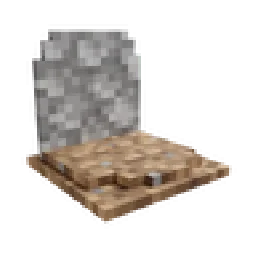
Places a gravestone with your inventory items inside when you die
GraveStone Mod is a mod made by henkelmax. Places a gravestone with your inventory items inside when you die.
It supports Minecraft 1.19 – 26.x. It has been downloaded 12,577,903 times on Modrinth. The last update came out on Oct 1, 2026.
GraveStone Mod has had 122 releases on Modrinth since Jun 25, 2022. 21 of them came out in the past year. The newest is neoforge-1.0.41+26.3, released on Oct 1, 2026. It is made for Minecraft 26.3. It runs on NeoForge. The download is 328 KB.
| Version | Released | Minecraft | Type |
|---|---|---|---|
neoforge-1.0.41+26.3 | Oct 1, 2026 | 26.3 | Release |
neoforge-1.0.40+26.3 | Sep 25, 2026 | 26.3 | Release |
neoforge-1.0.40+26.2 | Aug 17, 2026 | 26.2 | Release |
neoforge-1.0.40+26.1.2 | Aug 17, 2026 | 26.1, 26.1.1, 26.1.2 | Release |
neoforge-1.21.11-1.0.40 | Aug 17, 2026 | 1.21.11 | Release |
Every time you die, a grave is placed at your position.
To retrieve your items just break the grave.
There is also a config option to get your items back by sneaking on the grave (1.16.3+ only).
When you right-click the grave it will show information regarding the death of the player.
Since version 1.16.3-2.0.0 the grave is now able to store your items back into their original slots.
Everytime you die you get an obituary. If you don't want that you can disable it in the config.
It contains:
If you don't want to keep the obituary after you recovered your items, you can enable the automatic removal in the config.
If you break the grave with silk touch, you get it dropped as an item.
You can also craft graves.
Naming the grave in an anvil, allows you to have custom text displayed on your grave.
There are several things you can change in the configs:
If you somehow lost your items you can recover them with the recover command.
The syntax is /restore .
The parameter player is the player whose inventory should get restored.
The parameter death_id is the ID of the death. You can find it out by enabling advanced tooltips (F3 + H) and opening the obituary. The death ID also gets written into the logs if a grave couldn't get placed.
The last parameter defines if you want to get the players inventory replaced (Overwritten) or added (Just adds the items to the players existing inventory).
You can also get a pre made restore command by sneaking and right-clicking the obituary as an admin.
If you die inside a block, the grave is placed at the next empty space above your location. If there is no free block above your position, or you are above the build limit, your items drop as usual.
If you fall into the void, the grave is placed at the lowest point in the world where blocks can be placed. If there is no free space it will get placed at the next free spot above.
Written by henkelmax. Read it with pictures on Modrinth.
This mod is needed on both the server and every player who joins.
Install Forge and NeoForge for Minecraft 1.19 – 26.x.
Download the .jar file from Modrinth and put it in the mods folder of your .minecraft directory.
Start Minecraft with the Forge profile.
With the CraftRank Launcher you can skip these steps: open Mods, search for GraveStone Mod and click Install.
| Resource | Downloads | Versions | Last update | Price |
|---|---|---|---|---|
| GraveStone Modthe one you looked at | 12.6M | 1.19 – 26.x | Oct 1, 2026 | Free |
| SecurityCraftGeforce132 | 5.9M | 1.8 – 26.x | Oct 12, 2026 | Free |
 HighLightMyItemsi37c | 31 | 1.21 – 26.x | 12 hours ago | Free |
 Item BordersGrend | 9M | 1.12 – 26.x | Sep 22, 2026 | Free |
Yes. GraveStone Mod supports Minecraft 26.x. All supported versions: 26.x, 1.21, 1.20, 1.19.
Yes. GraveStone Mod is free to download from Modrinth.
Both. The server and every player need GraveStone Mod installed.
Yes: Jade 🔍. Install it before GraveStone Mod.
Yes. The last update came out in the past day.
The closest ones are SecurityCraft, HighLightMyItems and Item Borders. Compare all alternatives
SecurityCraftMods · 1.8 – 26.xAdds plenty of blocks and items to defend and secure your base with.
HighLightMyItemsMods · 1.21 – 26.xHighlight specific items in your inventory. ModMenu compatible
Item BordersMods · 1.12 – 26.xAdd colored borders to inventory slots to make your rare items stand out!
 Fabric Seasons: ExtrasMods · 1.19 – 1.21
Custom blocks and items to make your Fabric Seasons experience better.
 Immersive AircraftMods · 1.16 – 26.x
A bunch of rustic aircraft to travel, transport, and explore!
 Create AeronauticsMods · 1.21
Build anything from airships to planes and cars!
Log in to leave a review.