
 Transparent GUI and HUDTexture packs · 1.8 – 26.x
1.8.8+; Makes all of the GUIs and HUDs in the game transparent (clear; see-through) for a sleek and modern-looking minimal design! + Fire and Pumpkin overlay…
Free629,643 downloads
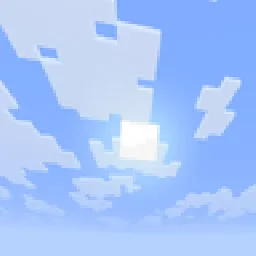
Make clouds... brighter, more vibrant and less sad, dim looking.

Make clouds... brighter, more vibrant and less sad, dim looking.
Brighter Clouds is a texture pack made by asapacey2. It supports Minecraft 1.21 – 26.x. It has been downloaded 16 times on Modrinth. The last update came out on Oct 27, 2026.
Brighter Clouds has had 2 releases on Modrinth since Oct 27, 2026. 2 of them came out in the past year. The newest is 1.21.-26.2, released on Oct 27, 2026. It is made for Minecraft 1.21.6 – 26.2. It runs on Minecraft. The download is 1 KB.
| Version | Released | Minecraft | Type |
|---|---|---|---|
1.21.-26.2 | Oct 27, 2026 | 1.21.6 – 26.2 | Release |
26.3+ | Oct 27, 2026 | 26.3 | Release |
Changes clouds to looks visually brighter, vibrant and less sad looking.
Inspired by real life clouds~~~~
Did you know, you can configure clouds distance in the settings?
Written by asapacey2. Read it with pictures on Modrinth.
Download the .zip file from Modrinth. Do not unzip it.
In Minecraft, open Options, then Resource Packs, then Open Pack Folder.
Drop the .zip file into that folder and go back to the game.
Move Brighter Clouds to the right-hand list and click Done.
It is made for Minecraft 1.21 – 26.x. On other versions Minecraft marks it as incompatible, but it often still works.
| Resource | Downloads | Versions | Last update | Price |
|---|---|---|---|---|
| Brighter Cloudsthe one you looked at | 16 | 1.21 – 26.x | 14 days ago | Free |
| Transparent GUI and HUDVirxEC | 630K | 1.8 – 26.x | Jun 20, 2026 | Free |
 Wool SimpleScroutop | 300K | 1.8 – 26.x | Jan 26, 2026 | Free |
 Quadraligxnaf | 420K | 1.20 – 26.x | Sep 14, 2026 | Free |
Yes. Brighter Clouds supports Minecraft 26.x. All supported versions: 26.x, 1.21.
Yes. Brighter Clouds is free to download from Modrinth.
Yes. The last update came out in the past day.
The closest ones are Transparent GUI and HUD, Wool Simple and Quadral. Compare all alternatives
Transparent GUI and HUDTexture packs · 1.8 – 26.x1.8.8+; Makes all of the GUIs and HUDs in the game transparent (clear; see-through) for a sleek and modern-looking minimal design! + Fire and Pumpkin overlay…
Wool SimpleTexture packs · 1.8 – 26.xSimpler and better looking wool for bedwars and Minecraft.
QuadralTexture packs · 1.20 – 26.xA bright, crisp design with vibrant colours. When you need a refreshing change from vanilla, this will give you a whole new perspective!
 Story Mode CloudsTexture packs · 1.21 – 26.x
Adds the clouds from Minecraft Story Mode into the main game.
 ShadifyTexture packs · 1.16 – 26.x
Removes block shading and makes the game more vibrant
 Chat Reporting HelperTexture packs · 1.19 – 26.x
An educational tool that explains chat reporting in a simple and neutral way.
Log in to leave a review.