
 Simple Shader OneShaders · 1.19
Is there anyone who wants a simple shadow? This shader is lightweight because it only puts round shadows. It’s not perfect, but you can enjoy a different…
Free7,223 downloads
That's not true, it has shadows and ambient occlusion
Opens Modrinth · 10,242 downloads there


That's not true, it has shadows and ambient occlusion
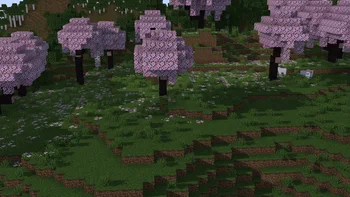
only shadows is a shader pack made by javierbendezuv. It supports Minecraft 1.17 – 26.x. It has been downloaded 10,242 times on Modrinth. The last update came out on Apr 25, 2026.
The newest is onlyshadows, released on Apr 25, 2026. It is made for Minecraft 1.17 – 26.1.2. It runs on Iris and Optifine. The download is 26 KB.
| Version | Released | Minecraft | Type |
|---|---|---|---|
onlyshadows | Apr 25, 2026 | 1.17 – 26.1.2 | Release |
EN:
This is my first Minecraft shader, developed as a personal learning project and released as-is.
ES:
Este es mi primer shader de Minecraft, desarrollado como un proyecto personal de aprendizaje y publicado tal cual.
Written by javierbendezuv. Read it with pictures on Modrinth.
Install Iris (with Sodium) or OptiFine for your Minecraft version: shaders need one of them.
Download the .zip file from Modrinth. Do not unzip it.
In Minecraft, open Options, then Video Settings, then Shader Packs, and click Open Shader Pack Folder.
Drop the .zip file into that folder, pick only shadows in the list and click Done.
Shaders are heavy on the graphics card. If the game gets slow, pick a lower profile in the shader settings.
| Resource | Downloads | Versions | Last update | Price |
|---|---|---|---|---|
| only shadowsthe one you looked at | 10K | 1.17 – 26.x | Apr 25, 2026 | Free |
| Simple Shader Onenercone | 7,223 | 1.19 | Jul 26, 2023 | Free |
 Rethinking Voxelsgri573 | 13.7M | 1.19 – 1.21 | Jun 20, 2025 | Free |
 BrighterAccessibilityqweren | 78K | 1.8 – 1.21 | Jul 14, 2024 | Free |
Yes. only shadows supports Minecraft 26.x. All supported versions: 26.x, 1.21, 1.20, 1.19, 1.18, 1.17.
Yes. only shadows is free to download from Modrinth.
Yes. The last update came out in the past day.
The closest ones are Simple Shader One, Rethinking Voxels and BrighterAccessibility. Compare all alternatives
Simple Shader OneShaders · 1.19Is there anyone who wants a simple shadow? This shader is lightweight because it only puts round shadows. It’s not perfect, but you can enjoy a different…
Rethinking VoxelsShaders · 1.19 – 1.21[WIP] A gameplay shaderpack based on complementary reimagined that has coloured block light with sharp shadows
BrighterAccessibilityShaders · 1.8 – 1.21Removes the shadows and fog from the game for visually impaired people. Has Distant Horizons support.
 MINIMALShaders · 1.18 – 1.21
A Minecraft shader that only adds shadows
 Fantasy.VTShaders · 1.17 – 26.x
The shader with the effect of picturesqueness is created for real connoisseurs of the game. It is not only pleasing to the eye, but also optimized to work on…
 ESSENTIALS ShaderShaders · 1.17 – 26.x
A lightweight Minecraft shader with only essential VFX to simulate realistic effects such as shadows, rays, etc., to run on integrated GPUs.
Log in to leave a review.