
 Lumina ShaderShaders · 1.8 – 26.x
Cinematic shaders for Minecraft Java featuring a black hole and white hole in the End, atmospheric lighting, volumetric clouds, water reflections and…
Free196,127 downloads

Dynamic atmospheric Minecraft shader with cinematic skies, volumetric clouds, immersive lighting, and reactive weather.
Opens Modrinth · 7,971 downloads there
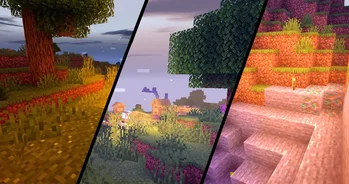
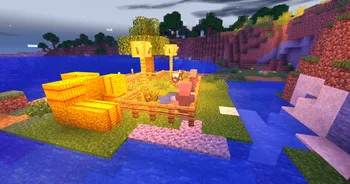

Dynamic atmospheric Minecraft shader with cinematic skies, volumetric clouds, immersive lighting, and reactive weather.
Principal is a shader pack made by xsoras. It supports Minecraft 1.16 – 26.x. It has been downloaded 7,971 times on Modrinth. The last update came out on Sep 12, 2026.
Principal has had 2 releases on Modrinth since May 20, 2026. 2 of them came out in the past year. The newest is 1.1, released on Sep 12, 2026. It is made for Minecraft 1.16 – 1.18.2. It runs on Iris and Optifine. The download is 24 KB.
| Version | Released | Minecraft | Type |
|---|---|---|---|
1.1 | Sep 12, 2026 | 1.16 – 1.18.2 | Release |
0.6 | May 20, 2026 | 1.16 – 26.2 | Release |
La Flòr Principal is a handcrafted Minecraft shaderpack built around one goal: making every hour of the in-game day feel alive. Instead of cranking up bloom and calling it done, this shader layers together a full atmospheric pipeline — from physical sky scattering at dawn to torch-lit caves with warm amber glow — so that the world looks different, feels different, and plays differently depending on when and where you are.
The sky is never static. La Flòr Principal uses a Rayleigh-style scattering model that shifts the sky gradient based on sun angle: midday gives you a crisp cerulean dome that deepens toward the zenith, while sunrise and sunset transition through rich amber and violet tones that bleed into the horizon fog. Twilight windows are tightly tuned pulse functions — you'll notice a real "golden hour" at approximately 6:00 AM and 6:00 PM game time, not just a color swap.
At night, the sky fills with a procedural twinkling star field that fades naturally near the horizon so it never looks pasted on.
Clouds are rendered using domain-warped FBM (Fractional Brownian Motion) — a technique that prevents the repetitive grid pattern common in simpler shaderpacks. The result is organic, puffy cloud shapes that shift and dissolve over time as a wind vector slowly scrolls them across the sky.
Cloud lighting is gradient-aware: the underside of each cloud is darker and cooler, while the lit top catches the sun's color. During twilight, clouds pick up the warm orange-red of the setting sun along their edges, creating naturally cinematic silhouettes without any manual tuning.
All solid blocks, entities, and held items are lit through a unified PBR (Physically Based Rendering) pipeline that reads OptiFine/Iris normal maps and specular maps when present. Even without a PBR resource pack, the shader improves:
Pair it with any PBR pack (such as Patrix or SEUS PTGI's resource pack) and surfaces gain real specular reflections and depth from their normal maps.
Terrain fades into colored fog that matches the sky state: pale blue-gray during clear days, warm amber-tinted at dusk, dark blue at night, and a heavier desaturated gray-green during rain. Rain strength directly increases fog density (up to ~4× denser in a downpour), making storms feel claustrophobic and intense without breaking visibility entirely.
When the camera dips below water, the shader switches to an underwater rendering pass with its own light attenuation and color grading — blue-green volume with depth-based darkening, giving ocean and river exploration a distinct visual identity.
Every lighting state in La Flòr Principal is tuned against the same palette:
Time · Sky / Fog · Torch · Ambient
Morning · Soft lavender-pink · Warm amber · Rosy fill
Midday · Cerulean blue · Warm amber · Neutral white
Dusk/Dawn · Amber-orange horizon · Warm amber · Golden-violet
Night · Deep indigo · Warm amber · Cool blue
Rain · Slate gray-green · Warm amber · Desaturated
This consistency means screenshots look intentional rather than accidental — every biome and build style benefits from the same careful calibration.
The name means "The Main Flower" — a reference to the idea that good lighting is the centerpiece everything else in a scene grows around. Trees look better. Builds look better. Even flat plains get character when the light is right.
Compatible with OptiFine and Iris. Screenshots are always welcome — tag your builds!
Written by xsoras. Read it with pictures on Modrinth.
Install Iris (with Sodium) or OptiFine for your Minecraft version: shaders need one of them.
Download the .zip file from Modrinth. Do not unzip it.
In Minecraft, open Options, then Video Settings, then Shader Packs, and click Open Shader Pack Folder.
Drop the .zip file into that folder, pick Principal in the list and click Done.
Shaders are heavy on the graphics card. If the game gets slow, pick a lower profile in the shader settings.
| Resource | Downloads | Versions | Last update | Price |
|---|---|---|---|---|
| Principalthe one you looked at | 7,971 | 1.16 – 26.x | Sep 12, 2026 | Free |
| Lumina ShaderBenjiaa | 196K | 1.8 – 26.x | Sep 20, 2026 | Free |
 Knight ShadersGlacierDevelopment | 4,016 | 1.20 – 26.x | Jul 2, 2026 | Free |
 yDreamneekometria | 276 | 1.20 – 26.x | 2 days ago | Free |
Yes. Principal supports Minecraft 26.x. All supported versions: 26.x, 1.21, 1.20, 1.19, 1.18, 1.17, 1.16.
Yes. Principal is free to download from Modrinth.
Yes. The last update came out in the past day.
The closest ones are Lumina Shader, Knight Shaders and yDream. Compare all alternatives
Lumina ShaderShaders · 1.8 – 26.xCinematic shaders for Minecraft Java featuring a black hole and white hole in the End, atmospheric lighting, volumetric clouds, water reflections and…
Knight ShadersShaders · 1.20 – 26.xA lightweight Minecraft shader with volumetric lighting, dynamic skies, bloom, god rays, and customizable cinematic visuals.
yDreamShaders · 1.20 – 26.xA cinematic and highly customizable visual experience for Minecraft. Explore new skies, dynamic lighting, volumetric clouds and planetary atmospheres without…
 Eclipse ShaderShaders · 1.16
A modern, high-performance shaderpack for Iris featuring cinematic lighting, physically-based water, dynamic shadows, and immersive volumetric fog.
 MaxRealstic ShaderShaders · 1.16 – 26.x
Ultra-realistic Minecraft shader with animated foliage, dynamic water, realistic lighting, cinematic skies, and optimized performance.
 Phero VisualsShaders · 1.16 – 26.x
Phero Visuals Minecraft shader pack featuring vibrant lighting, realistic water, dynamic skies, soft shadows, cinematic atmosphere, and optimized performance…
Log in to leave a review.