
 Outline ShaderShaders · 1.8 – 26.x
A shader based on the original style, which can add outline for game object and make the graphics more cartoonish
Free33,926 downloads
A simple shader that add a few skyboxes based on references
Direct download from Modrinth · 6,415 downloads


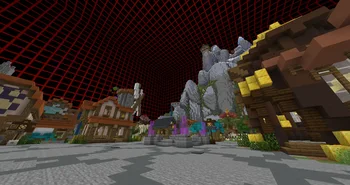
Paranoia Shader is a shader pack made by LaCollecteuse. A simple shader that add a few skyboxes based on references.
It supports Minecraft 1.20 – 1.21. It has been downloaded 6,415 times on Modrinth. The last update came out on Jan 11, 2026.
The newest is 1.0, released on Jan 11, 2026. It is made for Minecraft 1.20 – 1.21.11. It runs on Iris. The download is 29.3 MB.
| Version | Released | Minecraft | Type |
|---|---|---|---|
1.0 | Jan 11, 2026 | 1.20 – 1.21.11 | Release |
Paranoia is a simple shader based on Base-Shader 2.0 that add a few skyboxes based on games I love or references.
Titan Eye from deltarune. All 500 of them, looking straight at you. At all time. This is why it's called Paranoia.
a great way to passively remain aware of your suroundings at all time.
Omori's HeadSpace, with the little drawing in the sky.
a safe place that you can home, anywhere in your world !
A red grid, inspired by Tron. Great for events taking place in a small space to give a simulation-like feeling.
The heatmap of the infamous NoCom exploit from 2b2t, in 8K.
Can also look like Gojo's Domain Expansion if you want.
Written by LaCollecteuse. Read it with pictures on Modrinth.
Install Iris (with Sodium) or OptiFine for your Minecraft version: shaders need one of them.
Download the .zip file from Modrinth. Do not unzip it.
In Minecraft, open Options, then Video Settings, then Shader Packs, and click Open Shader Pack Folder.
Drop the .zip file into that folder, pick Paranoia Shader in the list and click Done.
Shaders are heavy on the graphics card. If the game gets slow, pick a lower profile in the shader settings.
Full guide: How to install Minecraft shaders
| Resource | Downloads | Versions | Last update | Price |
|---|---|---|---|---|
| Paranoia Shaderthe one you looked at | 6,415 | 1.20 – 1.21 | Jan 11, 2026 | Free |
| Outline ShaderLoongLy | 34K | 1.8 – 26.x | Feb 4, 2026 | Free |
 Lux V1TechDevOnGitHub | 1.3M | 1.8 – 26.x | Sep 26, 2026 | Free |
 Aurora's ShadersCrafterAurora | 949K | 1.20 – 1.21 | Mar 28, 2025 | Free |
Not yet. The newest version it supports is Minecraft 1.21.
Yes. Paranoia Shader is free to download from Modrinth.
Yes. The last update came out in the past day.
The closest ones are Outline Shader, Lux V1 and Aurora's Shaders. Compare all alternatives
Outline ShaderShaders · 1.8 – 26.xA shader based on the original style, which can add outline for game object and make the graphics more cartoonish
Lux V1Shaders · 1.8 – 26.xLux is a high fidelity Minecraft: Java Edition shader pack based on Capt Tatsu's BSL Shaders.
Aurora's ShadersShaders · 1.20 – 1.21Based on Complimentary Unbound, a beautifully colorful Vanilla+ shader meant for making the game look good while maintaining good performance and vanilla feel.
 Voyager shader 2.0Shaders · 1.16 – 1.21
A shader that add realism for Minecraft with a good look
 DERCODEShaders · 1.20 – 26.x
Realistic & Fantasy Shader based on Derivative shader
 RetroVisionShaders · 1.8 – 1.21
Add a VHS TV Effects Shader and MORE
Log in to leave a review.