
 PhialShaders · 1.20 – 1.21
Post-processing shader that aims to mimic the style of pixel art
Free15,672 downloads
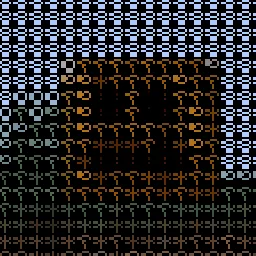
ascii post processing procedural shader
Direct download from Modrinth · 3,129 downloads


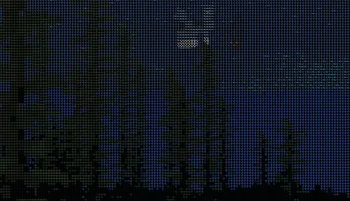
bit glyphs is a shader pack made by tuvefef. ascii post processing procedural shader.
It supports Minecraft 1.17 – 26.x. It has been downloaded 3,129 times on Modrinth. The last update came out on May 17, 2026.
bit glyphs has had 6 releases on Modrinth since Feb 22, 2026. 6 of them came out in the past year. The newest is 0.25, released on May 17, 2026. It is made for Minecraft 1.17 – 26.1. It runs on Optifine. The download is 3 KB.
| Version | Released | Minecraft | Type |
|---|---|---|---|
0.25 | May 17, 2026 | 1.17 – 26.1 | Release |
0.25 | May 17, 2026 | 1.17 – 26.1.2 | Release |
0.2 | May 16, 2026 | 1.17 – 26.1 | Release |
0.2 | May 16, 2026 | 1.17 – 26.1.2 | Release |
0.1 | Feb 22, 2026 | 1.17 – 1.21.4 | Release |
ascii art that transforms each block into a procedural character based on luminance
Each glyph is represented with a compact binary pattern
without use of textures and atlas
Written by tuvefef. Read it with pictures on Modrinth.
Install Iris (with Sodium) or OptiFine for your Minecraft version: shaders need one of them.
Download the .zip file from Modrinth. Do not unzip it.
In Minecraft, open Options, then Video Settings, then Shader Packs, and click Open Shader Pack Folder.
Drop the .zip file into that folder, pick bit glyphs in the list and click Done.
Shaders are heavy on the graphics card. If the game gets slow, pick a lower profile in the shader settings.
Full guide: How to install Minecraft shaders
| Resource | Downloads | Versions | Last update | Price |
|---|---|---|---|---|
| bit glyphsthe one you looked at | 3,129 | 1.17 – 26.x | May 17, 2026 | Free |
| PhialSnorfield | 16K | 1.20 – 1.21 | Oct 25, 2025 | Free |
 FilterLite ShadersNiix-Dan | 3,649 | 1.12 – 26.x | Jun 26, 2026 | Free |
 ASCII ShaderBouncingElf10 | 23K | 1.8 – 1.21 | Oct 5, 2024 | Free |
Yes. bit glyphs supports Minecraft 26.x. All supported versions: 26.x, 1.21, 1.20, 1.19, 1.18, 1.17.
Yes. bit glyphs is free to download from Modrinth.
Yes. The last update came out in the past day.
The closest ones are Phial, FilterLite Shaders and ASCII Shader. Compare all alternatives
PhialShaders · 1.20 – 1.21Post-processing shader that aims to mimic the style of pixel art
FilterLite ShadersShaders · 1.12 – 26.xA lightweight, screen-space post-processing shader focused entirely on color grading and camera filters. Features 20 built-in presets (Cinematic, Vintage…
ASCII ShaderShaders · 1.8 – 1.21A shader intended to make Minecraft render only with ASCII characters!
 Ascii like shaderShaders · 1.17 – 1.21
This is ascii shader for minecraft inspired by Acerola's video
 Emoji like shaderShaders · 1.17 – 1.21
A sequel to the **Ascii like shader**, unlike the first one, this one replaces everything with emojis.
 Lost Signal VHSShaders · 1.18 – 26.x
Authentic Backrooms VHS shader with analog fog, YIQ processing, true interlacing, tracking damage, and the critical v1.8.1 Iris packaging fix.
Log in to leave a review.