
 Just ExpressionsResource packs · 1.18 – 26.x
A EMF resource pack that brings Fresh Animations eye Animations but for the player. Just that...
Free2,425,968 downloads
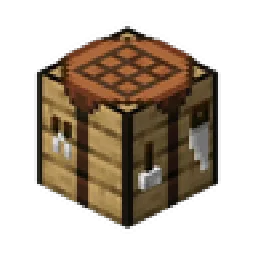
A Pack to make certain utility blocks 3D, but keeping it vanilla-like
Direct download from Modrinth · 166,002 downloads
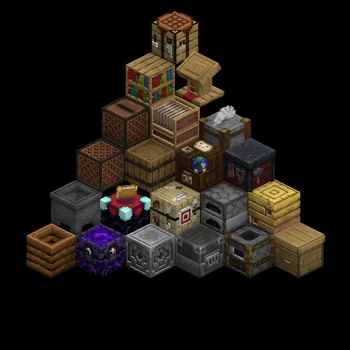
Simply 3D is a resource pack made by Konijnebeer. A Pack to make certain utility blocks 3D, but keeping it vanilla-like.
It supports Minecraft 1.18 – 1.20. It has been downloaded 166,002 times on Modrinth. The last update came out on Jun 8, 2023.
Simply 3D has had 3 releases on Modrinth since Aug 21, 2022. None of them came out in the past year. The newest is 1.0.0, released on Jun 8, 2023. It is made for Minecraft 1.20. It runs on Minecraft. The download is 136 KB.
| Version | Released | Minecraft | Type |
|---|---|---|---|
1.0.0 | Jun 8, 2023 | 1.20 | Release |
0.1.1 | Aug 22, 2022 | 1.19, 1.19.1, 1.19.2 | Beta |
0.1.0 | Aug 21, 2022 | 1.18, 1.18.1, 1.18.2 | Beta |
This pack turns the utility blocks into 3D models, but does not over do it.
I only use 1/0.75/0.5/0.25 indents or raises to keep inline with the same 3D style as the item frame.
Want more like this check the page out for all the extra additions, like lanterns and other blocks!
Click to go to the page!
Blocks That Have A Model
This pack could work with a lot of other pack's as it still uses the vanilla textures and only modifys the models, as long as a pack doesn't change positions of certain details it would work.
Make sure this texture pack is on-top of all the other packs.
Thanks to Isometric renders for their great mod to make these renders
Written by Konijnebeer. Read it with pictures on Modrinth.
Download the .zip file from Modrinth. Do not unzip it.
In Minecraft, open Options, then Resource Packs, then Open Pack Folder.
Drop the .zip file into that folder and go back to the game.
Move Simply 3D to the right-hand list and click Done.
It is made for Minecraft 1.18 – 1.20. On other versions Minecraft marks it as incompatible, but it often still works.
| Resource | Downloads | Versions | Last update | Price |
|---|---|---|---|---|
| Simply 3Dthe one you looked at | 166K | 1.18 – 1.20 | Jun 8, 2023 | Free |
| Just ExpressionsIthanMendoza | 2.4M | 1.18 – 26.x | Jul 5, 2026 | Free |
 Customizable TotemAlphaLeoli | 136K | 1.17 – 26.x | Oct 5, 2025 | Free |
 Vanilla Experience+Kryqu | 1.7M | 1.18 – 26.x | Sep 21, 2026 | Free |
Not yet. The newest version it supports is Minecraft 1.20.
Yes. Simply 3D is free to download from Modrinth.
Yes. The last update came out in the past day.
The closest ones are Just Expressions, Customizable Totem and Vanilla Experience+. Compare all alternatives
Just ExpressionsResource packs · 1.18 – 26.xA EMF resource pack that brings Fresh Animations eye Animations but for the player. Just that...
Customizable TotemResource packs · 1.17 – 26.xBy adding your own skin to the pack, the totem of undying will update to look like ClownPierce's or Theobald's totem but with your skin!
Vanilla Experience+Resource packs · 1.18 – 26.xIt improves, refines, and fixes various aspects while keeping the Vanilla style.
 Nautilus 3DResource packs · 1.20 – 26.x
Nautilus 3D is a Minecraft Resource-pack, mainly focused on 3D-Models with a vanilla style.
 3D DefaultResource packs · 1.16 – 26.x
A light-weight resource pack mainly provide vanilla-look 3D models
 Golden Days BaseResource packs · 1.16 – 26.x
Golden Days is a Minecraft resource pack meant to bring back old textures, lighting, names, and sounds from older versions of Minecraft, like Beta. Requires…
Log in to leave a review.