About:
Vanilla Refresh is a quality of life expansion, aiming to make small improvements to Minecraft in its gameplay, immersion, creative mode, multiplayer and more. Features aim to enhance the game whilst still maintaining the vanilla experience.
Future Updates Note
I'll continue updating these packs when I can, but maintenance is becoming more difficult with the fast drops cycle. If you'd like to help keep my Minecraft projects up to date, let me know on [Discord](
discord.gg/XZVARKkjwt) or submit a pull request on GitHub!
Config / Settings
Toggle features in the settings menu by using /function vanilla_refresh:_settings in chat
⚠️ Command Confirmation
For 1.21.6+ I recommend using this mod that disables the command confirmation in the settings menu when clicking ui: https://modrinth.com/mod/nocc
Features:
With over 30+ features and still adding, Vanilla Refresh continues improving Minecraft. Any features you don't desire, you can disable and re-enable at anytime via the settings menu
Main Features
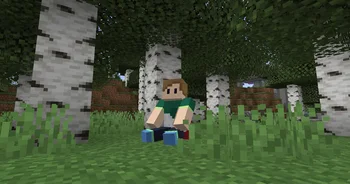
- Player Sitting
- Sit anywhere by facing straight down, crouching and right clicking. Your hand slot must be empty.
- Mob Health Display:
- Displays the health of a mob near you above your hotbar
- Daycounter:
- Counts the days of the server and displays them at the start of each day
- Also displays when first joining a server
- On milestone days like day 100, or any other day milestone thats a multiple of 100, a special daycounter animation will play
- Homing Experience Orbs
- Killed a ghast from a far distance? Those orbs will come straight back to you instead of into lava
- Craft Sounds
- When crafting items, a woody crafting sound will be played, along with a light particle animation. Makes crafting anything satisfying.
- The sound can vary depending on what you craft, like tools, and whether you crafted multiple items at once. Special items like beacons and enchanting tables have especially unique sounds for crafting too!
- Crops XP
- When breaking crops, wheat, pumkins, nether wart, etc, you'll have a chance of receiving a bit of experience
- Jukebox Music Override.
- When playing jukebox music, it'll stop and override Minecraft game music currently playing from nearby players.
- Extra Loyal Tridents
- If your (loyalty) trident inevitably falls into the void, it'll no longer meet its end, instead it will bounce right back to you.
- Improved Baby Zombies
- Baby zombies have been nerfed! Halves the health of baby zombies. However, they can now sometimes sprint jump!
- A critical hit with a diamond/netherite sword one shots baby zombies
- Improved/Local Death Sound
- Upon death, an improved death sound effect related to how you died will play. Makes your death a little more dramatic.
- Can be configured to a set sound instead
- Better Armor Stands
- They now have arms, and a bunch of different poses for you to display your armor, items, and weapons
- Power a lever near them to swap their pose
- You can add an item to an armor stand then right click it with a tripwire hook to turn it into a tool rack. They'll hook onto to the wall the armor stand is against, perfect for displaying your swords and tools.
- Drop Ladder
- Found yourself a big drop in a cave below you? Press sneak whilst on a ladder to extend its length down and create hanging ladders allowing you to descend down.
- Totem Works In Void
- Falling into the void with a totem in hand/offhand will enter you into a controllable float mode of levitation till you reach land.
- Player Head Drop:
- Upon death, your player head will drop. Place it anywhere for a cute display of your misfortune.
- Echo Shard Silence
- Drop an echo shard ontop of a mob to silence it. You can get that echo shard back by placing water ontop of the mob, or directly killing the mob.
- Time Offset
- You know how the Minecraft F3 Day oddly starts on day 0? Vanilla Refresh adds +1 so that when you first create the world, you're on day 1! On existing worlds, your world will have +1 day added.
- Wither Head Drop:
- Upon defeating the Wither, it'll drop its head as a trophy of your win.
- Equipable Banners
- To equip a banner, triple click sneak whilst holding a banner. Note your head slot must be empty
- Improved Player Animations
- New player animations for leveling up and splashing on water at different heights!
- Improved Block Animations
- Blocks including Enchanting Tables, Brewing Stands, Beacons, Wither Skeleton Skulls, Dragon Eggs, and Jukeboxes will have improved block animations. Immersion x100!
- Jukebox animations can be enhanced even more by placing a note block below a jukebox
- Subtitles on Major Events
- Major events like summoning the wither and entering the end will display a dramatic title on screen
- Subtitles on Biome Discovery
- When finding a new biome, it'll display the name/category name of the biome as a title on screen
- Trimmed Armored Piglins
- Armored piglins now have a chance of spawning in with their armor pieces trimmed. About 8% of all piglins will have trimmed armor, and bastion remnants will have 16% of all piglins with trimmed armor.
- Global Death Sound Effects
- Plays a sound effect globally to all players on your death. Set to play a sound based on how you died, or to a set sound. "F"
- Spectator Ghost
- Gives players in spectator mode a white effect particle visible to non spectator players.
- Griefing Gamerules
- Within the settings menu, toggle in antigrief whether you want TNT enabled or disabled
- Low Health Sound
- If you take damage at low health, a heartbeat amethyst sound will play once
- Better Lodestones (below 1.21.5!)
- Lodestones have a variety of helpful new functions
- Drop a named paper ontop of a lodestone to name it. The lodestone will display the name above to players.
- Dropping an ender pearl ontop of the lodestones will create an instant waypoint, which can be teleported to instantly via ender pearls within 96 blocks.
- The lodestones dye/color also affects the color of the teleport indicator.
- Path Sprinting
- Paths now give you speed as an incentive to place paths around your towns
- Stands and Frames Invisibility
- Throw an invisibility potion on an armor stand or item frame to make it invisible
- Use a splash water bottle to make it reappear!
- Recovery Coordinates
- Makes the recovery compass show the coordinates and dimension where you died
- Readable Clocks
- Holding a clock will show day you're on and time. Put it up on an item frame to see the time without needing to hold it.
- Party Cake
- Make your cakes more surprising by dropping a firework on them making them explode with confetti when eaten (no griefing)
Creative Features
Creative Mode
- Improved Spectator Mode
- Upon entering spectator mode, you'll be given a variety of actions to help you in spectator mode, including teleporting to spawn, a random player, reappearing, or giving yourself night vision.
- Wands
- A variety of wands useable by server operators to aid in building and manipulating mobs. Freeze and pose mobs, filter certain ones to edit, teleport quickly, and more.
- Access Creative Mode wands with /function vanilla_refresh:_x_wands in chat**
- If you arent using the mod version, and would like to more easily identify/differentiate each wand when using them, download this resourcepack!
- Mobs with the refresh_exclude_wand are excluded from editing with wands
- Entity wands textures with the mod version or resourcepack installed
- Item Sets
- Sets of blocks and items to help you quickly get building or equipping armor sets for fighting
- Access Creative Mode item sets with /function vanilla_refresh:_x_item_sets in chat**
- Admin Commands
- A variety of other extra commands for creative use, like toggling permanent night vision, and debuging are also available. See the full list and their usage here
- Command Keys is a super helpful mod for using these admin commands with the press of a button
Multiplayer Features
Servers & Multiplayer
- Join/Exiting Sound Effects
- Plays a notification sound when someone joins or exits the game
- Player Statistics: Using /trigger stats players will be able to view their stats the server has tracked.
- View the stats of a player near you by using /trigger stats set -2
- You can view the stats of other online players by using the command /trigger stats set memberIDhere replacing memberIDhere with the member ID of an online player to view their stats. You can find your member ID by using /trigger stats.
- If wanted, you can make member ID's easily accessible by setting them to be on the Tab Display or Belowname Display
- Tab Display: - Allows you to display stats on the player tab list
- Belowname: Display - Allows you to display stats below the player name OR cycle all their stats
- Viewable Gamerules: Use /trigger gamerules in chat to see the gamerules and vanilla refresh features the server you are on has configured!
- Playerlist Command: Use /trigger playerlist to view a list of online players, the count of online players, and how many ever joined the server. Player names are categorized based on gamemodes: Survival/Adventure (Players), Spectators, Creative Mode.
Features Disabled by Default
Features Disabled By Default:
These features are not quite as vanilla-fitting as the other features, so they're disabled by default when first installing Vanilla Refresh. To enable them, use the settings command ingame. For info on enabling these on first install (default settings), see this guide!
- Soul Links
- Stores your items and XP after death in the form of a Soul, when touched by its owner, drops the items and XP.
- 80% of your XP levels are returned.
- Souls cannot burn in lava
- Also not destroyed by the void. If it ends up in the void, it will make an attempt to teleport to the highest point of land it can. If not, teleports to y96
- First Join Chat Message
- Lets players know when a member who has joined for their first time joins, along with their member join order number.
- Stop Music on Death.
- Makes currently playing music stop on death.
- Enderdragon Drops Elytra
- Makes the dragon drop elytra on each kill, animated with a pretty epic particle animation.
- Renewable Dragon Eggs
- Makes the dragon drop a dragon egg on each kill, not just on its first kill, also animated with a pretty epic particle animation.
- Looping Jukebox
- Discs inside a jukebox will play on loop so you dont have to reinsert it everytime you wanna relisten to a disc. This feature has since become disabled by default with the addition of Mojang's jukebox redstone interactions.
- Gravestones
- Upon death, a decorative grave will be placed with your head as a marker to other players of your death.
- Tips
- Tells the player about certain Vanilla Refresh features when using an item related to that feature.
- On the start of the 2nd to 5th day, some tips are garunteed to show whilst others only show when holding a related item
- There is also an extra option available which displays general Minecraft tips in chat
- Death Stats
- On death, your death count and time since last death will be announced
- Dynamic Optifine Lighting:
- (Buggy and may cause lag) Makes torches emit light in your hand on the serverside
- Exploding Blast Furnace
- Disabled by default- for a good reason. This is a joke feature, unless you do actually want exploding blast furnaces lol
License
For view of the entire license, click here. In summary, just dont republish this project or send modified copies to other people. You may modify it in singleplayer or in

 Friends&FoesMods · 1.18 – 26.x



 Joy of Paintingxerca
 HyChatterTomeko
 Health IndicatorsMods · 1.20 – 26.x
 HyBedWarsMods · 26.x
 uku's Armor HUDMods · 1.20 – 26.x