
 Menu TabsMods · 26.x
Adds Tabs to all menus to navigate more easily.
Free2 downloads
A simple way to edit the position of F3 elements via the F3 + F6 menu
Direct download from Modrinth · 3 downloads
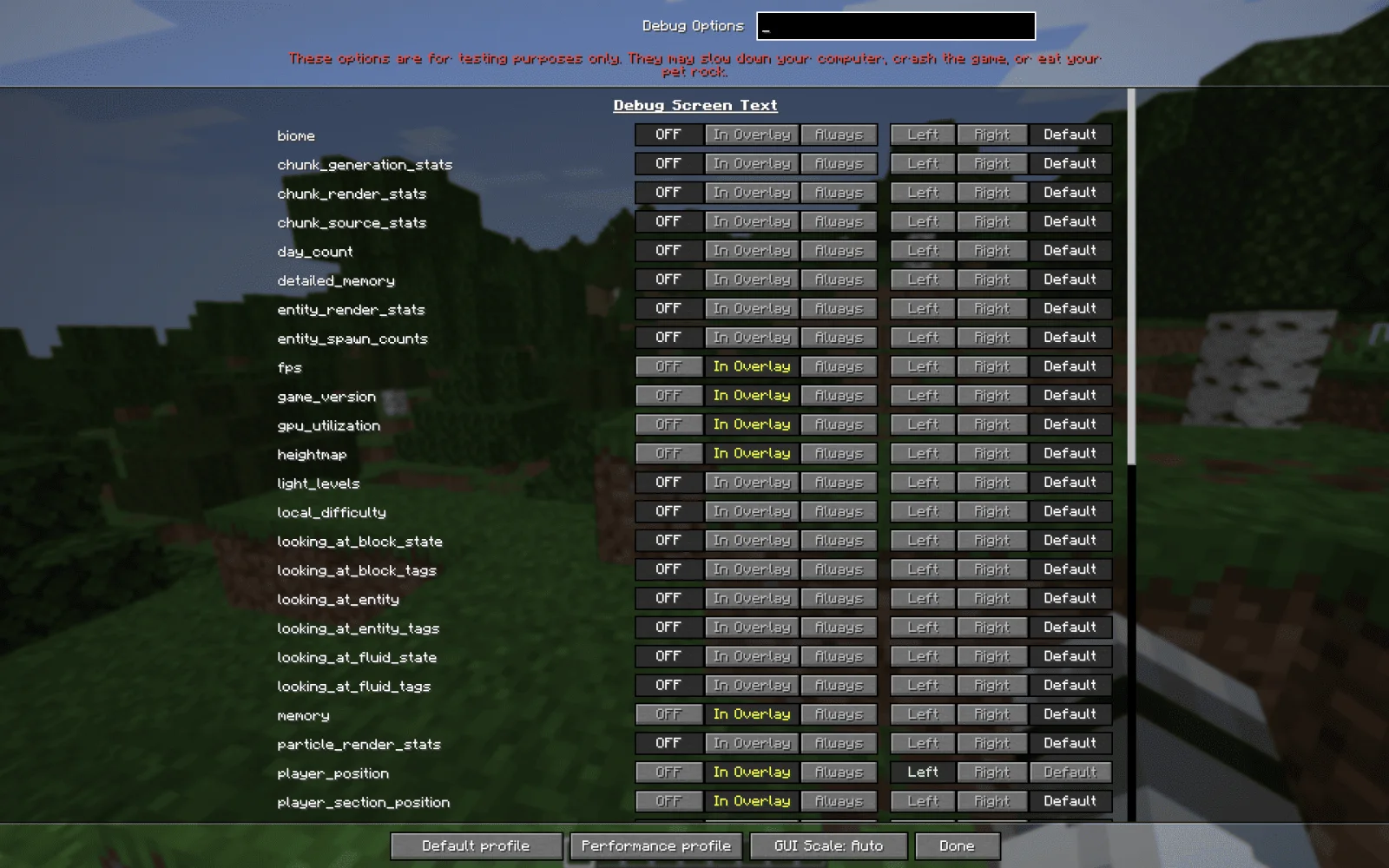
F3 Editor is a mod made by thegwimweeper. A simple way to edit the position of F3 elements via the F3 + F6 menu.
It supports Minecraft 26.x. It has been downloaded 3 times on Modrinth. The last update came out on Oct 17, 2026.
The newest is 1.0.0, released on Oct 17, 2026. It is made for Minecraft 26.3. It runs on Fabric. The download is 32 KB.
| Version | Released | Minecraft | Type |
|---|---|---|---|
1.0.0 | Oct 17, 2026 | 26.3 | Release |
A simple lightweight mod that lets you edit the positions of the F3 menu elements.
Just press F3 + F6 to enter the options menu and select between Left/Right/Default.
This works even if you set the element to Always visible (Instead of In Overlay).
Default reverts this, and allows Minecraft to decide how to organize the elements.
This isn't a fully completed mod and I will be updating it more and adding more features
To Do:
Written by thegwimweeper. Read it with pictures on Modrinth.
This mod runs only on your own game. Servers do not need it, so you can use it on any server.
Install Fabric for Minecraft 26.x.
Add the mods it needs: Fabric API.
Download the .jar file from Modrinth and put it in the mods folder of your .minecraft directory.
Start Minecraft with the Fabric profile.
Easier: in Prism Launcher or the Modrinth App, search for F3 Editor in your instance's mods and click Install. It adds the loader and the mods it needs for you.
Full guide: How to install Minecraft mods
| Resource | Downloads | Versions | Last update | Price |
|---|---|---|---|---|
| F3 Editorthe one you looked at | 3 | 26.x | 25 days ago | Free |
| Menu TabsTheRealRaphael | 2 | 26.x | 3 days ago | Free |
 Better Block Entitiescseden | 11.6M | 1.21 – 26.x | 3 days ago | Free |
 World Play TimeKhajiitos | 3.8M | 1.19 – 26.x | Mar 28, 2026 | Free |
Yes. F3 Editor supports Minecraft 26.x. All supported versions: 26.x.
Yes. F3 Editor is free to download from Modrinth.
Client-side. F3 Editor goes in your own mods folder and works on any server, including servers without mods.
Yes: Fabric API. Install it before F3 Editor.
Yes. The last update came out in the past day.
The closest ones are Menu Tabs, Better Block Entities and World Play Time. Compare all alternatives
Menu TabsMods · 26.xAdds Tabs to all menus to navigate more easily.
Better Block EntitiesMods · 1.21 – 26.xA Minecraft optimization mod for Fabric-Sodium that improves framerates by improving block entity rendering via a hybrid renderer
World Play TimeMods · 1.19 – 26.xDisplays the world's play time in the world selection menu.
 Radical Cobblemon Trainers APIMods · 1.21
Trainer management and battle API for Cobblemon.
 Better Compatibility CheckerMods · 1.16 – 26.x
Changes the default server compatibility check to compare modpack versions
 TrashSlotMods · 1.18 – 26.x
Adds a draggable trash slot to all inventory screens. Press T to toggle.
Log in to leave a review.