
 Entity Texture FeaturesMods · 1.16 – 26.x
Emissive, Random & Custom texture support for entities in resourcepacks just like Optifine but for Fabric
Free110,997,522 downloads
A polished keybind overlay for Fabric with smooth animations, customizable themes, and support for MaLiLib-based mods like Litematica and Tweakeroo.
Direct download from Modrinth · 7 downloads
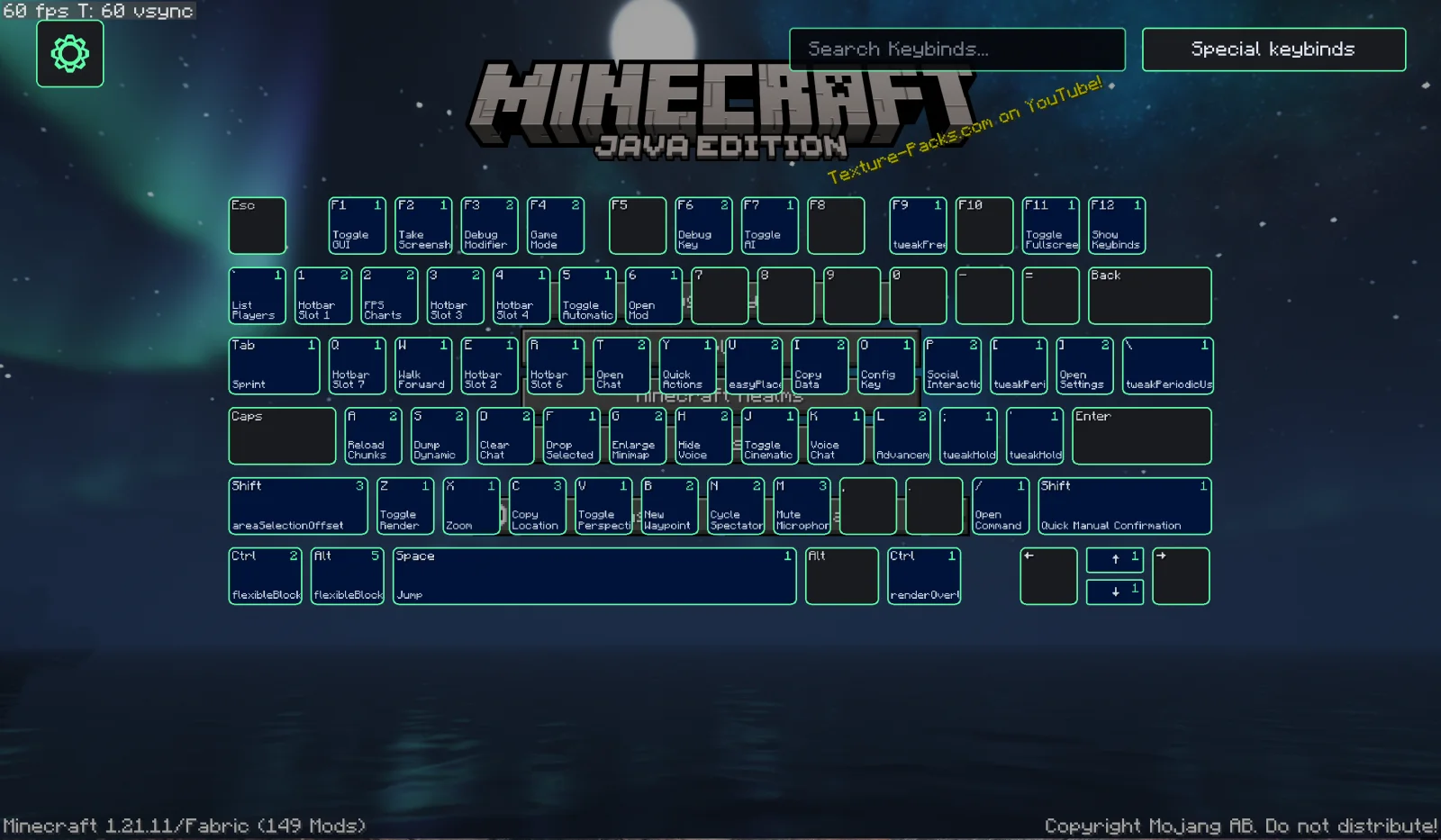
Keybind Overlay is a mod made by Kewbex. A polished keybind overlay for Fabric with smooth animations, customizable themes, and support for MaLiLib-based mods like Litematica and Tweakeroo.
It supports Minecraft 1.21. It has been downloaded 7 times on Modrinth. The last update came out on Oct 23, 2026.
Keybind Overlay has had 3 releases on Modrinth since Sep 21, 2026. 3 of them came out in the past year. The newest is 4.2.1+mc.1.21.11, released on Oct 23, 2026. It is made for Minecraft 1.21.11. It runs on Fabric. The download is 297 KB.
| Version | Released | Minecraft | Type |
|---|---|---|---|
4.2.1+mc.1.21.11 | Oct 23, 2026 | 1.21.11 | Release |
4.1.0 | Oct 2, 2026 | 1.21.11 | Beta |
4.0.0-dev7.3 | Sep 21, 2026 | 1.21.11 | Alpha |
Keybind Overlay is my attempt at making a visual keybinds mod for Fabric! :D
It shows all of your keybinds on a visual keyboard, including multiple bindings on the same key, special key combinations, and bindings from supported mods.
The idea of a keybind overlay obviously already exists, but I wanted to make my own version of it... and then proceeded to spend a slightly ridiculous amount of time optimizing basically every little part of it :D
The animations are probably my favorite part, I kinda just wanted it to look good, so I spent way too much time animating every single key, individually. At least it looks good now >.<
TO ADD SOON: Being able to directly change keybinds from the menu (this is an easy change, but of course, knowing me, I gotta spend way too much time designing a brand new, novel animation for the opening of the menu)
Keybind Overlay also supports keybinds from MaLiLib-based mods such as Litematica, Tweakeroo, or MiniHUD!
Normal single-key bindings can appear directly on the keyboard, while multi-key combinations and other unusual bindings are shown in the MaLiLib section of Special Keybinds.
Press F12 to open Keybind Overlay! (This is the default, it can be changed in the MC controls menu, of course)
Press Ctrl + F while the overlay is open to search through your keybinds.
Space switches Normal Keybinds and Special Keybinds.
You can also drag the keyboard around and use the scroll wheel to zoom it in and out.
Keybind Overlay is entirely client-side.
Written by Kewbex. Read it with pictures on Modrinth.
This mod runs only on your own game. Servers do not need it, so you can use it on any server.
Install Fabric for Minecraft 1.21.
Add the mods it needs: Fabric API.
Download the .jar file from Modrinth and put it in the mods folder of your .minecraft directory.
Start Minecraft with the Fabric profile.
Easier: in Prism Launcher or the Modrinth App, search for Keybind Overlay in your instance's mods and click Install. It adds the loader and the mods it needs for you.
Full guide: How to install Minecraft mods
| Resource | Downloads | Versions | Last update | Price |
|---|---|---|---|---|
| Keybind Overlaythe one you looked at | 7 | 1.21 | 19 days ago | Free |
| Entity Texture FeaturesTraben | 111M | 1.16 – 26.x | 8 days ago | Free |
 Indiumcomp500 | 45.9M | 1.16 – 1.21 | Feb 26, 2025 | Free |
 GD656KilliconMinecraft_GD656 | 8M | 1.18 – 1.21 | Aug 12, 2026 | Free |
Not yet. The newest version it supports is Minecraft 1.21.
Yes. Keybind Overlay is free to download from Modrinth.
Client-side. Keybind Overlay goes in your own mods folder and works on any server, including servers without mods.
Yes: Fabric API. Install it before Keybind Overlay.
Yes. The last update came out in the past day.
The closest ones are Entity Texture Features, Indium and GD656Killicon. Compare all alternatives
Entity Texture FeaturesMods · 1.16 – 26.xEmissive, Random & Custom texture support for entities in resourcepacks just like Optifine but for Fabric
IndiumMods · 1.16 – 1.21Sodium addon providing support for the Fabric Rendering API, based on Indigo
GD656KilliconMods · 1.18 – 1.21This Minecraft mod adds FPS-style killfeed notifications with exceptionally smooth animations. It offers unique features and highly customizable settings for…
 PathoGramMods · 26.x
A simple fabric mod that allows you to design curvy paths (roads) easily in survival, zero cheating, only holographic like litematica. With a lot of…
 OptiGUIMods · 1.18 – 26.x
Blazing fast custom GUI textures on Fabric and Quilt with built-in OptiFine custom GUI resource pack support
 Status Effect BarsMods · 1.17 – 26.x
Adds customizable bars to the status effects overlay to show the remaining duration of effects.
Log in to leave a review.